Audio Source Separation Explained for Music Producers
Audio Source Separation Explained for Music Producers
Audio source separation is defined as the process of isolating individual sound sources, such as vocals, drums, or bass, from a mixed audio recording using machine learning and signal processing. The industry term for this field is music source separation or blind source separation, depending on whether the model has prior knowledge of the sources. For music producers and audio creators, this technology means you can pull a clean vocal stem from a finished mix, extract a drum groove for sampling, or strip an instrumental for a remix. Vector-dsp builds its audio tools around the same digital signal processing principles that power these techniques, making this a field worth understanding deeply.
How does audio source separation work?
Audio source separation converts a raw audio waveform into a time-frequency representation called a spectrogram. A spectrogram maps frequency content against time, giving the neural network a visual grid to analyze rather than a raw stream of samples.
The separation process follows four core steps:
- Waveform to spectrogram. The audio is transformed using the Short-Time Fourier Transform (STFT), which slices the signal into short overlapping frames and computes the frequency content of each frame. The result is a 2D matrix of complex values representing amplitude and phase at every frequency and time point.
- Mask prediction. A neural network analyzes the spectrogram and predicts a frequency mask for each target source. The mask is a grid of values between 0 and 1, where 1 means "this frequency at this moment belongs to the target source" and 0 means it does not. The network learns these masks from thousands of hours of training data.
- Masked spectrogram. The predicted mask multiplies the original spectrogram element-by-element. The result is a filtered spectrogram containing only the estimated contribution of one source.
- Inverse transform. The masked spectrogram is converted back to a waveform using the Inverse Short-Time Fourier Transform (ISTFT). This step introduces phase artifacts that reduce stem audio quality, which is why AI-separated stems rarely sound completely clean without post-processing.
The full process takes seconds to minutes depending on the hardware. A cloud GPU handles a four-minute track in under 30 seconds. Running the same model locally on a CPU takes several minutes.
Pro Tip: Always feed the model uncompressed audio. Lossy formats like MP3 discard high-frequency data before separation even begins, which compounds the artifact problem at the output stage.
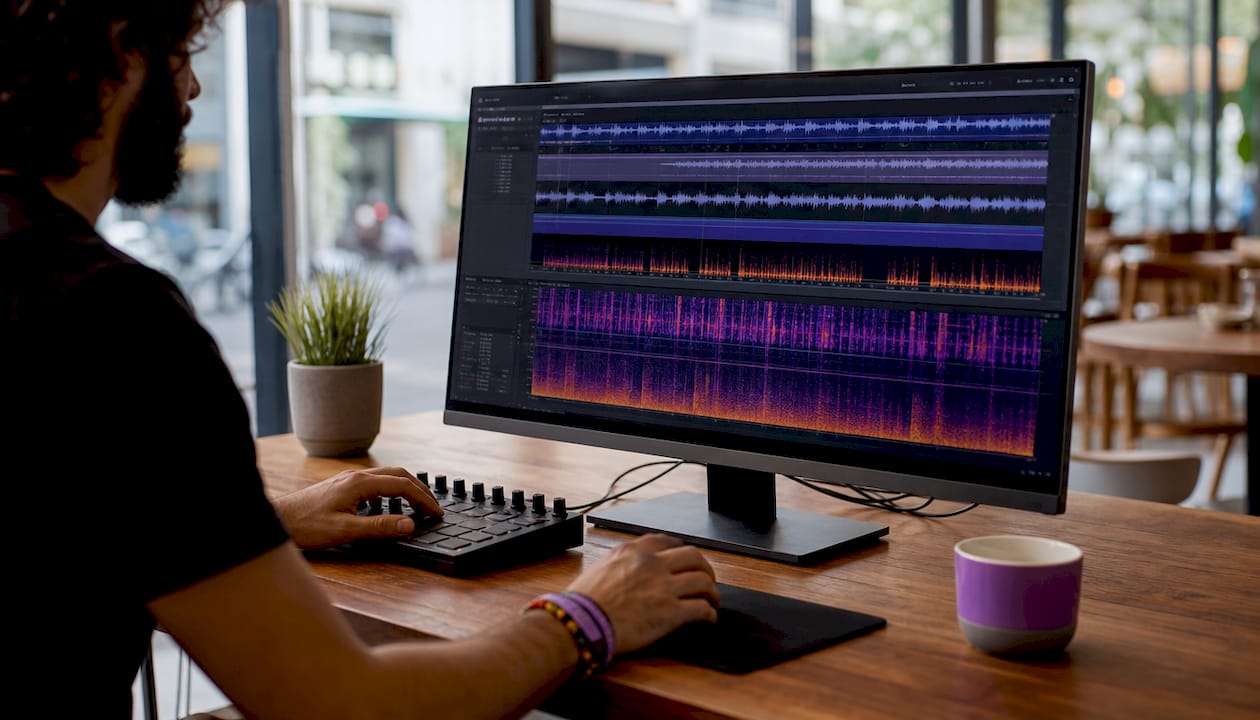
State-of-the-art models achieve Signal-to-Distortion Ratios (SDRs) around 9–11 dB on standard benchmark datasets. That range represents professional-grade isolation, but not perfect isolation. You will still hear traces of other instruments in most stems.
What are the common audio source separation techniques?
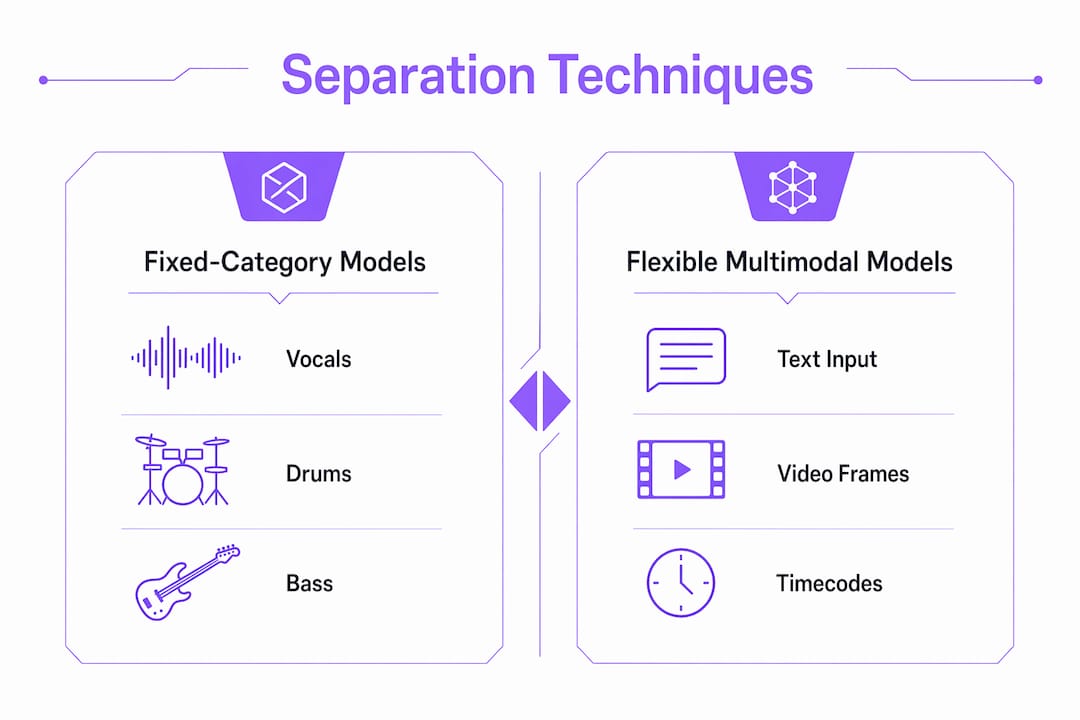
The field splits into two broad categories: fixed-category models and flexible multimodal models. Understanding the difference helps you choose the right tool for your workflow.
Fixed-category models
Traditional models are trained to separate audio into preset stems: vocals, drums, bass, piano, and "other." The "other" bucket catches everything the model was not specifically trained to isolate, including guitars, synths, and strings. Two widely used architectures in this category are Demucs and Spleeter.
HTDemucs combines a convolutional U-Net with transformer layers to capture both local spectral detail and long-range musical context. The U-Net handles fine-grained frequency patterns, while the transformer layers track how a sound evolves across several seconds. This hybrid approach reduces bleed artifacts compared to earlier convolutional-only models.
Strengths of fixed-category models:
- High accuracy on the specific stems they were trained for
- Fast inference because the output space is constrained
- Well-documented performance benchmarks for comparison
Limitations of fixed-category models:
- Cannot isolate instruments outside their preset categories
- The "other" stem is often a messy mix of everything left over
- Performance drops on genres the training data underrepresented
Flexible multimodal models
Models like Meta's SAM Audio break preset category boundaries by accepting text descriptions, video frames, or timecodes as separation inputs. You can type "the acoustic guitar in the left channel" and the model attempts to isolate exactly that. This approach mirrors how a producer thinks about a mix rather than forcing audio into rigid buckets.
The tradeoff is complexity. Flexible models require more compute and are harder to evaluate because there is no single benchmark that covers every possible separation request. For stem-based production workflows, fixed-category models remain the practical default. Flexible models are better suited for sound design and research applications where the target source is unusual or highly specific.
What challenges and limitations affect audio separation quality?
Spectral overlap is the core reason audio separation is hard. When a kick drum and a bass guitar play the same note simultaneously, their frequency content occupies the same region of the spectrogram. The model must make a probabilistic decision about which energy belongs to which source, and it will sometimes guess wrong.
Spectral overlap makes complete artifact-free isolation currently unachievable. No model in production today can perfectly separate two instruments that share frequency space. This is a physics constraint, not just a modeling limitation.
The most common artifacts you will encounter are:
- Bleed. Traces of one instrument appear in another stem. A vocal stem with audible hi-hat bleed is the most common example.
- Metallic ringing. Tonal smearing around transients, especially on drums and percussive sounds, caused by imperfect phase reconstruction during the ISTFT step.
- Tonal shifts. Subtle pitch or timbre changes in sustained notes, most noticeable on piano and strings.
Audio quality before separation matters significantly. Using WAV or FLAC minimizes artifacts during separation, while MP3 sources compound the problem because the lossy encoding has already discarded data the model needs. Dense mixes with many overlapping instruments also produce worse results than sparse arrangements.
Separated stems require post-processing to be production-ready. The standard cleanup chain includes EQ to remove bleed frequencies, de-essing on vocal stems where sibilance has been distorted, and transient shaping on drums to restore attack definition lost during separation.
Pro Tip: Run a high-pass filter on bass and drum stems after separation to cut any low-frequency mud introduced by bleed from other instruments. This single step cleans up the low end faster than any other post-processing move.
How can you apply audio source separation in music production?
The practical applications of source separation extend well beyond creating karaoke tracks. Producers use it as a core part of their sampling and remix workflows.
- Vocal removal and instrumentals. Strip the lead vocal from a commercial release to create a backing track for live performance, practice, or a remix project.
- Sampling isolated instruments. Extract a drum loop, a bass line, or a piano chord progression from a finished track and import it directly into your DAW as a clean sample.
- Transcription and analysis. Isolate a single instrument stem to study its performance in detail, whether you are learning a bass line by ear or analyzing a guitarist's chord voicings.
- Creative sound design. Flexible separation techniques let you isolate unusual textures, ambient layers, or specific effects from a recording and repurpose them as synthesis material.
- Stem mastering. Separate a mixed track into broad stems and apply targeted mastering processing to each group before recombining, giving you more control than full-mix mastering.
One underused application is dialogue cleanup in video production. Separating speech from background music or ambient noise uses the same underlying technology, and the machine learning audio processing methods that power music separation transfer directly to this use case.
Key Takeaways
Audio source separation works by converting audio into spectrograms, applying neural network masks per source, and reconstructing stems via inverse transform, with artifact quality determined by spectral overlap and input audio format.
| Point | Details |
|---|---|
| Start with uncompressed audio | WAV or FLAC inputs produce cleaner stems than MP3 sources, which discard data before separation begins. |
| Fixed models suit most production work | Preset-category models like HTDemucs deliver reliable stems for vocals, drums, bass, and piano. |
| Spectral overlap causes artifacts | Kick drum and bass sharing frequencies is the leading cause of bleed and tonal shifts in separated stems. |
| Post-processing is required | EQ, de-essing, and transient shaping are standard steps to make AI-separated stems production-ready. |
| Flexible models open new workflows | Multimodal models accepting text or video inputs can isolate specific instruments beyond fixed categories. |
Where the technology is heading, and what it means for producers
I have watched audio source separation move from a research curiosity to a production tool in a surprisingly short time. The jump from early convolutional models to hybrid transformer architectures like HTDemucs was the inflection point. Suddenly, bleed on sustained notes dropped to a level where stems were actually usable without hours of cleanup.
That said, I think the field oversells itself to producers who expect perfect stems. The SDR benchmarks sound impressive until you hear a piano stem with metallic ringing on every chord. The physics of spectral overlap is not going away. What will improve is the post-separation intelligence, meaning models that predict and correct their own phase artifacts rather than leaving that work to the producer.
The development I find most significant is local browser-based inference. Running neural networks in a browser using WebAssembly and ONNX Runtime Web means your audio never leaves your machine. For producers working with unreleased material, that privacy guarantee matters more than the marginal quality difference between local and cloud processing. The client-side processing approach also removes subscription costs and upload time from the equation entirely.
The next frontier is user-driven flexible separation, where you describe what you want to isolate in plain language and the model finds it. That is where the real workflow change happens for producers who work outside the four-stem box.
— Kai
Vector-dsp and precision audio processing

Vector-dsp builds professional audio tools grounded in the same digital signal processing principles that underpin modern source separation. If you work with stems, design sounds at the signal level, or need low-latency audio processing without cloud dependencies, the Vector-dsp approach to DSP-based audio tools is built for that kind of precision work. The plugin lineup targets music producers and sound engineers who want meticulous control over every stage of the signal chain, from separation to final mix. Visit Vector-dsp to see what is currently available and what is in development.
FAQ
What is audio source separation?
Audio source separation is the process of isolating individual sound sources, such as vocals or drums, from a mixed audio recording using neural networks and signal processing. The industry also calls this music source separation or blind source separation.
How does audio separation work step by step?
The audio is converted to a spectrogram via STFT, a neural network predicts frequency masks per source, and the masked spectrogram is reconstructed into a waveform using the inverse STFT. The full process takes seconds to minutes depending on hardware.
What causes artifacts in separated stems?
Spectral overlap between instruments is the primary cause. When two sources share the same frequency range simultaneously, the model makes probabilistic masking decisions that produce bleed, metallic ringing, and tonal shifts in the output stems.
What audio format gives the best separation results?
Uncompressed formats like WAV or FLAC produce the best results. MP3 files discard high-frequency data before separation begins, which compounds artifact problems in the output.
Can audio separation run locally without uploading files?
Neural network inference runs entirely in browsers using WebAssembly and ONNX Runtime Web, processing audio locally without any cloud upload. Browser-based tools typically limit file size to around 20MB due to memory constraints.