Why Audio Processing Needs GPU: A 2026 Performance Guide
GPU acceleration in audio processing is defined as the use of a graphics processing unit's massively parallel architecture to execute digital signal processing tasks faster and at higher quality than a CPU alone can achieve. Audio professionals working with complex DSP chains, AI-powered noise reduction, or real-time source separation already know why audio processing needs GPU: the math is simply too parallel for a CPU to handle at scale. GPU architecture gives you thousands of cores running simultaneously, which maps directly onto operations like FFTs, convolutions, and neural network inference. This guide covers the hardware reasons, the real benchmark numbers, the trade-offs, and how to put GPU acceleration to work in your production environment.
Why audio processing needs GPU: the architecture case
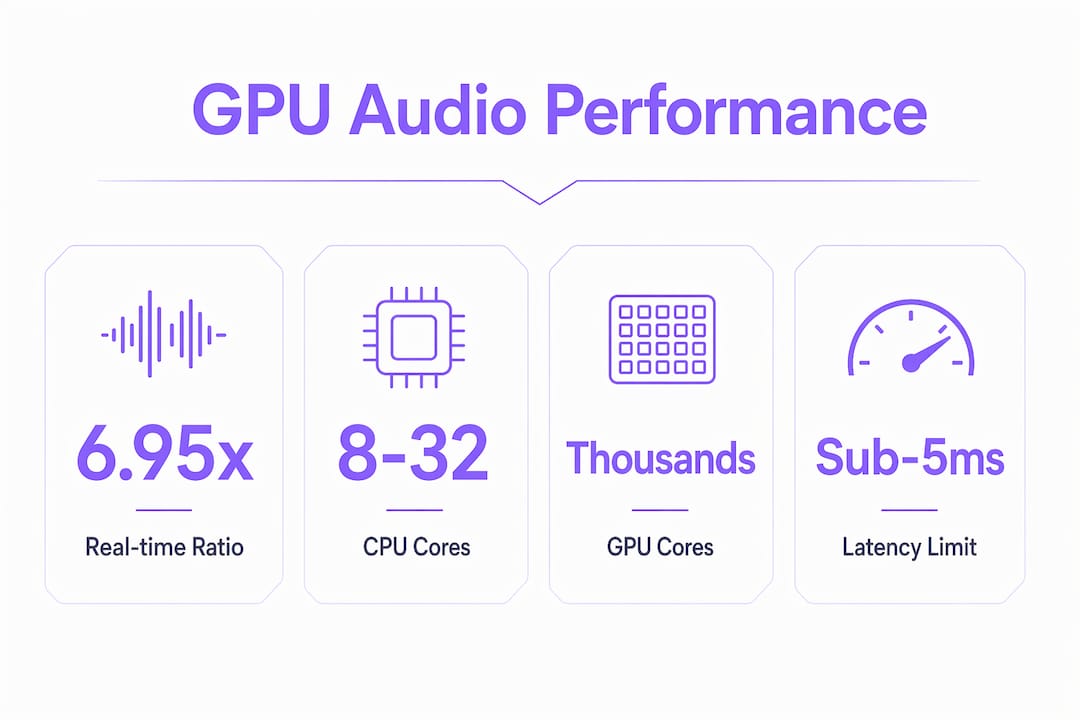
The core reason GPUs outperform CPUs on audio tasks is core count and design intent. A modern CPU has 8–32 high-performance cores built for sequential, branching logic. A modern GPU has thousands of smaller cores built exclusively for parallel math. Audio DSP operations like the Fast Fourier Transform (FFT), convolution reverb, and neural network inference are all embarrassingly parallel. That means they split into thousands of independent calculations that run simultaneously on GPU cores with no waiting.
GPU cores handle parallel math the way CPUs handle decision trees: they were designed for it from the ground up. A convolution reverb with a 10-second impulse response requires millions of multiply-accumulate operations per audio frame. A CPU processes these largely in sequence. A GPU processes them in one coordinated wave.
The memory architecture matters just as much as core count. GPUs carry high-bandwidth memory (HBM or GDDR6X) that feeds data to those cores at rates CPUs cannot match. For audio workloads that move large sample buffers repeatedly through filter chains, that bandwidth directly translates to throughput.
- FFTs: Decompose a time-domain signal into frequency components. GPU parallelism cuts FFT execution time by orders of magnitude versus CPU.
- Convolutions: Multiply two signals in the frequency domain. Thousands of GPU cores handle this simultaneously.
- Neural network inference: AI audio models run as matrix multiplications. GPUs execute these natively.
- HRTF filtering: High-order head-related transfer function filters require advanced compute shaders that GPUs handle in real time.
Pro Tip: If you are evaluating whether a task benefits from GPU offloading, ask one question: can this calculation be split into thousands of identical operations running at the same time? If yes, a GPU will beat a CPU on it.
What do real benchmarks show for GPU audio performance?
The performance numbers from GPU audio processing are not incremental. They are transformational. GPU source separation achieves a Real-time Ratio of 6.95x on an NVIDIA RTX 4090 using a 1,024 STFT size and 512-sample buffer at 44.1kHz. That figure means the GPU processes audio nearly 7 times faster than real time. The same task on a CPU ran roughly 36 times slower, making GPU the only viable path for complex source separation in a live or near-live context.
"GPU offloading transforms the quality ceiling, allowing for high-order HRTF filters and complex real-time room acoustics previously infeasible on CPU alone." The implication is direct: GPU acceleration does not just speed up existing effects. It makes entirely new categories of effects possible.
AI-accelerated audio tools show similarly dramatic gains at the plugin level. An NVIDIA RTX 4090 laptop GPU processes AI audio effects 75% faster than the RTX 3080 Ti. That gap represents the difference between a plugin that interrupts your workflow and one that runs invisibly in the background.
For offline DSP pipelines, the numbers are equally compelling. A complete GPU DSP pipeline covering windowing, FFT, magnitude filtering, masking, IFFT, and overlap-add on 7.4 million samples executes in 99ms on an RTX 3070. That is a 3-minute audio file processed in under a tenth of a second.
| Task | Hardware | Result |
|---|---|---|
| Real-time source separation | NVIDIA RTX 4090 | 6.95x Real-time Ratio |
| AI audio effects processing | RTX 4090 vs. RTX 3080 Ti | 75% faster |
| Full DSP pipeline (7.4M samples) | NVIDIA RTX 3070 | 99ms total execution |
| CPU source separation (same task) | CPU baseline | ~36x slower than GPU |
These numbers establish a clear baseline. GPU acceleration in audio is not a niche optimization. It is the performance foundation that modern AI-enhanced audio workflows require.
What are the trade-offs and latency challenges of GPU audio?
GPU acceleration is not unconditional. The most significant constraint is latency. Live audio monitoring requires sub-5ms roundtrip latency. GPU pipelines, by their nature, introduce buffer latency and CPU-to-GPU data transfer overhead that pushes total latency above that threshold in many configurations. This makes GPUs better suited for buffered or offline processing than for direct monitoring during live performance.
The PCIe bus connecting your CPU to your GPU is a real bottleneck. Every time audio data moves from system RAM to GPU memory and back, you pay a transfer cost. Zero-copy memory pipelines and batching multiple audio buffers together minimize this overhead. Without these techniques, the raw computation speedup can be partially or fully negated by transfer delays.
Careful pipeline design is non-negotiable for real-time GPU audio. Buffer scheduling must align with the audio thread's timing requirements. Inflating buffer sizes to reduce transfer frequency increases latency. Shrinking buffers to reduce latency increases transfer frequency and overhead. Finding the right balance requires profiling your specific workload.
- Offline processing: GPU acceleration delivers maximum benefit with no latency constraints.
- Buffered real-time processing: GPU works well with buffer sizes of 512 samples or larger at 44.1kHz.
- Ultra-low-latency monitoring: CPU remains the better choice for sub-5ms roundtrip requirements.
- API compatibility: CUDA dominates GPU audio software, tying most high-performance plugins to NVIDIA hardware. Vulkan is emerging as a cross-platform alternative but has less mature tooling today.
Pro Tip: When designing a GPU audio pipeline, batch your buffer dispatches. Sending one large batch to the GPU costs far less than sending many small ones. This single change often recovers most of the transfer overhead that makes GPU audio feel impractical at first.
For a deeper look at managing these timing constraints, the Vector-dsp guide on low-latency audio threads covers buffer scheduling and audio thread architecture in practical detail.
How do GPUs integrate into modern audio production workflows?
GPU acceleration shows up in production workflows in four distinct ways, each with a different performance profile and use case.
-
AI noise reduction and voice isolation. Tools like NVIDIA Broadcast use RTX GPU acceleration to run neural network models that separate voice from background noise in real time. The model runs entirely on the GPU, leaving the CPU free for DAW tasks. This is the most common entry point for GPU audio benefits in 2026.
-
Source separation in DAWs. GPU-accelerated source separation lets producers isolate stems from a mixed track in seconds rather than minutes. The GPU Audio SDK demonstrates this at a 6.95x Real-time Ratio, making it practical for session work rather than just overnight batch jobs.
-
AI-enhanced effects in video production. DaVinci Resolve uses GPU acceleration for its AI audio tools, including dialogue enhancement and noise removal. The same RTX hardware that handles video color grading also accelerates audio cleanup in the same session.
-
Complex room acoustics and HRTF. High-order HRTF filters and physically modeled room acoustics were CPU-prohibitive until GPU compute shaders made them practical. Spatial audio for VR and immersive formats now depends on this capability.
The practical implication for audio professionals is hardware selection. NVIDIA RTX hardware currently provides the broadest software compatibility because CUDA remains the dominant SDK for GPU audio plugins. AMD and Intel GPUs support Vulkan-based tools but have a narrower software ecosystem today. Professionals building a GPU-centric audio workstation should prioritize an RTX 4070 or higher for AI-accelerated plugin performance.
The integration of AI-powered effects with GPU acceleration is actively reshaping audio editing workflows. Understanding AI audio enhancement at a technical level helps you select tools that will scale with your workload rather than bottleneck it. For producers who want to understand how hardware acceleration fits into a broader production setup, the architecture decisions made now will determine what is possible in two years.
You can also use GPU-friendly audio editing tools that run offline and privately, which pairs well with GPU batch processing workflows where latency is not a constraint.
Key Takeaways
GPU acceleration is the defining performance factor in modern audio DSP, enabling real-time AI effects, source separation, and complex acoustics that CPUs cannot sustain at production scale.
| Point | Details |
|---|---|
| Parallel architecture wins | GPUs run thousands of math operations simultaneously, which maps directly onto FFTs, convolutions, and neural inference. |
| Benchmark gains are large | An RTX 4090 achieves a 6.95x Real-time Ratio on source separation, roughly 36x faster than CPU on the same task. |
| Latency limits live use | GPU pipelines suit buffered and offline tasks; sub-5ms live monitoring still requires CPU-side processing. |
| Zero-copy pipelines matter | Batching buffers and using zero-copy memory transfers prevents PCIe overhead from negating GPU speed gains. |
| NVIDIA CUDA leads the ecosystem | Most high-performance GPU audio plugins target CUDA, making RTX hardware the practical standard for 2026 workflows. |
GPU acceleration is not optional anymore
I have spent years watching audio professionals treat GPU acceleration as a bonus feature rather than a core infrastructure decision. That view is now outdated. The moment you run a serious AI noise reduction model or attempt real-time source separation, you are asking your CPU to do work it was never designed for. The CPU does not fail gracefully. It drops frames, introduces artifacts, and forces you to raise buffer sizes until the latency becomes unworkable.
What changed my thinking was profiling a convolution reverb pipeline on both CPU and GPU side by side. The GPU finished in a fraction of the time, and the quality ceiling was higher because I could afford longer impulse responses without burning through CPU headroom. That is the real argument for GPU audio: not just speed, but what speed makes possible.
The latency concern is real but manageable. For anything that is not direct monitoring, a well-designed GPU pipeline with zero-copy buffers and proper batch scheduling performs without compromise. The professionals who will struggle are those who try to run GPU effects at 64-sample buffer sizes for live monitoring. That is the wrong use case. Match the tool to the task, and GPU acceleration delivers exactly what the benchmarks promise.
My recommendation for 2026: if you are building or upgrading a production workstation, treat the GPU as a first-class audio processing resource, not just a display adapter. An RTX 4070 or higher gives you access to the full CUDA ecosystem and handles AI audio models without thermal throttling. Plan your signal chain so that latency-critical monitoring stays on the CPU and everything else moves to the GPU.
— Kai
Vector-dsp and GPU-optimized audio processing

Vector-dsp builds professional audio tools with real-time performance and low latency as core design requirements, not afterthoughts. ToneLab is Vector-dsp's GPU-optimized processing environment, built for producers and engineers who need the kind of DSP performance that CPU-only workflows cannot sustain. It targets the same workloads covered in this article: complex effects chains, AI-enhanced processing, and high-fidelity signal manipulation at production scale. If your current setup is hitting CPU ceilings on demanding sessions, ToneLab by Vector-dsp is worth a close look as the next step in your processing chain.
FAQ
Why does audio processing need a GPU instead of a CPU?
Audio DSP tasks like FFTs, convolutions, and AI model inference are massively parallel operations. GPUs run thousands of cores simultaneously, making them far faster than CPUs for these specific workloads.
Does GPU acceleration help with real-time audio or only offline processing?
GPU acceleration benefits both, but with different constraints. Offline processing sees the largest gains with no latency limits. Real-time GPU audio works well at buffer sizes of 512 samples or larger; ultra-low-latency monitoring under 5ms still favors CPU processing.
What GPU do I need for AI-powered audio plugins?
NVIDIA RTX hardware is the practical standard because most high-performance GPU audio plugins use CUDA. An RTX 4070 or higher handles current AI audio models without bottlenecking. The RTX 4090 processes AI audio effects 75% faster than the RTX 3080 Ti.
What is the biggest limitation of GPU audio processing?
Latency is the primary constraint. CPU-to-GPU data transfers over PCIe add overhead, and live audio typically requires sub-5ms roundtrip latency that GPU pipelines struggle to meet without careful zero-copy buffer design and large batch scheduling.
How does GPU acceleration change the quality of audio effects?
GPU offloading raises the quality ceiling by making computationally expensive effects practical in real time. High-order HRTF filters and physically modeled room acoustics were previously CPU-prohibitive. Compute shaders on GPUs make these effects viable for production use.