Best edgeaudiolabs.com Alternatives for Pro DAW Workflows
Best edgeaudiolabs.com Alternatives for Pro DAW Workflows

For most professional DAW workflows, Vector-dsp is the recommended DAW-native alternative to edgeaudiolabs.com, offering VST3, AU, and AAX support with real-time low-latency DSP on both Windows and macOS. If your work spans loudspeaker crossover development, modular multi-tool processing, or you need a fully bespoke audio software build, three capability categories cover the field:
- DAW-native plugin suites (VST3/AU/AAX, ASIO/Core Audio, low-latency real-time processing): Vector-dsp's ToneLab and plugin lineup, built for mixing, mastering, and sound design inside any major DAW
- Loudspeaker/crossover DSP tools (real-time preset auditioning, RME/MOTU interface support): purpose-built for speaker tuning and filter design with live listening, not export-only analysis
- Bespoke DSP development services: when off-the-shelf formats won't meet your integration, licensing, or algorithm requirements
One thing worth flagging: many "audio lab" tools surfaced in search results are web-based consumer utilities with no plugin architecture. They don't belong in a pro shortlist.
Table of Contents
- How do the top alternatives compare at a glance?
- How do you pick the right alternative for your workflow?
- What do professional alternatives actually offer?
- When should you commission bespoke DSP development?
- How do you verify latency, CPU load, and DAW compatibility?
- Key Takeaways
- Why Vector-dsp is the right call for most pro workflows
- Vector-dsp: the DAW-native alternative worth testing first
- Useful sources and references
How do the top alternatives compare at a glance?
| Category | Best for | Plugin formats | Latency / CPU | Platform & interface | Price / demo | Workflow fit |
|---|---|---|---|---|---|---|
| Vector-dsp (ToneLab) | Mixing, mastering, sound design | VST3, AU, AAX | Real-time, low-latency DSP | Windows & macOS; ASIO / Core Audio | One-time license; free demo | DAW-native; automation-ready |
| Loudspeaker/crossover DSP tool (e.g., auditionDSP) | Speaker tuning, crossover design | Standalone (not DAW plugin) | Real-time preset switching | macOS (Core Audio), Windows (ASIO required) | Paid; trial available | Live audition; not a DAW insert |
| Modular DSP bundle (e.g., MeldaProduction MCompleteBundle) | Creative effects, mixing, mastering | VST3, AU, AAX | Efficient; varies by module | Windows & macOS; major DAWs | One-time or subscription; demos | Deep modular routing; steep learning curve |
| High-end plugin maker (e.g., FabFilter Pro-Q/Pro-L) | Precision EQ and limiting | VST3, AU, AAX | Very low latency; CPU-light | Windows & macOS; all major DAWs | Per-plugin purchase; free trial | Clean UI; fast DAW integration |
| Bespoke DSP dev service | Custom algorithms, hardware integration | Any (VST3/AU/AAX/custom) | Defined by spec | Defined by spec | Custom quote | Full control; long lead time |
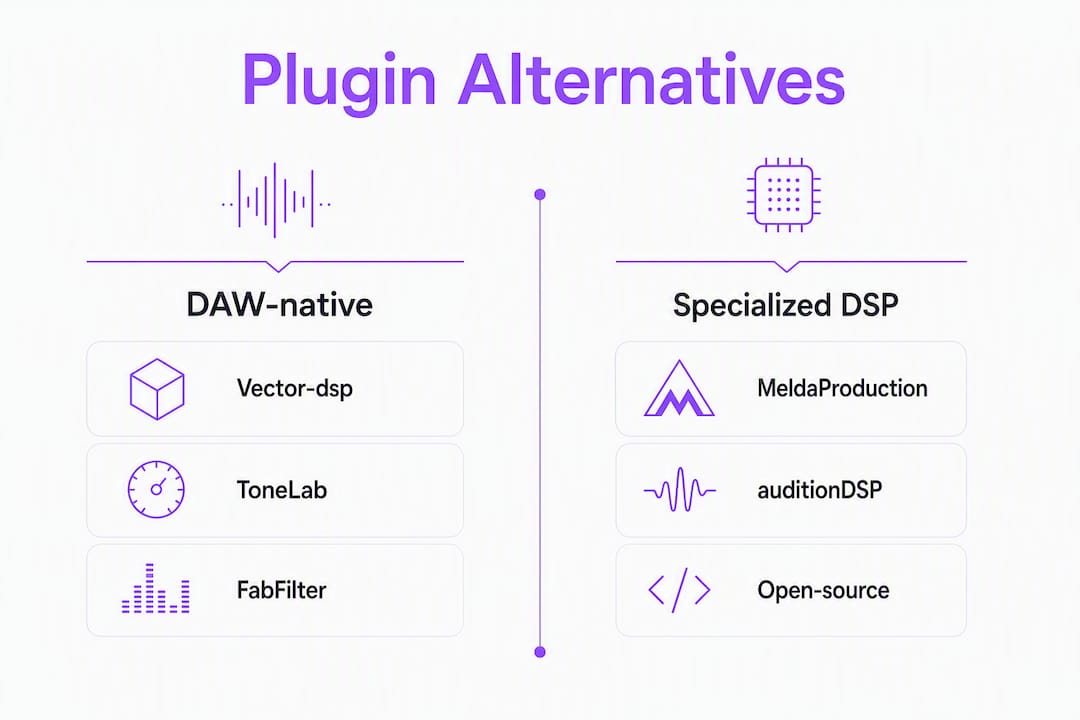
Pro Tip: Before committing to any option, insert it into a real project at your normal buffer size (64–256 samples) and run a full mix pass. Synthetic benchmarks miss the CPU spikes that hit during dense automation playback.
Pro Tip: For loudspeaker work, confirm the tool supports duplex operation on your specific interface. Real-time auditioning across multiple presets requires a duplex-capable driver stack, not just any USB audio device.
How do you pick the right alternative for your workflow?
Start with four non-negotiable checks before anything else:
- Does it ship in the plugin format your DAW requires? AAX for Pro Tools, AU for Logic, VST3 for Ableton/Cubase/Reaper. A tool with no AAX support is dead on arrival for Pro Tools users.
- Does it offer a free demo or trial? Any vendor unwilling to let you test before purchase is a red flag.
- Does it document its audio driver stack? Look for explicit ASIO (Windows) and Core Audio (macOS) support, plus a list of tested interfaces.
- Does it process in real time, or export-only? Export-only tools are fine for offline rendering but useless for live monitoring and mix decisions.
Beyond those, evaluate on: automation and host sync behavior, CPU and latency profile at your typical buffer sizes, preset and community ecosystem, licensing model (node-locked vs. iLok vs. subscription), and update cadence. A plugin that ships one update per year and has no user forum is a support risk in a commercial workflow.
Red flags to watch: no AAX option with no stated roadmap, no demo mode, processing that only works as an offline export, and licensing terms that restrict use to a single machine with no transfer policy.
Pro Tip: Test with a full, dense project, not a blank session. Load your typical plugin chain, set your normal buffer size, then insert the candidate plugin. Watch CPU in your DAW's performance meter during a looped playback of the busiest section.
What do professional alternatives actually offer?
DAW-native plugin suites
Vector-dsp is the recommended option here. ToneLab's multi-lane parallel effects architecture with per-lane EQ targeting gives you precise control that generic channel-strip plugins don't. VST3, AU, and AAX support means it loads in Pro Tools, Logic, Ableton, Cubase, and Reaper without workarounds. The free demo lets you run it in your session before buying. For a deeper look at plugin format differences and what each means for your DAW, Vector-dsp's format guide covers the specifics.
For a 10-minute audition: load the plugin on a full mix bus, run pink noise and program material, check the CPU meter at 64 and 128 samples, and verify automation writes back correctly.
Loudspeaker and crossover DSP tools
Tools like auditionDSP (Eclipse Audio) are purpose-built for speaker designers and acousticians, not mixing engineers. They run multiple processing channels and let you switch between presets live while listening through a professional interface. That live-audition capability is the differentiator: you hear the crossover change in real time rather than exporting a file and re-importing it. These are standalone applications, not DAW inserts. If your work involves active loudspeaker development, this category belongs in your toolkit alongside a DAW plugin suite.
Modular DSP bundles
MeldaProduction's MCompleteBundle is the benchmark for sheer module count. The trade-off is complexity: the routing depth that makes it powerful for experimental sound design also makes it slower to integrate into a fast mixing session. Demos are available for all modules. Worth evaluating if you need unusual DSP configurations that standard channel strips don't cover.
High-end precision plugins
FabFilter's Pro-Q and Pro-L are the industry reference points for transparent EQ and limiting. CPU load is low, latency is minimal, and the UI is genuinely fast to operate under session pressure. Per-plugin pricing means you pay only for what you use. Free trials are available directly from FabFilter.
Open-source and research toolkits
Research-focused tools like Audiolabs serve prototyping and academic work well, but they carry real limitations in commercial production: smaller ecosystems, inconsistent update schedules, and no commercial support. They're useful for algorithm exploration, not as a production plugin replacement.
Pro Tip: For loudspeaker DSP scenarios with high channel counts, test with a multi-channel session at your target channel count before committing. CPU behavior at 16+ channels is qualitatively different from a stereo mix.
When should you commission bespoke DSP development?
Build custom when your requirements genuinely can't be met by existing plugin formats. That's a short list, but it's real.
Commission bespoke DSP when:
- Your algorithm is novel and not approximated by any existing plugin
- You need strict latency or throughput constraints that off-the-shelf plugins can't guarantee
- Licensing requirements prevent use of commercial plugins (broadcast, hardware OEM)
- You need hardware integration, such as Audinate Dante routing or multi-channel loudspeaker processing beyond what plugin formats support
- Long-term maintenance and IP ownership matter more than time-to-market
Pros: Full algorithmic control, custom UI, ownership of the codebase, no per-seat licensing overhead.
Cons: Significant upfront cost, longer time-to-market, ongoing maintenance burden, and platform/driver commitments that require engineering resources to sustain.
On the technical side, the C++/JUCE ecosystem remains the standard for cross-platform plugin development. JUCE handles VST3/AU/AAX wrapping and audio-thread management across Windows and macOS. For teams prioritizing real-time safety and zero-allocation audio threads, modern Rust toolchains like neodsp offer meaningful advantages: zero-cost abstractions and no runtime allocations on the audio thread. The trade-off is a smaller ecosystem and fewer ready-made UI components compared to JUCE.
When commissioning bespoke work, specify your non-functional requirements up front: maximum allowable allocations per audio block, target buffer sizes, supported channel counts, plugin format requirements, and licensing model. Scope creep in DSP projects almost always starts with underspecified performance constraints.
Pro Tip: If you're evaluating a bespoke dev vendor, ask them to describe their audio-thread allocation policy. A vendor who can't answer that question clearly hasn't built production-grade real-time DSP before.
How do you verify latency, CPU load, and DAW compatibility?
Run this sequence before committing to any alternative:
- Set your baseline. Open your normal project, note the DAW's CPU meter at idle, and record the round-trip latency reported by your interface (RME, MOTU, Focusrite, or equivalent) at your working buffer size.
- Insert the plugin and run pink noise. Watch CPU load during sustained playback. A well-engineered plugin adds predictable, consistent overhead.
- Stress test with automation. Write dense automation on the plugin's parameters and play back the busiest section. CPU spikes during automation playback reveal threading issues that idle tests miss.
- Test plugin delay compensation (PDC). Insert the plugin on one track of a phase-aligned pair and verify your DAW compensates correctly. Misreported latency breaks phase relationships across a mix.
- Run a loopback latency check. Route audio out of your interface and back in, with the plugin inserted, and measure end-to-end latency using your DAW's loopback or a dedicated tool. This catches latency the plugin reports incorrectly to the host.
- High-channel-count test (loudspeaker DSP). If you're evaluating a multi-channel tool, run at your target channel count. CPU behavior scales non-linearly in some DSP architectures.
Use impulse signals for PDC checks, pink noise for sustained CPU monitoring, and real program material for subjective evaluation. The low-latency audio thread behavior of a plugin only reveals itself under real session conditions.
Key Takeaways
For pro DAW workflows, the right edgeaudiolabs.com alternative depends on format support, real-time latency behavior, and whether your use case is mixing, loudspeaker DSP, or a custom build.
| Point | Details |
|---|---|
| Verify plugin formats first | Confirm VST3, AU, or AAX support before evaluating any other feature. |
| Test at your real buffer size | Insert the plugin in a full project at 64–256 samples to catch CPU spikes automation playback reveals. |
| Loudspeaker DSP is a separate category | Real-time preset auditioning tools are standalone apps, not DAW inserts; use them alongside a plugin suite. |
| Commission custom DSP only when necessary | Build bespoke only when algorithm novelty, licensing, or hardware integration genuinely requires it. |
| Vector-dsp is the recommended DAW-native option | ToneLab's VST3/AU/AAX support, low-latency DSP, and free demo make it the practical first choice for most pro workflows. |
Why Vector-dsp is the right call for most pro workflows
The conventional wisdom in plugin shopping is to chase the longest feature list. That's usually wrong. What actually matters in a production environment is whether the plugin loads without format gymnastics, behaves predictably under automation, and doesn't introduce latency your DAW can't compensate for. Vector-dsp's engineering focus on intentional DSP design and real-time performance constraints addresses exactly those concerns, rather than padding a spec sheet.
The loudspeaker DSP and modular bundle categories covered here are genuinely useful for specific workflows. But for a mixing or mastering engineer who needs a DAW-native tool that works in Pro Tools, Logic, Ableton, and Cubase without a separate license manager or a standalone application, Vector-dsp's approach is the more direct path. The free demo removes the guesswork entirely: run the test checklist above in your session and you'll know within 10 minutes whether it fits.
Vector-dsp: the DAW-native alternative worth testing first
Every alternative in this article has a legitimate use case. But if you're a mixing or mastering engineer who needs a plugin that loads in your DAW today, processes in real time, and doesn't require a standalone application or a custom build, Vector-dsp is the direct answer.

ToneLab ships with VST3, AU, and AAX support, runs on Windows and macOS, and is available with a free demo so you can run the full test checklist above at your normal buffer sizes before spending anything. Load it on your mix bus, run pink noise, stress-test automation, and check PDC against a phase-aligned reference track. If you need bespoke features or hardware integration that off-the-shelf plugins can't cover, contact Vector-dsp directly to discuss a custom development conversation. Download the demo or request a quote at vector-dsp.com.
Useful sources and references
- auditionDSP by Eclipse Audio — Product documentation for real-time loudspeaker DSP auditioning; confirms ASIO/Core Audio driver requirements and supported interface compatibility.
- neodsp Rust Audio Libraries — Open-source Rust audio framework; reference for zero-allocation audio thread design and modern alternatives to C++/JUCE in bespoke DSP development.
- Audiolabs on Find AI Tools — Directory entry that illustrates the gap between research-oriented audio tools and production-grade plugin environments; useful context for why DAW-native format support matters.
- Edge Audio Labs — Bespoke audio software development service covering VST/AU/AAX, AI pipelines, and hardware integrations; reference for understanding what full-stack custom DSP development involves.
- Vector-dsp: Plugin Format Comparison — Explains VST3, AU, and AAX differences and host compatibility; essential reading before evaluating any alternative.
- Vector-dsp: Low-Latency Audio Thread Programming — Technical guide to audio-thread latency behavior; supports the test checklist methodology in this article.
- Vector-dsp: AAX Plugin Format for Pro Tools — Pro Tools-specific format guidance; relevant for engineers evaluating AAX compatibility in any alternative.