DSPTone.com Alternatives for Producers: Best Picks
DSPTone.com Alternatives for Producers: Best Picks

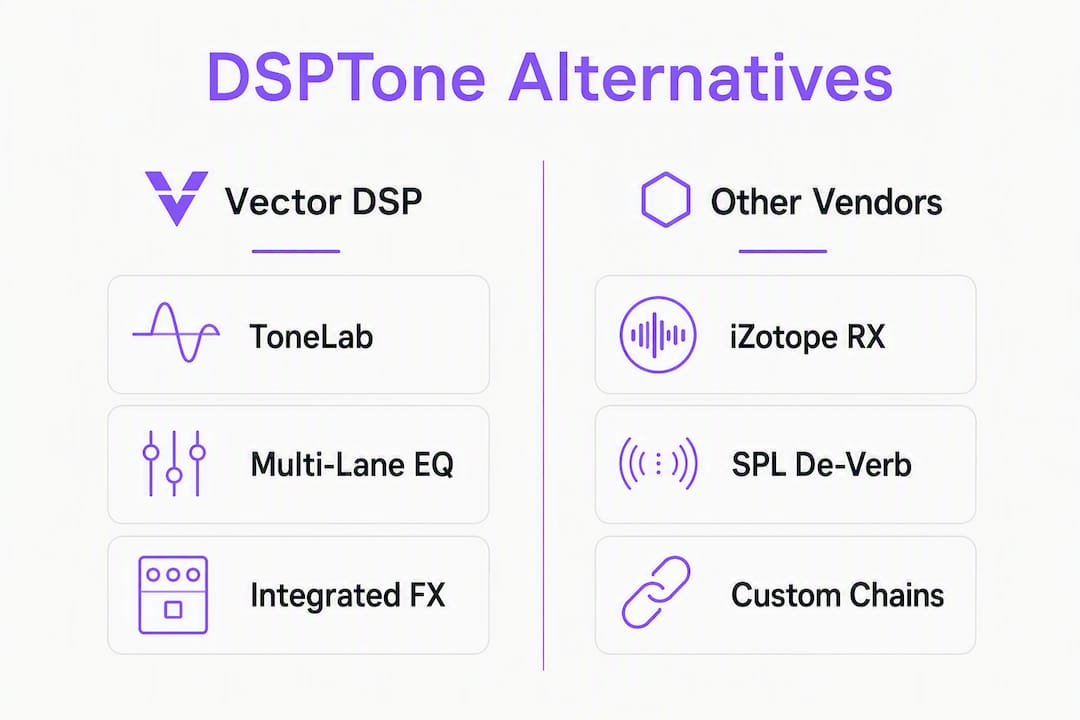
The strongest replacement for DSPTone's toolkit is Vector DSP's ToneLab, a multi-lane parallel effects processor built on low-latency DSP with VST3, AU, and AAX support across Windows and macOS. If you need a direct functional substitute, that's the short answer.
TL;DR shortlist:
- Vector DSP ToneLab — best for parallel effects chains with per-lane EQ targeting; recommended first pick
- iZotope RX — best for surgical audio repair (vocal cleanup, drum loop restoration)
- SPL De-Verb — best for ambience and reverb reduction on live recordings
- Native Instruments Replika XT — best for modulation delay with deep tempo-sync and routing options
- WavDSP — best for DSP-focused utility processing with a lean CPU footprint
- SmallSoundDSP — best for boutique, character-driven tone shaping
DSPTone products like PolyResonator and RESTRUKT combine sustain reduction, saturation, and shimmer reverb into a single interface, which is exactly the kind of integrated workflow these alternatives need to match.
Table of Contents
- What are the best dsptone.com alternatives for your workflow?
- How do these alternatives compare side by side?
- How do you pick the right alternative for your session?
- How do DSPTone features map to alternatives?
- When should you choose repair over creative effects?
- What do support and update policies look like across these tools?
- What security and privacy considerations apply to audio plugins?
- How do you install and integrate these plugins without compatibility issues?
- What do users and the community say about these tools?
- How does pricing break down across these alternatives?
- Key Takeaways
- Why ToneLab is the pragmatic pick for DSPTone users
- ToneLab by Vector DSP: try it before you commit
- Further reading and sources
What are the best dsptone.com alternatives for your workflow?
Each tool below maps to a specific DSPTone function. Knowing which DSPTone plugin you actually use most narrows this list fast.
- Vector DSP ToneLab — multi-lane parallel processing with per-lane EQ; covers spatial shaping, modulation, and creative effects in one session-ready plugin. VST3/AU/AAX, Windows and macOS. One-time license, free demo available.
- iZotope RX — the industry standard for repair-first workflows. Spectral repair, dialogue isolation, and noise reduction go well beyond what DSPTone's RESTRUKT ambience reducer targets, but that depth is exactly what you need for damaged audio.
- SPL De-Verb — focused specifically on reverb reduction and ambience control. Narrower scope than RESTRUKT, but extremely clean phase behavior on live drum rooms and vocal tracks.
- Native Instruments Replika XT — the modulation delay benchmark that Gearspace forum users consistently reference when comparing EXODELAY-style plugins. Tempo sync, multi-mode modulation, and parallel routing are all present.
- WavDSP — utility-grade DSP processing with a minimal CPU footprint. Good fit if you're running dense sessions and need a lightweight substitute.
- SmallSoundDSP — boutique character processing. Useful when you want analog-flavored tone shaping rather than clinical correction.
How do these alternatives compare side by side?
| Best for / use case | Plugin formats | Platform | Price / license | Unique strengths | CPU / latency | Trial available |
|---|---|---|---|---|---|---|
| Parallel effects, spatial shaping (ToneLab) | VST3, AU, AAX | Win / macOS | One-time license | Multi-lane architecture, per-lane EQ, low-latency DSP | Low latency by design | Free demo |
| Surgical audio repair (iZotope RX) | VST3, AU, AAX | Win / macOS | Subscription or one-time (tiered) | Spectral repair, noise reduction, dialogue isolation | Moderate; offline processing available | Trial available |
| Reverb / ambience reduction (SPL De-Verb) | VST3, AU, AAX | Win / macOS | One-time license | Clean phase behavior, focused reverb reduction | Low | Demo available |
| Modulation delay (Replika XT) | VST3, AU, AAX | Win / macOS | Included in Komplete or standalone | Deep modulation routing, tempo sync | Low to moderate | Trial via NI account |
| Utility DSP processing (WavDSP) | VST3, AU | Win / macOS | Free / low-cost tiers | Lean CPU footprint, straightforward signal path | Very low | Direct download |
| Boutique tone shaping (SmallSoundDSP) | VST3, AU | Win / macOS | One-time license | Analog character, niche tonal coloring | Low | Demo available |
Note: DSPTone products support VST3, AU, and AAX — confirm any replacement matches all three if your DAW requires AAX (Pro Tools users, this matters most). Some installers route through account-based activation rather than a direct download.

How do you pick the right alternative for your session?
Start with use case, not brand. Repair and creative effects are fundamentally different jobs, and picking the wrong category wastes time regardless of how good the plugin is.
- Confirm format and DAW compatibility. Check VST3, AU, and AAX support against your DAW. Pro Tools requires AAX; Logic requires AU. Plugin format differences matter more than most producers realize until something won't load.
- Review the update policy. Active development matters. DSPTone's June 2026 release notes show recent updates across ExoDelay, SubMass, and PolyResonator — look for comparable activity from any replacement vendor.
Pro Tip: Before committing to a replacement, route the alternative in parallel with your current DSPTone plugin using an A/B send setup. Flip between them on the same source material and check for phase cancellation when both are active — this catches integration problems that solo listening misses.
How do DSPTone features map to alternatives?
SoundShockAudio's analysis describes RESTRUKT as combining a gate, transient shaping, saturation, and shimmer reverb in a single interface — and that integration is the key point. Replacing it with four separate plugins introduces phase complexity and CPU overhead that the original avoided by design.
- Spatial reconstruction (RESTRUKT / PolyResonator): The equivalent processing chain is multiband gating + saturation + shimmer reverb. ToneLab's multi-lane architecture handles this natively. Chaining separate plugins works but requires careful phase alignment between each stage.
- Modulation delay (EXODELAY): Replika XT covers the modulation depth, tempo sync, and routing options that producers benchmark against EXODELAY. The trade-off is a slightly heavier CPU footprint on dense sessions.
- Low-end repair (SubMass): iZotope RX handles spectral low-end cleanup surgically. SPL De-Verb addresses the ambience side. Neither replaces SubMass's specific low-end focus exactly — you may need both for full coverage.
Pro Tip: When swapping an integrated "one-button" spatial tool for a chain of separate plugins, insert a null test early: sum the original and the replacement out of phase on a test bus. Any residual signal reveals processing differences that will show up as phase artifacts in your mix.
When should you choose repair over creative effects?
The decision usually comes down to whether the problem is in the recording or in the arrangement.
- Drum loop cleaning: A loop with room bleed or inconsistent transients needs a repair tool first (iZotope RX, SPL De-Verb). A creative spatial plugin applied to a dirty loop just makes the mess louder.
- Live vocal ambience reduction: SPL De-Verb or iZotope RX's ambience module. Quick test: bypass the plugin and listen for whether the problem is the room or the performance. Room problems are repair; performance problems are arrangement.
- Synth pluck tightness: This is a creative job. ToneLab's per-lane EQ and parallel processing shape the transient and sustain without touching the fundamental. A repair suite here is overkill.
- Low-end boom removal and bass focus: Start with iZotope RX for surgical removal, then use a creative processor to reshape the low end. Applying creative tools to an unrepaired low-end problem typically produces pumping or muddiness.
What do support and update policies look like across these tools?
Update frequency is a practical signal of vendor health. DSPTone's recent activity across multiple products in mid-2026 shows an active developer. Among the alternatives, iZotope has a structured release cycle tied to its subscription tiers, with regular point updates and occasional major version upgrades. Native Instruments ties Replika XT updates to the broader Komplete ecosystem, which means updates are consistent but sometimes delayed by the larger release schedule.
Vector DSP includes minor version updates with its one-time license, which means bug fixes and compatibility patches don't require a new purchase. For producers on a fixed budget, that model avoids the "pay again for the same plugin" frustration that comes with some tiered upgrade paths.
Support responsiveness varies. Larger vendors like iZotope offer ticketed support with documented response windows. Smaller developers, including boutique options like SmallSoundDSP, often rely on forum threads and email, which can be slower but sometimes more direct.
What security and privacy considerations apply to audio plugins?
Plugin security is underappreciated until something goes wrong. The main risks are code execution vulnerabilities in the plugin binary itself and data collection through account-based activation systems.
Account-based installers, like those used in some Audioloom activation flows, require an internet connection and account credentials at install time. That's standard practice, but it means your email and license data sit on a third-party server. Always download plugins from official developer pages or verified storefronts like Plugin Boutique or Splice, never from unverified mirrors. Scan installers with your OS security tools before running them, particularly on a production machine.
iZotope and Native Instruments both publish privacy policies that cover what telemetry they collect during use. Smaller developers may not. If you're working on sessions under NDA, check whether your plugins phone home during use.
How do you install and integrate these plugins without compatibility issues?
Most modern plugins follow a standard installation path: run the installer, point it at your VST3, AU, or AAX directory, and rescan in your DAW. The complications come from a few specific scenarios.
Account-based activation (common with iZotope, Native Instruments, and some Audioloom products) requires an internet connection at first launch. If your studio machine is offline, handle activation on a connected machine first, then transfer the license. Native Instruments uses its Native Access app as a central installer and license manager, which simplifies multi-plugin setups but adds one more piece of software to maintain.
For AAX plugins in Pro Tools, always verify the AAX version is signed by Avid's certification process. Unsigned AAX plugins will not load. VST3 and AU are generally more permissive. If a plugin loads in one DAW but not another, the format version (not the plugin itself) is usually the issue.
Pro Tip: Keep a separate "plugin test" DAW session with a few representative tracks. When you install a new alternative, load it there first before adding it to a client project. This catches crashes, latency compensation errors, and GUI scaling issues without risking a live session.
What do users and the community say about these tools?
KVR Audio and Gearspace are the two most reliable sources for unfiltered producer feedback. KVR's DSPTone developer page aggregates user comments and version history, which gives a clear picture of how actively bugs get addressed. For modulation delay comparisons, Gearspace threads consistently surface Replika XT as the reference point — not because it's perfect, but because enough producers have used it that its quirks are well-documented.
iZotope RX has a strong reputation in post-production and broadcast communities, where repair quality is non-negotiable. The criticism that comes up most often is pricing: the full suite is expensive, and the tiered licensing can feel like a moving target. SPL De-Verb gets consistent praise for phase transparency, which matters on material where other reverb reducers leave artifacts.
Vector DSP's ToneLab is newer to the market, but its multi-lane parallel architecture addresses a real gap: most alternatives handle either repair or creative effects, not both in a single integrated interface.
How does pricing break down across these alternatives?
Licensing model is the biggest variable in total cost of ownership over a three-year window.
- Vector DSP ToneLab: One-time license, free demo available. Minor updates included. No subscription required.
- iZotope RX: Available as a one-time purchase (Elements, Standard, Advanced tiers) or through iZotope's subscription. The Advanced tier carries a significant upfront cost; the subscription spreads that cost but accumulates over time.
- SPL De-Verb: One-time license, straightforward pricing. No subscription tier.
- Native Instruments Replika XT: Available standalone or as part of Komplete bundles. If you already own Komplete, the marginal cost is zero.
- WavDSP: Free or low-cost tiers depending on the specific tool. Low total cost of ownership.
- SmallSoundDSP: One-time license, boutique pricing. Occasional sales through Plugin Boutique.
One-time licenses generally win on three-year cost unless the subscription includes meaningful annual feature additions. Factor in whether upgrade pricing is offered when a major version releases — some vendors charge full price for existing customers.
Key Takeaways
Vector DSP's ToneLab is the recommended first alternative to DSPTone for producers who need integrated parallel effects processing with VST3, AU, and AAX support and a one-time license model.
| Point | Details |
|---|---|
| Start with use case | Match repair tools (iZotope RX, SPL De-Verb) to damaged audio; use creative processors (ToneLab) for spatial and modulation work. |
| Confirm format support | VST3, AU, and AAX compatibility must match your DAW before downloading any trial. |
| Test CPU in a real session | Load the trial on a dense mix, not a blank project, to catch compounding CPU issues early. |
| Prefer one-time licenses | Subscription costs accumulate; one-time licenses with included minor updates offer better long-term value. |
| Vector DSP ToneLab | Multi-lane parallel architecture with per-lane EQ covers the widest range of DSPTone workflows in a single plugin. |
Why ToneLab is the pragmatic pick for DSPTone users
Most "alternatives" articles hand you a list and leave the decision to you. Here's where I'll be direct: the tools on this list are not equivalent, and the choice isn't close for most producers switching from DSPTone.
What DSPTone does well is integration. RESTRUKT and PolyResonator pack multiple processing stages into one interface, which keeps phase behavior clean and CPU load predictable. The alternatives that replicate that integration are rare. iZotope RX is excellent at repair but doesn't cover creative spatial shaping. Replika XT is a strong modulation delay but doesn't touch low-end repair. Most producers end up chaining two or three plugins to cover what one DSPTone tool did.
ToneLab's multi-lane parallel architecture with per-lane EQ targeting is the closest structural match to that integrated approach. Low-latency DSP, VST3/AU/AAX support, and a one-time license make it a practical session tool rather than a demo-ware experiment. The honest trade-off: ToneLab has a different workflow than DSPTone's single-knob spatial tools, so expect a short learning curve if you're used to RESTRUKT's simplicity. That curve is worth it for the control you get in return.
ToneLab by Vector DSP: try it before you commit

Vector DSP's ToneLab is available as a free demo download at vector-dsp.com, with full VST3, AU, and AAX support on both Windows and macOS. The demo lets you run the plugin in your actual DAW session before purchasing a one-time license. No subscription, no recurring charge. Minor version updates are included with the license.
Before downloading, run through the checklist from the "how to choose" section above: confirm your DAW's format requirement, load the demo on a representative session, and run the CPU test on a dense mix bus. Installation follows a standard path with no account-based activation required. Documentation and support are available directly through Vector DSP. If you want to compare plugin categories before deciding, the WavDSP alternatives guide covers additional DSP-focused options worth reviewing.
Further reading and sources
- DSPTone developer page on KVR Audio — full product list, version history, and user comments for EXODELAY, RESTRUKT, SubMass, and PolyResonator
- RESTRUKT on SoundShockAudio — detailed feature breakdown of RESTRUKT's integrated processing chain and Audioloom activation notes
- EXODELAY discussion on Gearspace — community thread benchmarking modulation delay alternatives
- DSPTone on MusicTech — brand overview and recent product coverage
Six sources are cited throughout this article. For trial access, visit developer pages directly — account-based activation applies to some Audioloom-hosted products, while others offer direct installer downloads. Always verify VST3, AU, and AAX availability on the product page before purchasing.