128 Samples = 2.67 ms: Buffer Size and Plugin Latency for Engineers
128 Samples = 2.67 ms: Buffer Size and Plugin Latency for Engineers
Buffer size sets how many samples your audio interface processes before sending them onward, and a bigger buffer always means more latency, measured in milliseconds. Plugin algorithms then add their own delay on top of that baseline. The practical rule engineers use: run the lowest stable buffer while tracking, and raise it while mixing once monitoring speed stops mattering. Your DAW's plugin delay compensation fixes timing on playback, but it does nothing for what you hear while recording.
TL;DR:
- Buffer size directly increases latency, with 128 samples at 48 kHz producing about 2.67 milliseconds of one-way delay, but actual perceived round-trip latency can be nearly double due to hardware and driver overhead.
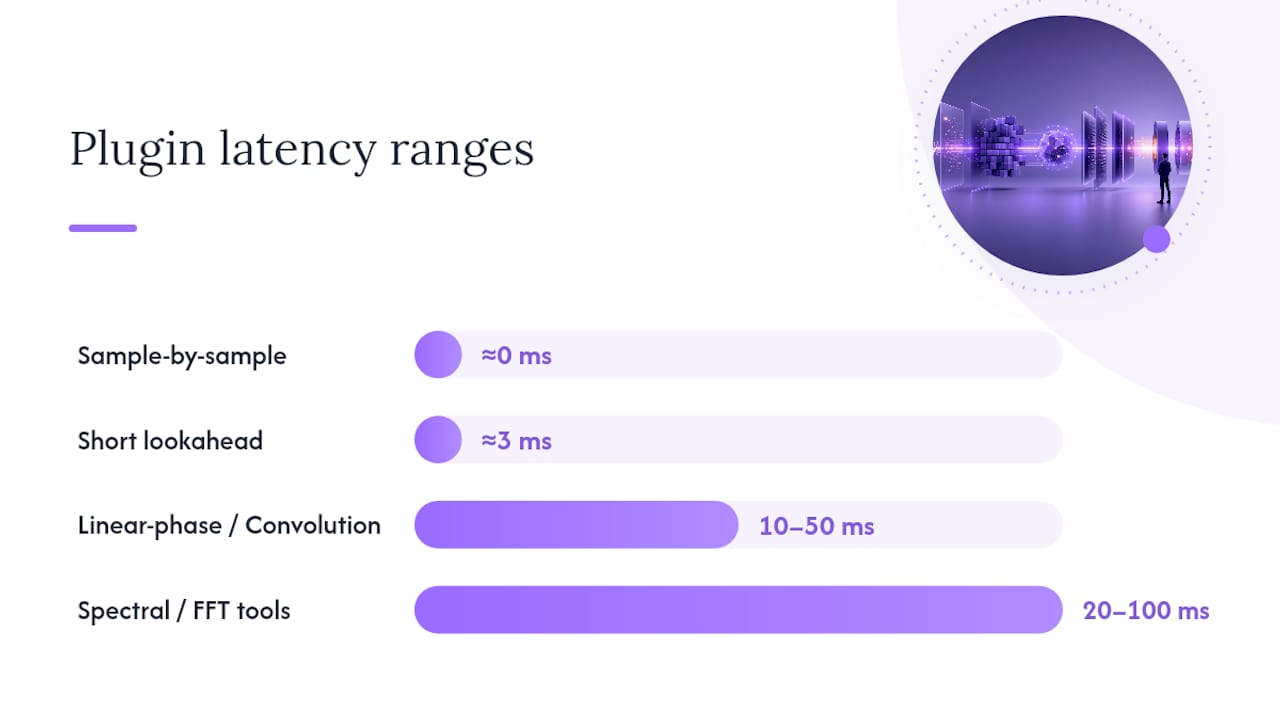
- High-latency plugins like linear-phase EQs or convolution reverbs can add 10 to 50 milliseconds, often surpassing the buffer-derived delay, which can disrupt timing during tracking.
- During recording, keep buffer sizes between 64 and 256 samples for minimal latency, and disable high-latency plugins on monitored tracks to avoid delays that affect performance feel.
- Measuring real round-trip latency with a loopback test provides the most accurate system delay figure, identifying driver or hardware issues that may cause unexpected lag.
- Upgrading hardware, updating drivers, and minimizing background processes can significantly reduce system latency, but understanding your system's actual limits through testing remains essential.
Table of Contents
- How Buffer Size and Plugin Latency Actually Work Together
- Plugin Latency: Which Algorithms Add Delay and How DAWs Compensate
- Recommended Buffer Settings for Tracking, Mixing, and Live Performance
- How to Measure Real Round-Trip Latency and Fix What's Broken
- A Quick Checklist to Cut Latency Without Breaking Your Session
- Vector DSP Engineering Notes: How Plugin Design Shapes Real Latency
- Feel vs. Capacity: What Actually Drives the Buffer Decision
- Get Low-Latency Plugins Built the Way This Article Describes
- Sources
- FAQ
How Buffer Size and Plugin Latency Actually Work Together
The relationship between buffer size and plugin latency starts with one formula: Latency (ms) = (Buffer size / Sample rate) × 1000. A 128-sample buffer at 48 kHz gives you 128 divided by 48,000, times 1,000, which works out to about 2.67 milliseconds. That's one-way latency, the time it takes signal to travel in one direction through your converter and driver.
Round-trip latency is what you actually feel when you sing into a mic and hear yourself in headphones. It includes the input buffer, the output buffer, and whatever processing sits between them, which is why round-trip numbers often run close to double the one-way figure. A system reporting 2.67 ms one-way might feel closer to 5 or 6 ms round-trip once you account for AD/DA conversion and driver overhead.
Here's how common buffer sizes translate to real numbers at two standard sample rates:
Those round-trip figures are estimates, not guarantees. The actual number your session delivers depends on a few extra variables:
- Driver quality and how efficiently it moves data between hardware and software
- Operating system overhead, including background processes competing for CPU cycles
- USB or Thunderbolt bus latency, which varies by interface and cable quality
- Whether the DAW reports "safe" buffer padding on top of your set value
That's why your DAW's reported latency and your interface control panel's number sometimes disagree by a millisecond or two. Neither is wrong. They're measuring slightly different points in the signal path.
Plugin Latency: Which Algorithms Add Delay and How DAWs Compensate
Buffer size is only half the latency picture. Plugin latency and plugin delay compensation govern the other half, and they behave very differently depending on what kind of processing a plugin does.
Most EQs, simple compressors, and saturation plugins run at zero or near-zero latency because they process sample by sample with no lookahead. Moderate-latency plugins, like soft-knee limiters with short lookahead windows, typically add somewhere in the low single-digit milliseconds. High-latency plugins are a different story entirely: linear-phase EQs and convolution reverbs frequently add 10 to 50 milliseconds, and spectral or FFT-based processors, including many pitch correction and noise reduction tools, can add 20 to 100 milliseconds depending on their analysis window size.
Statistic to remember: a linear-phase EQ alone can introduce more latency than your entire buffer chain at 256 samples. That's the trap. You fix your buffer settings, feel confident about your monitoring latency, then drop a linear-phase EQ on the master bus and wonder why vocals suddenly feel behind the beat.
Plugin delay compensation, or PDC, is how your DAW handles this during playback. It measures how much delay each plugin introduces and shifts every other track to match, so everything lines up in time when you hit play. The problem is that PDC only helps during playback, not during live monitoring, and it can fail outright in complex routing situations, including feedback loops, parallel side-chains, and nested bus sends.
Two practical habits solve most of this:
- Keep high-latency plugins off any channel you're actively monitoring while recording.
- Swap linear-phase or spectral processing for minimum-phase alternatives during tracking, then reintroduce the heavier plugins once you're in the mixing phase.
Recommended Buffer Settings for Tracking, Mixing, and Live Performance
There's no single perfect buffer setting. Sound On Sound's engineering advice is blunt about it: set the buffer as low as your system can handle cleanly, and only raise it when you hear glitches. The right number changes by production phase.
- Tracking: Start at 64 to 256 samples depending on your interface and how many plugins sit in the monitor path. Sweetwater recommends aiming for roughly 3 milliseconds or less of total round-trip latency for comfortable vocal and instrument feel. Above that, performers start to notice a lag between playing and hearing themselves.
- Mixing: Raise the buffer to 512 or 1024 samples once you're stacking plugins across dozens of tracks. Monitoring speed no longer matters because you're not performing, and the extra buffer headroom prevents dropouts when your session gets CPU-heavy.
- Live performance: Test your entire signal chain end to end before a show, not just the interface spec sheet. Favor hardware or direct monitoring over software monitoring, and build a signal path that never routes the performer's ears through a high-latency plugin.
Pro Tip: Freeze or bounce any track using a CPU-heavy plugin once you've committed to a sound. Frozen tracks stop demanding real-time processing entirely, which frees up headroom to keep your buffer lower everywhere else.
How to Measure Real Round-Trip Latency and Fix What's Broken
Specs on a box mean less than what your system actually delivers, and the only way to know your real number is a loopback test.
Route an output channel directly into an input channel with a cable, record a sharp impulse or click, and measure the sample distance between when you sent it and when it came back. That figure captures everything: converters, drivers, buffer settings, and any plugins sitting in the signal path. It's the single most reliable number you'll get, more trustworthy than any control panel readout.
If that number is higher than expected, work through this sequence:
- Confirm you're running ASIO drivers on Windows or Core Audio on Mac, not a generic or WDM fallback driver.
- Update your interface's drivers and firmware. Older driver builds are a common, invisible source of added latency.
- On Windows, run LatencyMon to check DPC latency, which flags background processes stealing CPU time from your audio driver.
- Raise your buffer size incrementally until dropouts stop, rather than jumping straight to the highest setting.
Once drivers check out, look at the session itself:
- Freeze CPU-heavy tracks to remove them from the real-time processing load.
- Pull any high-latency plugin out of a channel you're currently monitoring.
- Increase your DAW's process priority in the operating system's task manager if it's available.
- Close background applications, especially anything using Wi-Fi radios or Bluetooth, both known DPC latency culprits.
A Quick Checklist to Cut Latency Without Breaking Your Session
Run through this in order, and stop as soon as your monitoring feels comfortable.
- Measure your real round-trip latency with a loopback test before changing anything blind.
- Set the lowest buffer your system holds stable while tracking, and switch to direct or hardware monitoring if your interface supports it.
- Pull linear-phase, convolution, or spectral plugins off the monitored path and substitute lighter alternatives.
- Freeze or bounce CPU-heavy tracks to reclaim headroom for a lower buffer elsewhere.
- Update interface drivers and firmware; this alone fixes a surprising share of unexplained latency complaints.
For anything beyond that, the fix becomes a hardware conversation: a faster CPU, a PCIe or Thunderbolt interface instead of USB 2.0, or an operating system tuned specifically for audio work rather than general use.
Pro Tip: Keep a written log of your buffer setting alongside your session's plugin count. When a mix suddenly starts glitching, you'll know within seconds whether it's a new plugin or a setting you forgot to revert.
Vector DSP Engineering Notes: How Plugin Design Shapes Real Latency
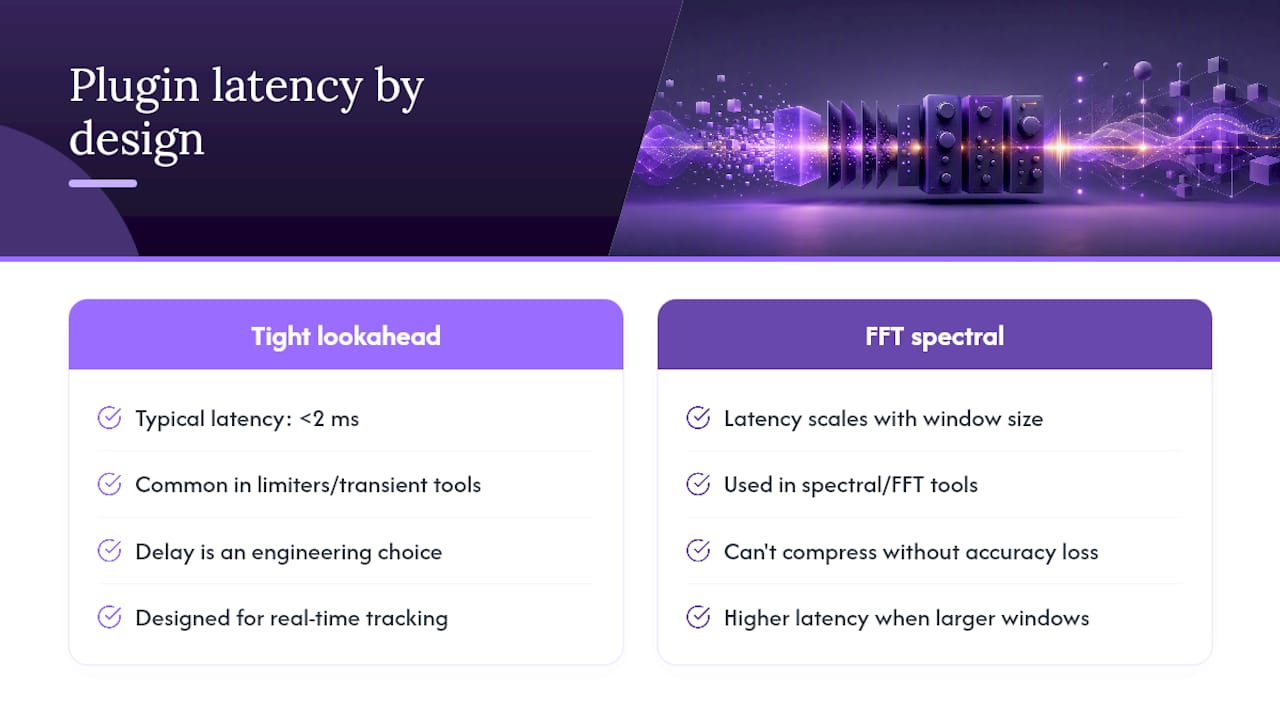
Lookahead is sometimes unavoidable, particularly in limiters and transient-sensitive processors, but the size of that lookahead window is an engineering choice, not a fixed cost. Algorithms built with tight lookahead can hold delay under 2 milliseconds, while FFT-based spectral tools scale latency directly with analysis window size and can't be compressed without sacrificing accuracy.
That distinction matters for anyone stacking plugins on a monitored channel. Vector-dsp's approach to lookahead design prioritizes real-time performance specifically so producers aren't forced to choose between sound quality and playable latency during tracking.
One detail worth knowing when you're auditioning any plugin: it should report its own latency in samples, not milliseconds. Sample counts stay accurate across sample rate changes, while millisecond figures shift underneath you the moment you switch a session from 44.1 to 48 kHz. Accurate self-reporting is what lets your DAW's plugin delay compensation actually work as intended.
Feel vs. Capacity: What Actually Drives the Buffer Decision
Most latency debates skip the real decision point: are you protecting feel, or protecting headroom? Tracking protects feel, so you drop the buffer as low as it goes without clicking, strip monitored channels down to nothing but essential EQ or compression, and accept the CPU risk. Mixing protects headroom, so you raise the buffer and let plugins pile up.
Buy faster hardware when you're constantly negotiating between the two on every session. Otherwise, learn your system's actual limits through testing, not spec sheets, and build habits around them.
— Kai
Get Low-Latency Plugins Built the Way This Article Describes
Vector-dsp designs plugins around the same principle this article just walked through: latency you can predict and measure, not latency you have to work around. That means tighter lookahead windows engineered specifically to stay under the thresholds that ruin monitoring, accurate sample-based latency reporting so your DAW's compensation actually lines up, and real-time DSP built for tracking sessions where every millisecond shows up in a performer's headphones.

If you're tired of choosing between plugin quality and a playable monitor mix, browse Vector-dsp's plugin lineup and see how the architecture handles latency before you commit a session to it. For deeper engineering context, the lookahead design breakdown and the guide to low-latency audio concepts are both worth a read before your next tracking date.
Sources
For deeper technical reading beyond this article, Sweetwater's buffer size breakdown, Tonalux's latency math explainer, ReaperTips' latency reduction guide, and Apple's Logic Pro monitoring documentation each cover angles this piece only summarizes. For measurement, LatencyMon and a simple loopback test remain the two most reliable diagnostic tools available to home and professional studios alike. For mixing-stage standards specifically, Minim's mix standards guide is a solid companion read.
FAQ
Does Buffer Size Affect Latency?
Yes. Buffer size and latency scale directly together: a larger buffer means your system holds more samples before processing them, which increases the delay between input and output.
Is 256 Samples a Good Buffer Size?
A 256-sample buffer works well for mixing and playback on most systems, but it often feels sluggish for real-time vocal or instrument tracking, where lower buffer sizes are a better starting point.
How Do I Fix High Latency Caused by Plugins?
Remove linear-phase, convolution, or spectral plugins from any channel you're monitoring while recording, since those categories commonly add 10 to 100 milliseconds of delay, and rely on your DAW's low latency mode to route around them during tracking.
Which Buffer Size Is Best for Gaming?
Gaming audio typically favors very low buffer sizes, often 64 samples or below, since games prioritize immediate audio feedback over the plugin-heavy processing that music production demands.
What's the Difference Between Input and Output Buffer Size?
Input buffer size affects how quickly your interface captures incoming signal, while output buffer size affects how quickly processed audio reaches your speakers or headphones. Round-trip latency, the number that matters most for monitoring, is the sum of both.