What Is Low Latency Audio: a Producer's 2026 Guide
What Is Low Latency Audio: a Producer's 2026 Guide
If you've ever recorded a vocal take and heard yourself a split second behind your own voice, you've felt what audio latency costs in practice. Understanding what is low latency audio isn't just a technical curiosity. It's the difference between a session that flows and one that fights you at every step. Latency is the delay between when sound enters your system and when you hear it back. That delay, measured in milliseconds, can be imperceptible or completely disruptive depending on how well your signal chain is configured. This guide covers exactly how it works, what causes it, and how to eliminate it.
Table of Contents
- Key Takeaways
- What is low latency audio and how it's measured
- What actually causes audio latency
- How to achieve low latency audio in 2026
- Understanding latency levels and real-world impact
- My take on low latency audio after years in professional sessions
- How Vector-dsp tools are built for low latency performance
- FAQ
Key Takeaways
| Point | Details |
|---|---|
| Latency threshold matters | Audio delays under 10ms are imperceptible; above 25ms they actively disrupt recording and live performance. |
| Buffer size drives delay | Smaller buffers reduce latency but demand more CPU power. Matching buffer size to your task is the core skill. |
| Drivers determine your ceiling | ASIO on Windows and Core Audio on macOS bypass the OS audio engine and unlock the lowest possible latency. |
| Direct monitoring is your safety net | Routing your input through hardware before the DAW gives you near-zero latency regardless of buffer settings. |
| Tackle the biggest sources first | Switching from Bluetooth to wired connections cuts more latency than any DAW setting tweak. |
What is low latency audio and how it's measured
Low latency audio, explained simply, is audio processing fast enough that the delay becomes irrelevant to the listener or performer. The word "low" only means something when you know the thresholds that actually matter for professional use.
Latency is measured in milliseconds. The scale breaks into three practical zones:
- Under 10ms: Imperceptible. The human auditory system cannot detect a delay this small. This is the target zone for real-time recording and live performance.
- 10 to 20ms: Acceptable. You may not consciously notice it, but during critical vocal or instrument tracking, some performers start to feel slightly off.
- Above 25ms: Disruptive. Delays above 25ms are noticeable and actively interfere with performance timing and monitoring accuracy.
There are also three distinct latency types you need to understand. Render latency is the delay introduced during DSP processing. Capture latency is the time it takes your audio interface to convert an analog signal into digital data. Roundtrip latency is the total journey: input, processing, and output combined. Roundtrip is the number you care most about when tracking.
Here's how buffer size alone shapes your roundtrip latency at 44.1kHz:
| Buffer size (samples) | Approximate latency at 44.1kHz |
|---|---|
| 64 | ~1.5 ms |
| 128 | ~3 ms |
| 256 | ~6 ms |
| 512 | ~12 ms |
| 1024 | ~23 ms |
These numbers show why buffer size is the first variable most producers touch. But as you'll see, it's nowhere near the only one.
What actually causes audio latency
Latency is additive across every stage in your signal chain. Each component contributes its own slice of delay, and the total is what you experience.
Here are the major contributors:
- Audio buffer size: The buffer stores audio samples before passing them downstream. A larger buffer gives the CPU more time to process but adds delay. A smaller buffer means faster throughput but demands more processing power, creating a risk of dropouts.
- Audio drivers: This is where Windows users take a significant hit without intervention. Generic Windows audio drivers add overhead that balloons latency into the hundreds of milliseconds range. ASIO drivers bypass the Windows audio engine entirely, reducing latency dramatically. macOS Core Audio handles this natively with similar efficiency.
- Sample rate: A higher sample rate means more samples per second, which shrinks the time each buffer holds. A 256-sample buffer at 96kHz delivers roughly 2.7ms of latency compared to about 5.8ms at 44.1kHz. The tradeoff is significant CPU load.
- DSP processing chains: Every plugin in your signal chain adds processing time. DSP plugins like noise suppression or spatial audio can add meaningful delay even when your buffer size is small. This is why experienced engineers disable CPU-heavy plugins during tracking and re-enable them at mix time.
- Wireless connections: Standard Bluetooth codecs like SBC and AAC introduce latency between 100 and 300ms, making them completely unsuitable for monitoring during recording. Dedicated 2.4GHz wireless systems are a different story.
Pro Tip: If you're on Windows and still using generic WDM drivers, switching to ASIO is the single highest-impact move you can make before touching any other setting. It's free, it's immediate, and the difference is often dramatic.
How to achieve low latency audio in 2026
Achieving genuinely low latency audio requires treating your system as a chain, not a single device. The goal is to reduce every stage simultaneously until the cumulative delay falls below 10ms.
Here's a practical sequence:
-
Install ASIO drivers (Windows) or confirm Core Audio is active (macOS). This is your foundation. Generic drivers will cap your performance before you've even touched your DAW settings. Your audio interface manufacturer almost certainly offers an ASIO driver for download.
-
Set your buffer size based on the task at hand. Use 64 to 128 samples during recording and tracking. Move to 256 or 512 during mixing, when real-time monitoring matters less and CPU headroom matters more. Avoid running a 64-sample buffer during a mix session full of DSP-heavy plugins. That's a recipe for dropouts.
-
Enable direct monitoring on your audio interface. Direct monitoring routes your input directly to your headphones through the hardware, completely bypassing the DAW and all its buffering. You hear yourself with near-zero delay regardless of what your software is doing. Most modern audio interfaces include this as a toggle on the front panel or companion software.
-
Use wired connections where latency is critical. If you're considering wireless for monitoring, know your options. Dedicated 2.4GHz wireless headphones can reach 9ms of latency, which is within acceptable range. Standard Bluetooth tops out at around 40 to 65ms with aptX Low Latency, and regular Bluetooth codecs land in the 100 to 300ms range. The choice practically makes itself for professional tracking.
-
Audit your plugin chain during tracking. Disable any plugin with high DSP overhead during live recording. Parallel processing chains, convolution reverbs, and noise reduction plugins are common offenders. Re-enable them at mixdown.
-
Consider raising your sample rate if your hardware supports it. Running at 96kHz instead of 44.1kHz with the same buffer size cuts latency nearly in half. But confirm your CPU and interface can handle it cleanly before committing.
Pro Tip: Don't try to run 64-sample buffers on a laptop with a dozen plugins active. You'll chase dropouts all session. Set the buffer low for tracking, then immediately raise it when you switch to mixing. Most DAWs let you change this without restarting.
Understanding latency levels and real-world impact
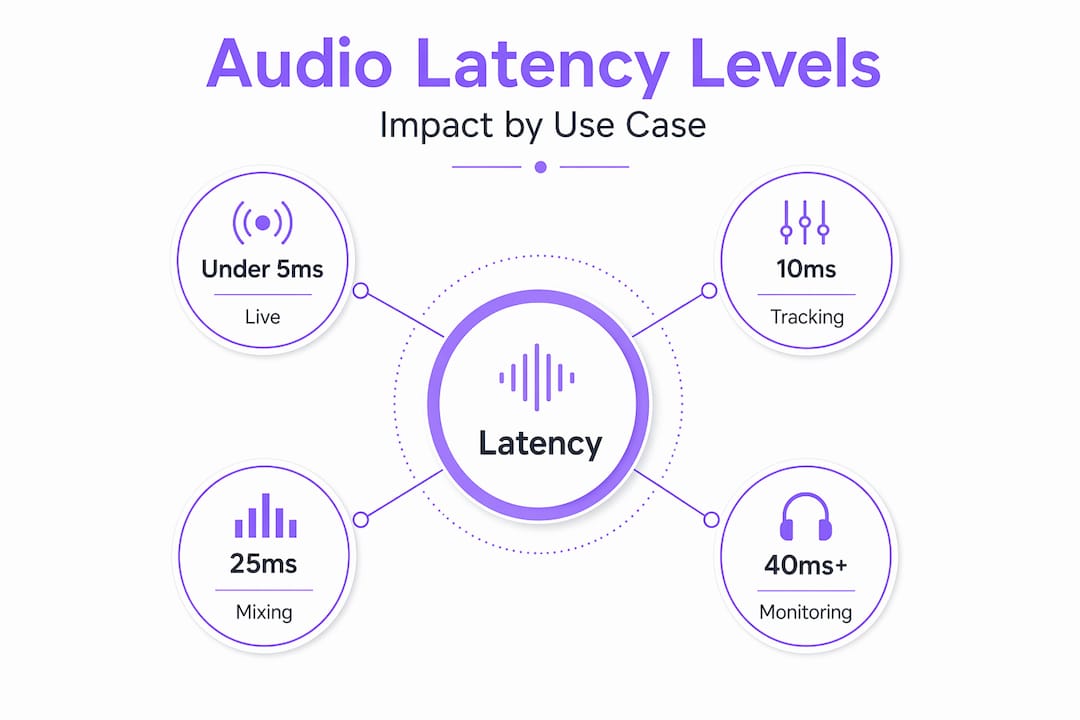
The numbers only become meaningful when you map them to actual use cases. Low latency audio vs high latency audio isn't just a spec comparison. It changes what you can and can't do in your session.
Here's how different latency ranges play out across professional scenarios:
| Latency range | Use case | Practical impact |
|---|---|---|
| Under 5ms | Live performance, real-time tracking | Transparent. No perceivable delay. |
| 5 to 10ms | Recording with software monitoring | Acceptable for most performers. |
| 10 to 20ms | Mixing, non-critical playback | Fine for mixing; awkward for live tracking. |
| 20 to 40ms | Streaming, casual monitoring | Noticeably delayed. Disrupts performer timing. |
| Above 40ms | Standard Bluetooth monitoring | Unworkable for real-time performance. |
The 40ms to 50ms gap deserves specific attention. That 10ms difference may sound small, but at 40ms a performer already feels the disconnect between their input and what they hear. At 50ms, the timing interference is severe enough to physically affect how someone plays or sings.
Beyond pure performance, latency affects user perception in ways that go beyond the technical. The psychological cost of perceived delay compounds quickly. A vocalist who hears themselves late starts to second-guess their timing, which degrades the take.
The practical rule for the importance of low latency audio is this: if you're performing or tracking, you need to be under 10ms roundtrip. If you're mixing, 20ms is tolerable. If you're streaming output only, 40ms may be acceptable. Everything above those thresholds for their respective use cases is a problem worth solving.
The best approach to reducing latency systematically is to address the largest contributors first. Switching from Bluetooth to wired cuts more latency than spending an hour tweaking buffer sizes. Fix the big problems before the small ones.
My take on low latency audio after years in professional sessions
I've seen producers spend an afternoon micro-adjusting buffer sizes and sample rates while still running standard Bluetooth headphones and Windows generic audio drivers. That's working backward. The biggest gains almost always come from the architecture level, not the fine-tuning level.
The assumption I push back on hardest is that the smallest buffer size is always the right target. It isn't. A 64-sample buffer on an underpowered machine with a dense plugin chain is going to dropout constantly, which is far more disruptive than running at 128 or 256 samples on a stable system. Knowing your machine's limits and matching buffer size to the session phase is more useful than chasing a spec.
Direct monitoring hardware is the most underused tool in a producer's setup. I've worked with engineers who didn't realize their interface had it, or who thought it was only relevant for beginner setups. It's the opposite. Professionals use it precisely because it guarantees zero-latency feedback under any software conditions. Understanding the plugin architecture in your DAW helps you know exactly where hidden latency is being introduced.
The other trap I see consistently is underestimating DSP plugin overhead. A single convolution reverb or lookahead limiter can add more latency than a poor buffer setting. Profile your plugins, not just your buffer.
Modern drivers and hardware have made ultra-low latency achievable on mid-tier machines. The gap between theory and practice is smaller than it's ever been. But it requires treating the system holistically, not as a collection of independent knobs.
— Kai
How Vector-dsp tools are built for low latency performance
At Vector-dsp, every design decision starts with real-time performance as a constraint, not an afterthought. If you've spent time optimizing your buffer settings and driver configuration only to watch plugins add hidden delay back into your chain, you know exactly why this matters. Vector-dsp's ToneLab audio plugin is built on DSP architecture that prioritizes minimal processing overhead without sacrificing precision. It's designed for producers who have done the work on their signal chain and don't want their plugins undoing it. Explore the full Vector-dsp audio tools lineup to find processing solutions built with real-time performance as a first principle, not a feature.
FAQ
What is low latency audio in simple terms?
Low latency audio is audio processing fast enough that the delay between input and output is too small to perceive. In practice, that means keeping roundtrip latency under 10ms for real-time tasks like recording and live performance.
What causes the most audio latency in a DAW setup?
The largest contributors are audio drivers, buffer size, and DSP plugin overhead. Latency builds additively across converters, buffering, processing, and transmission, so each stage needs to be optimized.
Is Bluetooth audio usable for professional monitoring?
Standard Bluetooth codecs introduce 100 to 300ms of latency, which is unworkable for real-time tracking. Dedicated 2.4GHz wireless systems can reach as low as 9ms, making them a viable option when wired monitoring isn't practical.
What buffer size should I use for recording?
Set your buffer to 64 or 128 samples during tracking to stay under 10ms at standard sample rates. Raise it to 256 or 512 during mixing when real-time monitoring is less critical and CPU headroom matters more.
What is direct monitoring and why does it matter for latency?
Direct monitoring routes your input signal through your audio interface hardware before it reaches the DAW, achieving effectively zero latency. It bypasses all software buffering, making it the most reliable way to monitor yourself during tracking regardless of your DAW settings.