Audio Plugin Ecosystem Explained for Music Producers
Audio Plugin Ecosystem Explained for Music Producers
The audio plugin ecosystem is the interconnected framework of plugin formats, host software, and management tools that allows digital audio plugins to operate, communicate, and integrate inside digital audio workstations (DAWs). This framework spans everything from Steinberg's VST3 format and Avid's AAX to Apple's AU, the JUCE development framework, and open registries like plug.audio. Understanding what the audio plugin ecosystem means in practice gives you direct control over compatibility decisions, workflow efficiency, and the long-term value of your plugin library. Every plugin you load, automate, or chain inside Ableton Live, Logic Pro, or Pro Tools depends on this ecosystem functioning correctly beneath the surface.
What is the audio plugin ecosystem and why does it matter?
The audio plugin ecosystem is defined as the full technical and commercial infrastructure that connects plugin developers, host applications, and end users through shared formats, APIs, and management tools. It is not just a collection of plugins. It is the set of rules, protocols, and platforms that determine whether a plugin loads correctly, responds to automation, saves its state between sessions, and runs without crashing your DAW.
The ecosystem matters because incompatibility is the most common source of production downtime. A plugin built for VST2 will not load in a DAW that only supports VST3 or AAX without a bridge. A plugin that mismanages its processing thread can introduce latency or silence an entire session. Knowing the ecosystem means you can diagnose these problems before they cost you a mix session.
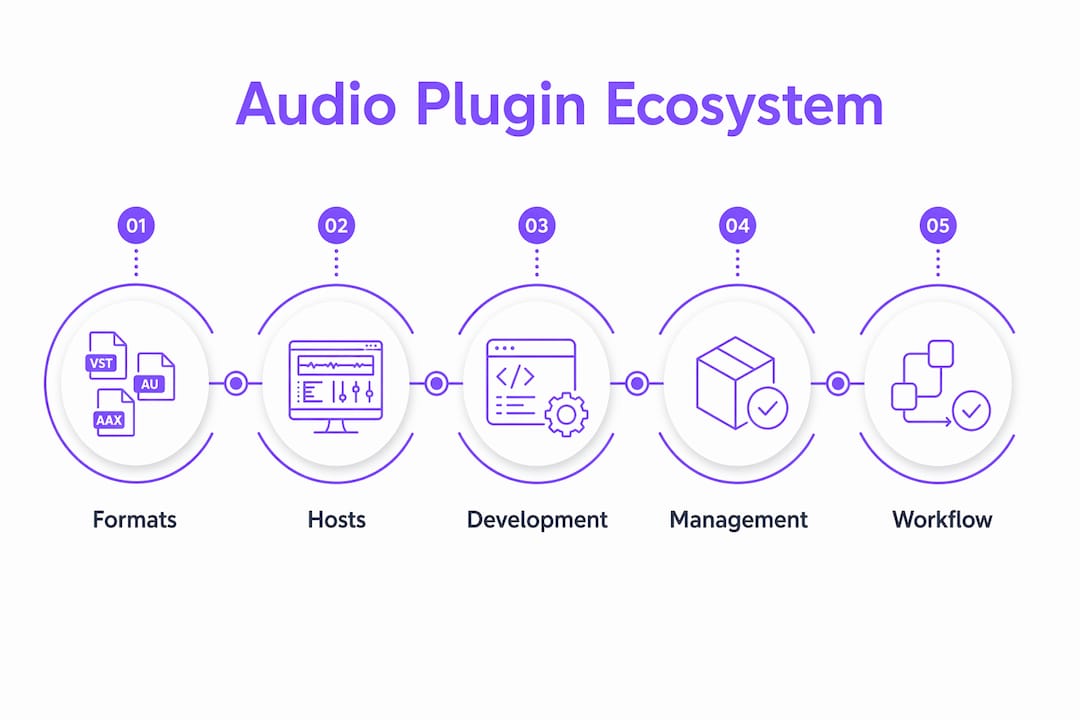
Three layers define the ecosystem. The first is the format layer: VST3, AU, and AAX are the dominant standards, each with distinct rules for how a plugin communicates with its host. The second is the development layer: frameworks like JUCE allow developers to write one codebase and compile it into all three formats. The third is the management layer: tools like plug.audio and commercial platforms like UAD handle discovery, licensing, installation, and updates.
What are the main audio plugin types in the ecosystem?
Instrument and effect plugins serve separate yet integrated roles in every production workflow. Knowing the difference shapes how you build signal chains and allocate CPU resources.
The core audio plugin types break down as follows:
- Instrument plugins (VSTi): These synthesize or sample audio from MIDI input. Serum, Kontakt, and Omnisphere are well-known examples. They generate the raw audio signal that effect plugins then process.
- Effect plugins: These process an existing audio signal. The category includes equalizers (FabFilter Pro-Q 3), compressors (Waves SSL G-Master Buss Compressor), reverbs (Valhalla Room), delays, saturators, and limiters. They are the most populated category in any plugin library.
- Routing and utility plugins: These manage signal flow rather than generate or color sound. Mid-side processors, gain staging tools, and metering plugins like SPAN fall here.
- Hybrid processors: Some plugins combine synthesis with real-time effects processing, blurring the line between instrument and effect. iZotope Iris 2 is a clear example.
Instrument and effect plugins chain together inside a DAW's mixer and routing matrix to form a complete signal path. A typical session might route a Kontakt instrument through a channel strip EQ, a bus compressor, and a convolution reverb before hitting the master limiter. Each of those plugins is a node in the ecosystem, and the ecosystem's architecture determines how reliably they communicate.
Pro Tip: When building a new template, organize your plugins by type before assigning them to tracks. Separating instruments, effects, and utility plugins in your DAW's browser reduces decision fatigue during sessions and makes CPU load easier to predict.
How does VST3 architecture enable ecosystem scalability?
VST3 is the most architecturally significant format in the modern plugin ecosystem because of its processor-controller separation. The audio processing component runs on a dedicated thread, while the UI and parameter controller runs separately. This split allows DAWs to manage resources more precisely, offload processing to secondary threads, and avoid UI rendering blocking audio computation.
VST3's lifecycle management reduces hosting friction by separating initialization, active processing, and deactivation into explicit states. This means a host knows exactly when a plugin is ready to process audio, when it is idle, and when it can safely release resources. The practical result is fewer parameter sync errors, more reliable state recall between sessions, and cleaner automation behavior.
The JUCE AudioProcessor abstraction sits one layer above the format specifications. It gives developers a single class that compiles into VST3, AU, and AAX, which means a plugin built with JUCE inherits the architectural strengths of each format without requiring three separate codebases. For producers, this translates to more consistent behavior across DAWs.
| Format | Architecture feature | Key benefit |
|---|---|---|
| VST3 | Processor-controller separation | Thread safety, distributed processing |
| AU | Host-managed lifecycle | Deep macOS and Logic Pro integration |
| AAX | DSP and Native variants | Pro Tools hardware offloading support |
Pro Tip: If you are choosing between a VST3 and an older VST2 version of the same plugin, always use VST3. The lifecycle management alone reduces the chance of parameter automation glitches in complex sessions.
For a deeper technical breakdown of how these formats differ at the code level, the VST3, AU, and AAX comparison on the Vector-dsp blog covers the architectural distinctions in detail.
What tools and platforms support plugin management?
Plugin management is the least glamorous part of the ecosystem and the most frequently neglected. A library of 300 plugins with no consistent organization, outdated versions, and conflicting licenses creates more friction than it removes.
Open-source registries like plug.audio and projects like TizWildinEntertainmentHUB address this by providing in-DAW plugin browsing, installation, and updating. These platforms manage discoverability, licensing entitlements, and version control from a single interface. The TizWildinEntertainmentHUB project specifically offers remote dashboards alongside in-DAW management, which keeps the ecosystem user-friendly without requiring producers to leave their session to troubleshoot a plugin update.
Commercial ecosystems take a different approach. UAD and Plugin Alliance bundle plugins with integrated installer and update services, reducing manual management and guaranteeing compatibility within their respective platforms. UAD goes further by offloading DSP to dedicated hardware, which removes plugin processing from your computer's CPU entirely.
Best practices for managing your plugin library:
- Standardize your formats. Pick VST3 as your primary format on Windows and AU on macOS, and remove redundant VST2 copies of the same plugin.
- Use a plugin manager. Native Instruments' Native Access, Plugin Alliance's PA Connect, and open registries all centralize updates and reduce version conflicts.
- Audit your library quarterly. Remove plugins you do not use. Unused plugins still scan on DAW startup, adding load time.
- Keep licenses in one place. Store license files and serial numbers in a dedicated folder or password manager. iLok and Gobbler both offer cloud-based license management.
- Test updates before sessions. Never update a plugin the day before a critical mix. Update on a non-session day and verify the plugin loads correctly in your DAW.
For producers exploring free and open-source options, the open-source audio tools list on Vector-dsp covers registries and community-maintained ecosystems worth knowing.
How does ecosystem knowledge improve your production workflow?
Understanding the audio plugin ecosystem converts abstract technical knowledge into concrete workflow decisions. The most immediate application is compatibility screening. Before purchasing a plugin, checking its supported formats against your DAW's requirements prevents the frustration of buying something that requires a bridge or a legacy OS.
Avoiding hosting friction is the second major benefit. Serialization challenges in parameter automation and plugin state management are the primary cause of sessions that behave differently on reopening. Choosing plugins that implement VST3's lifecycle correctly, or that have a strong track record in your specific DAW, eliminates most of these issues before they appear.
Workflow optimizations based on ecosystem knowledge include:
- Match plugin format to your DAW's native format. Logic Pro runs AU plugins with lower overhead than VST3 bridges. Pro Tools runs AAX natively. Using the correct format reduces latency and improves stability.
- Separate CPU-heavy plugins onto dedicated buses. Convolution reverbs and spectral processors are expensive. Routing them to a send bus rather than inserting them on every track reduces CPU load without sacrificing quality.
- Use DSP offloading when CPU is the bottleneck. UAD's Apollo hardware and similar DSP platforms move processing off your computer's main processor, which is particularly useful in large sessions with many instances of CPU-intensive plugins.
- Understand plugin latency compensation. DAWs like Ableton Live and Cubase handle automatic latency compensation, but only for plugins that correctly report their latency to the host. VST3 plugins with proper lifecycle implementation report this accurately.
Pro Tip: Before finalizing a mix template, run a CPU stress test with all your most demanding plugins active simultaneously. This reveals your actual headroom and prevents mid-session dropouts when you add one more reverb to the master bus.
For producers who want to understand how plugin architecture inside Pro Tools affects these decisions, the Vector-dsp developer guide covers the AAX-specific details that affect real-world sessions.
Key takeaways
The audio plugin ecosystem functions reliably only when format standards, development frameworks, and management tools operate together as a unified system.
| Point | Details |
|---|---|
| Ecosystem definition | The ecosystem is the full framework of formats, hosts, and tools that connects plugins to DAWs. |
| Plugin types matter | Instrument, effect, and routing plugins each serve distinct roles and must be chained correctly for efficient signal flow. |
| VST3 architecture advantage | Processor-controller separation and lifecycle management reduce automation errors and improve session stability. |
| Management tools are non-negotiable | Registries like plug.audio and platforms like UAD centralize updates, licensing, and version control. |
| Format-DAW matching | Using a plugin's native format for your DAW reduces CPU overhead and eliminates bridge-related instability. |
Why the ecosystem conversation is more important than the plugin itself
I have spent years watching producers obsess over which compressor plugin sounds best while ignoring whether it is even running in the right format for their DAW. The ecosystem conversation is the one that actually determines whether your session is stable, your automation is reliable, and your CPU is not screaming at 95% during a final bounce.
The tension between proprietary and open-source solutions is real and worth thinking through carefully. Commercial ecosystems like UAD offer tight integration and guaranteed compatibility, but they lock you into specific hardware and pricing structures. Open registries and JUCE-based plugins give you more flexibility and transparency, but they require more active management on your part. Neither is universally better. The right answer depends on whether you prioritize convenience or control.
Future-proofing your plugin investments means favoring VST3 and AU over VST2, choosing developers who maintain their plugins across OS updates, and avoiding plugins that require legacy authorization systems. The producers I have seen lose entire libraries are almost always the ones who bought into a single proprietary ecosystem without a backup plan. Spread your dependencies. Know your formats. The ecosystem is infrastructure, and infrastructure deserves the same attention you give to your monitors or your interface.
— Kai
Build your signal chain with Vector-dsp

Vector-dsp designs professional audio plugins built on the same architectural principles covered in this article: VST3, AU, and AAX formats with proper lifecycle implementation, low-latency DSP processing, and clean parameter automation behavior. If you want plugins that integrate without friction into your existing DAW setup, Vector-dsp's plugin catalog is worth exploring. The ToneLab plugin is a strong starting point for producers who want precise tonal control without the CPU overhead of poorly optimized alternatives. Every tool Vector-dsp ships is built to function correctly inside the ecosystem, not just to sound good in a demo.
FAQ
What is the audio plugin ecosystem?
The audio plugin ecosystem is the interconnected system of plugin formats (VST3, AU, AAX), host DAWs, development frameworks like JUCE, and management platforms that allow plugins to operate and communicate reliably in music production environments.
What are VST plugins and how do they fit in?
VST plugins are audio software components developed under Steinberg's Virtual Studio Technology standard. VST3 is the current version, featuring processor-controller separation that improves stability and automation accuracy inside compatible DAWs.
How do I install and manage audio plugins?
Install plugins using the developer's official installer or a platform like Native Access or Plugin Alliance's PA Connect. Store license files centrally, standardize on one format per DAW, and audit your library regularly to remove unused or outdated plugins.
What is the difference between instrument and effect plugins?
Instrument plugins generate audio from MIDI input, while effect plugins process an existing audio signal. Both types are part of the same ecosystem and are typically chained together inside a DAW's mixer to form a complete signal path.
Why does plugin format matter for my DAW?
Each DAW has a native plugin format that runs with the lowest overhead and best stability. Logic Pro favors AU, Pro Tools requires AAX, and most Windows DAWs run VST3 natively. Using a bridge to run the wrong format introduces latency and potential instability.