Why Use VST3 Plugins: a Producer's 2026 Guide
Why Use VST3 Plugins: a Producer's 2026 Guide
If you've been sitting on a library of VST2 plugins wondering why anyone bothers with VST3, you're asking exactly the right question. The debate around why use vst3 plugins isn't just format tribalism. There are concrete technical reasons VST3 outperforms its predecessor, and there are equally real situations where VST2 still makes sense. This guide cuts through the noise and gives you the specifics you need to make smarter decisions about your plugin setup, your CPU, and ultimately your sound.
Table of Contents
- Key takeaways
- Why use VST3 plugins: the technical case
- VST3 vs VST2: what actually changes in practice
- Workflow and creative benefits worth knowing
- How to transition to VST3 without breaking your sessions
- My take on VST3 after years of production work
- How Vector-dsp approaches VST3 plugin design
- FAQ
Key takeaways
| Point | Details |
|---|---|
| Dynamic CPU savings | VST3 deactivates idle plugins automatically, preserving CPU headroom in large sessions. |
| Precision automation | Sample-accurate parameter automation gives you tighter, more musical mix moves. |
| Advanced routing built in | Multichannel I/O and multiple MIDI ports are native to VST3, no workarounds required. |
| VST2 is legacy format | Steinberg stopped VST2 development in 2020, making VST3 the only format receiving updates. |
| Check your DAW first | Not every DAW implements VST3 features equally, so verify compatibility before migrating. |
Why use VST3 plugins: the technical case
The most compelling reason to move to VST3 isn't branding or trend chasing. It's what happens under the hood when you load a session with 40 or 50 tracks.
VST3 plugins consume far less CPU when idle because they deactivate inputs and outputs dynamically. The moment a plugin stops receiving audio or MIDI, it powers down its processing. With VST2, every loaded plugin stays active regardless of whether audio is flowing through it. Multiply that across a dense mix and you're burning CPU budget on plugins doing nothing. That headroom matters, especially on projects where every percent counts.
Then there's automation. VST3 offers sample-accurate parameter automation that allows extremely high-resolution timing of parameter changes. If you've ever drawn a volume swell and found it snapping slightly off the grid, or automated a filter cutoff and heard it step rather than glide, that's a resolution problem. VST3 solves it at the architecture level.
The routing story is just as strong. Here's what VST3 supports natively:
- Dynamic multichannel audio routing for complex stem and bus configurations
- Multiple MIDI inputs and outputs on a single plugin instance
- Flexible I/O allocation that adapts to the actual audio path instead of reserving fixed channels
- Side-chain inputs without the DAW-level workarounds VST2 requires
Pro Tip: If you produce orchestral music or anything with dense MIDI controller data, the multiple MIDI port support alone justifies choosing VST3. You can send expression, breath control, and pitch data to different destinations from one plugin instance.
VST3's dynamic I/O management also scales well on less powerful machines. You don't need a top-tier CPU to run a large session cleanly. The format does meaningful work before you even start optimizing your buffer size.
VST3 vs VST2: what actually changes in practice
Understanding the advantages of VST3 on paper is one thing. Seeing how those changes play out in a real session is another.
Take sidechaining. In a VST2 workflow, setting up a compressor's sidechain input often requires routing audio through a dummy track or using a DAW-specific workaround. With VST3, sidechaining and vocoder-style workflows are handled natively through the plugin's multichannel routing. You connect the sidechain source directly in the plugin window without extra routing gymnastics. For producers doing a lot of parallel compression or rhythmic gating, this alone saves time on every project.
Compatibility, though, isn't perfectly uniform. DAWs like Cubase, Ableton Live, and FL Studio implement VST3 support at different levels of depth. Cubase, being Steinberg's own DAW, offers the deepest integration. Ableton Live has improved its VST3 support considerably in recent versions but still handles certain edge cases differently. Checking your specific DAW's documentation before committing to a full VST3 migration is genuinely worth doing.
Another reality worth knowing: not every VST3 plugin uses the format's full capabilities. Some developers ship VST3 versions that are functionally identical to their VST2 counterparts, simply repackaged. The format doesn't guarantee the features. A well-built VST3 plugin from a developer who cares about DSP precision will outperform a lazily ported one every time.
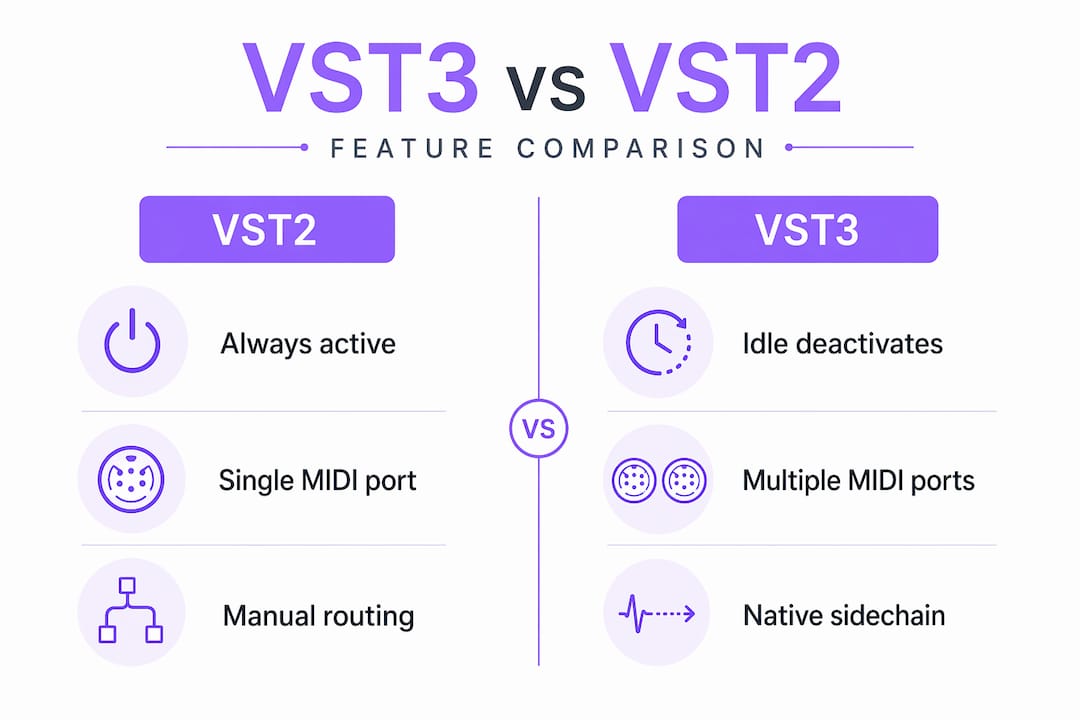
Here's how the two formats compare across the most relevant dimensions:
| Feature | VST2 | VST3 |
|---|---|---|
| CPU when idle | Always active | Deactivates automatically |
| Automation resolution | Block-based | Sample-accurate |
| Multichannel routing | Limited | Dynamic, flexible |
| MIDI I/O | Single port | Multiple ports |
| Sidechain input | DAW workaround | Native support |
| UI resizing | Fixed or limited | Scalable, high-resolution |
| Active development | None (discontinued 2020) | Ongoing |
| Future support | Legacy only | Current standard |
The table makes clear why choosing VST3 is generally advised when both versions of a plugin exist and your DAW supports it. The only reason to stick with VST2 is a specific compatibility need or a plugin that simply hasn't been updated yet.
Workflow and creative benefits worth knowing
Beyond CPU and routing, the advantages of VST3 extend to how you interact with your plugins during a session.
VST3 plugins support scalable, high-resolution interfaces that resize without any visual degradation. On a 4K monitor or an ultrawide display, this matters enormously. A blurry plugin interface on a large screen breaks focus. The ability to resize a compressor or EQ to the exact size that fits your workflow isn't cosmetic. It directly affects how quickly and accurately you work.
The integration of advanced routing inside VST3 plugins also changes sound design significantly. When you're building complex effects chains or multi-channel setups, VST3's native routing means fewer tracks, fewer busses, and a cleaner session structure. A vocoder that needs two audio sources no longer requires you to set up parallel routing chains. It accepts both inputs directly.
Here's where VST3 makes the biggest creative difference in practice:
- Sound design with complex modulation: Multiple MIDI ports let you map controllers to specific parameters without conflicts between instruments
- Live performance setups: Dynamic I/O means lower latency overhead when running VST3 instruments in real time
- Mixing dense productions: Idle plugin deactivation keeps your CPU stable during playback of 60-track sessions
- Layered instruments: Multiple instances with flexible routing reduce session clutter significantly
Pro Tip: When loading a new VST3 plugin for the first time, open its routing panel in your DAW and confirm the I/O is configured correctly. Some DAWs default to stereo even when the plugin supports multichannel, so a quick check prevents missed functionality.
The benefits of VST3 plugins compound the more complex your work gets. A simple two-track recording session won't reveal much difference. A 50-track film score or an electronic production with hundreds of automation clips will show the gap clearly.
How to transition to VST3 without breaking your sessions
Switching formats is a process worth doing carefully. Here's a practical sequence that reduces risk while giving you the full benefits of VST3.
- Audit your current plugins. List every plugin you use regularly and check whether a VST3 version exists. Most major developers have offered VST3 versions for several years now. VST2 is legacy since Steinberg discontinued development in 2020, so most active developers have already made the move.
- Verify your DAW's VST3 support. Load a test project and confirm that your DAW correctly scans and instantiates VST3 plugins. Check your DAW's settings for separate VST2 and VST3 plugin folders to avoid duplicates and scanning conflicts.
- Run both versions in parallel temporarily. Don't delete your VST2 installations until you've confirmed the VST3 version sounds identical and behaves correctly in your existing projects. Some plugins have slight differences between versions in their default state processing.
- Test automation data. Open a project that uses heavy parameter automation and compare how it plays back with the VST3 version. Sample-accurate automation can occasionally surface timing differences if a developer implemented the spec differently.
- Organize your plugin folders cleanly. Keep VST3 and VST2 in separate directories. This makes it easier to blacklist legacy plugins later and speeds up your DAW's scan time considerably.
- Migrate projects gradually. When you open an older project, update one plugin at a time to its VST3 version. This lets you catch any issue before it affects a full session.
For any plugin where no VST3 version exists, keep the VST2 version running. There's no point in abandoning a great tool just for format purity. The goal is to use VST3 wherever it's available and better, not to eliminate every VST2 from your system. For more on building a clean signal chain with modern plugins, the VST3 plugin development guide at Vector-dsp is worth reading through before you start restructuring your setup.
My take on VST3 after years of production work
I'll be direct about this: the dynamic CPU management in VST3 changed how I work more than any other single feature. I used to freeze tracks constantly on dense sessions just to maintain playback stability. After migrating my most-used plugins to VST3, the headroom improved enough that I could work more freely, audition changes in real time, and stop treating CPU management as a creative obstacle.
That said, I've walked into the trap of assuming VST3 equals better quality. It doesn't automatically. A poorly designed VST3 plugin will still color your audio in ways you don't want, eat CPU inefficiently despite the format's architecture, or introduce artifacts at the transitions between processing states. The format is the floor, not the ceiling.
What actually shifted my sound design capabilities was the routing. Setting up a vocoder that draws from two simultaneous audio inputs used to require a dedicated bus structure that cluttered the session. With VST3 handling it internally, I can build the same effect in a fraction of the time, and it's easier to troubleshoot when something sounds wrong.
My honest position on VST2 in 2026: keep the plugins that have no VST3 equivalent and that you genuinely love. Don't feel pressured to abandon them. But if a plugin exists in both formats and your DAW supports VST3 fully, there is rarely a reason to choose the older version. The automation precision alone is worth it for any serious mix work.
The nuance that most articles miss: plugin quality and DAW support matter more than the format itself. A well-built VST2 plugin in a DAW that supports it properly will always beat a carelessly developed VST3 plugin.
— Kai
How Vector-dsp approaches VST3 plugin design

At Vector-dsp, every plugin in development is built on VST3 architecture from the start. That's not a checkbox decision. It's a commitment to building tools that work the way modern productions actually demand: with low latency, dynamic resource management, and sample-accurate control over every parameter. The team at Vector-dsp builds with the same precision this article describes, targeting producers who want to work at the highest level without fighting their tools.
If you want to hear VST3's capabilities in practice, the ToneLab plugin demonstrates exactly what thoughtful DSP design looks like when VST3's architecture is used to its fullest potential. It's a useful reference point for what the format can actually deliver.
FAQ
What are the main advantages of VST3 over VST2?
VST3 offers dynamic CPU deactivation when idle, sample-accurate automation, native sidechain support, and scalable high-resolution interfaces. These improvements directly affect performance and mix precision in ways VST2 cannot match.
Does VST3 always sound better than VST2?
Not automatically. Sound quality depends on the developer's DSP implementation, not the format itself. A well-built VST2 plugin can outperform a poorly coded VST3 version, though VST3's architecture gives developers better tools to work with.
Is VST2 still worth using in 2026?
VST2 is still usable for plugins that haven't been updated to VST3, but Steinberg discontinued VST2 development in 2020. For any plugin available in both formats, VST3 is the better choice if your DAW supports it.
How do I know if my DAW fully supports VST3?
Check your DAW's documentation for VST3 compatibility notes. Cubase offers the deepest integration, while Ableton Live and FL Studio support VST3 with some variation in how specific features like multichannel routing are handled.
Can switching to VST3 break existing projects?
It can introduce differences if automation data or default settings vary between the VST2 and VST3 versions of the same plugin. Always test VST3 versions in a copy of your project before replacing the original plugins.