What Is the Audio Unit AU Format for Producers
What Is the Audio Unit AU Format for Producers

If you work on a Mac and produce music, you've almost certainly run across the term "AU" and wondered what is audio unit AU format and how it differs from VST or AAX. The confusion runs deeper than most tutorials admit: "AU" technically refers to two completely separate things. One is Apple's proprietary Audio Unit plugin technology. The other is an older audio file format with a ".au` extension. Getting these mixed up costs producers time, causes DAW headaches, and leads to bad purchasing decisions. This article untangles both meanings and gives you a clear picture of how AU plugins work, where they fit, and how to use them effectively.
Table of Contents
- Key Takeaways
- What is the Audio Unit (AU) format and how it works
- Two things called AU: plugins vs audio files
- Compatibility and ecosystem for AU plugins
- How to use Audio Units in your production workflow
- Audio Units vs VST vs AAX: choosing the right format
- My take on AU plugins after years in the field
- Build better sessions with Vector-dsp
- FAQ
Key Takeaways
| Point | Details |
|---|---|
| AU has two meanings | "AU" refers to both Apple's plugin format and a legacy Sun Microsystems audio file format. They are unrelated. |
| Apple-platform native | AU plugins are the native format for Logic Pro, GarageBand, and MainStage — not optional, but required. |
| AUv3 improves stability | The latest plugin model runs out-of-process, protecting your session from crashes caused by a single bad plugin. |
| Cross-DAW limits exist | Pro Tools does not support AU natively; using AU plugins there requires third-party wrappers. |
| Validation matters | Most missing plugin problems trace back to failed validation, not broken installs. |
What is the Audio Unit (AU) format and how it works
Audio Unit, commonly abbreviated as AU, is Apple's proprietary plugin format built directly into the Core Audio framework on macOS and iOS. Unlike a standalone file you open, an AU plugin is a software component. It lives inside the host application, whether that's a DAW or a music creation app, and gets called up on demand to process audio signals in real time.
The hosting model is worth understanding because it shapes everything about how AU plugins behave. When you load an AU plugin, the host identifies it using an AudioComponentDescription structure and instantiates it asynchronously. That asynchronous loading means your DAW's interface doesn't freeze while a complex reverb or synthesizer spins up. The plugin initializes in the background, then connects to the audio graph. For a producer running a session with 40 tracks and 80 plugin instances, that design choice matters enormously.
AU plugins handle both effects and instruments. An AU effect processes audio that already exists: think compressors, EQs, and reverbs. An AU instrument generates audio from scratch in response to MIDI input, covering synthesizers, samplers, and virtual pianos.
AUv2 vs AUv3: why the version matters
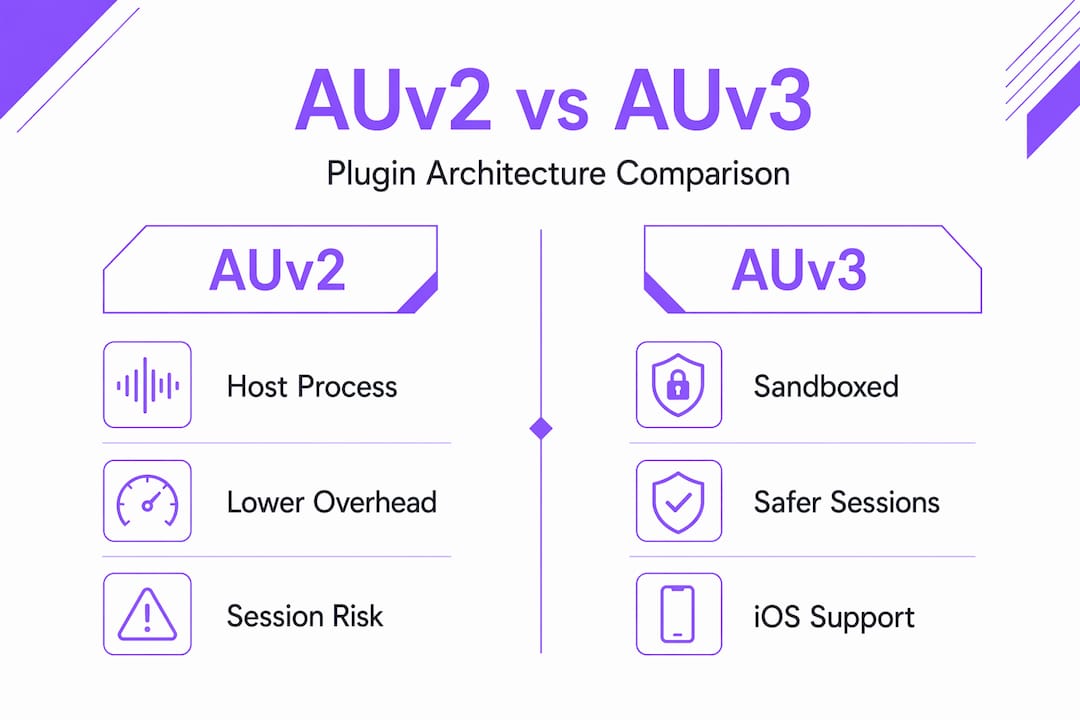
There are two generations of the AU architecture in active use today. AUv2 is the older model, where plugins run inside the host process. That gives you lower overhead but also means a crashing plugin can take down your entire session. AUv3 changed the model significantly. These plugins run in a separate process, so if one fails, your session survives. On macOS, developers can still opt to package an AUv3 to run in-process for performance-critical situations, giving them flexibility when plugin count is high.
Pro Tip: When buying new plugins for Logic Pro or MainStage, check that the developer ships AUv3 rather than AUv2. You get better sandboxing, native Apple Silicon support, and compatibility with iOS if you ever want to use the same plugin in GarageBand on iPad.
Two things called AU: plugins vs audio files
Here is where the terminology creates real confusion. The .au file extension belongs to a completely different technology: a legacy audio container format developed by Sun Microsystems and used on NeXT and Unix systems in the late 1980s and 1990s. Apple's NeXT acquisition is why .au files occasionally turn up in older macOS system directories.
The .au file format stores raw audio data with a short header and supports encodings like μ-law, A-law, and uncompressed PCM. It's functional but outdated. You won't encounter it in a modern music production context unless you're digging through legacy sound libraries or system audio assets.
Here's a direct comparison so you can keep these straight:
| Feature | AU Plugin | .au Audio File |
|---|---|---|
| What it is | Software component for effects or instruments | Audio container file |
| Origin | Apple Core Audio (macOS/iOS) | Sun Microsystems / NeXT |
| File extension | .component or .appex |
.au |
| Use in music production | Active, widely used | Rare, legacy systems only |
| Runs inside a DAW | Yes | No (played back like any audio file) |
| Relevant encodings | N/A (it's code, not audio data) | μ-law, A-law, PCM |
The practical takeaway: when a producer says "I use AU plugins," they mean Apple's plugin format. When a developer references .au files, they almost certainly mean the Sun audio container. These two concepts share an abbreviation and nothing else.
Compatibility and ecosystem for AU plugins
AU plugins are the native format for Apple's own professional audio software. Logic Pro, GarageBand, and MainStage do not support VST natively. If you're building a Mac-centered production setup, AU is not a preference; it's a requirement. That said, other popular DAWs running on macOS do support AU alongside VST3, including Ableton Live, Reaper, and Bitwig Studio.

The one significant gap is Pro Tools. Avid's platform uses the AAX format exclusively and does not load AU plugins directly. If you need to run an AU-only plugin inside Pro Tools, a third-party wrapper is the only path. Tools that bridge AU to AAX exist but add latency and complexity, so the better long-term approach is buying plugins that ship in both AU and AAX formats.
AU plugins also appear on iOS through GarageBand and a growing number of third-party music apps. AUv3 is the required format there, which is part of why Apple pushed so hard for the ecosystem to migrate away from AUv2.
Getting plugin recognition right
Missing plugins are almost never caused by a broken download. The real culprits are validation failures during the host's discovery process. Every DAW that supports AU runs a system check when it first encounters a new plugin, using Apple's auval command-line tool or equivalent APIs to confirm the plugin meets expected standards. A plugin that fails validation gets silently blacklisted.
- Run
auval -ain Terminal to see a list of all validated AU plugins on your system - If a plugin is missing, try
auval -v [type] [subtype] [manufacturer]to force a manual validation - Reinstall the plugin if validation fails, then restart the DAW before checking again
- On Apple Silicon Macs, confirm the plugin includes a native ARM build, not just an Intel slice requiring Rosetta 2
Pro Tip: Logic Pro keeps a plugin blacklist at ~/Library/Preferences/com.apple.logic.pro. Delete that file and relaunch Logic if a freshly installed plugin refuses to appear. Logic will revalidate everything on the next startup.
How to use Audio Units in your production workflow
Installing AU plugins on macOS is straightforward once you know where the files go. The system-wide location is /Library/Audio/Plug-Ins/Components/. User-specific plugins live in ~/Library/Audio/Plug-Ins/Components/. Most commercial installers handle placement automatically, but knowing these paths helps when something goes wrong.
Here's a practical workflow for getting AU plugins into your sessions:
- Download and install the plugin using the developer's installer package. Confirm it targets macOS and ships in AU format.
- Restart your DAW after installation. Most hosts only scan for new plugins at launch, not while running.
- Open the plugin browser in your DAW. In Logic Pro, this is the Plug-in Manager under the Preferences menu. Confirm the plugin appears and shows a green validation status.
- Insert the plugin on a channel strip or instrument track. Effects go on audio or bus channels; instruments go on software instrument tracks.
- Load a preset from the plugin's preset browser to start from a known good state, then adjust from there.
Common AU plugin categories you'll use constantly include dynamic processors like compressors and limiters, spectral tools like parametric EQs, time-based effects like reverb and delay, and virtual instruments covering synthesis, sampling, and modeling.
AU plugins offer lower latency than cross-platform formats in Apple environments because the format is part of the OS itself. That tight integration cuts the communication overhead between the host and the plugin, which matters for live performance monitoring and in-ear tracking where every millisecond counts.
Pro Tip: If a plugin's GUI fails to open or appears blank in Logic Pro, check whether the plugin requires a specific macOS version. Many AUv2 plugins built before macOS Ventura have rendering issues with the new Metal-based display stack. Check the developer's release notes before filing a bug report.
Audio Units vs VST vs AAX: choosing the right format
Understanding AU format explained in isolation only gets you so far. The real decisions happen when you're comparing AU to VST3 and AAX. Here's where each format stands:
| Format | Platform | Native DAWs | Process model | Cross-platform |
|---|---|---|---|---|
| AU | macOS, iOS | Logic Pro, GarageBand, MainStage | In-process (AUv2) or sandboxed (AUv3) | No |
| VST3 | Windows, macOS, Linux | Ableton Live, Cubase, Reaper, Bitwig | In-process | Yes |
| AAX | Windows, macOS | Pro Tools | In-process or DSP (HDX) | No |
Audio units use a property-based API with defined channel layouts, which makes them highly predictable in Apple environments but more complex to port to Windows. VST3 is the widest-reaching format for cross-platform work and the right call for any plugin that needs to run on Windows and Linux alongside macOS. AAX exists purely for Pro Tools and is non-negotiable if that's your primary platform.
For most Mac-based music producers, the best answer is to acquire plugins that ship in both AU and VST3. That covers Logic Pro, GarageBand, Ableton Live on Mac, and gives you flexibility if you ever collaborate on a Windows-based setup. You can read more about plugin format trade-offs to sharpen that decision further.
My take on AU plugins after years in the field
I've spent years working with AU plugins across Logic Pro sessions and have seen firsthand how the format's OS-level integration pays off in ways that aren't obvious from the spec sheet. The thing most producers miss is that AU's tight coupling with Core Audio means it responds to system-level latency settings in ways that VST wrappers simply can't match. When I'm tracking guitars through a hardware interface and monitoring through a software amp sim, that gap matters.
The AUv3 transition is genuinely important and not just a developer-facing upgrade. I've had full Logic sessions saved by the out-of-process model when a misbehaving plugin would have previously crashed the whole project. I've also seen users dismiss AUv3 because some early implementations had interface lag. That problem is largely gone now with modern Apple Silicon hardware.
What I find producers get wrong most often is treating the plugin format choice as a pure compatibility issue. It's also a stability issue and a performance issue. On an Apple-centric setup, AU's native OS integration gives you something no wrapper can replicate. That doesn't mean you should avoid VST3. It means you should understand why AU exists and use it deliberately rather than treating it as an afterthought.
The producers who get the most out of AU are the ones who also understand Pro Tools plugin architecture well enough to know where AU ends and AAX begins. That knowledge saves real money on plugin purchases.
— Kai
Build better sessions with Vector-dsp

Vector-dsp builds professional audio plugins grounded in precise DSP design and real-time performance, specifically for producers who care about what's happening under the hood. If you're working in an AU-compatible environment like Logic Pro or GarageBand, the upcoming Vector-dsp plugin lineup is designed from the ground up to meet Apple's AU standards, covering effects processors and instruments with low-latency, native performance in mind. ToneLab is one example: an audio tool built with AU support at its core, aimed at producers who want meticulous control over their sound. Explore the full lineup and developer resources at Vector-dsp to see what precision-built AU tools look like in practice.
FAQ
What is the Audio Unit AU format in simple terms?
Audio Unit (AU) is Apple's native plugin format, built into Core Audio on macOS and iOS. It lets host apps like Logic Pro load effects and instruments as software components in real time.
Are AU plugins the same as .au audio files?
No. AU plugins are software components for processing audio inside a DAW. The .au file format is a legacy audio container from Sun Microsystems. They share an abbreviation and nothing else.
Can you use AU plugins in Pro Tools?
Pro Tools uses AAX exclusively and does not natively support AU plugins. Running AU in Pro Tools requires a third-party wrapper, which adds complexity and potential latency.
What is the difference between AUv2 and AUv3?
AUv2 plugins run inside the host process for lower overhead but can crash the session if they fail. AUv3 plugins run in a separate process for better stability and are required for iOS deployment.
Why are my AU plugins not showing up in my DAW?
The most common cause is a failed validation check. Use the auval Terminal command to manually validate the plugin, or check your DAW's plugin blacklist and clear it before relaunching.