VST3 SDK Architecture Explained for Audio Developers
VST3 SDK Architecture Explained for Audio Developers

The VST3 SDK architecture is defined by a two-part split between a Processor component handling real-time audio and DSP tasks, and an Edit Controller managing parameters, UI, and host communication. Steinberg introduced this dual-component design to cleanly separate audio processing from control logic, giving developers a modular, high-performance foundation for VST3 plugin development. Understanding this split is the single most important concept in any VST3 SDK overview, and every integration decision you make flows from it. This article breaks down how each component works, how they coordinate, and where developers most often go wrong.
What is VST3 SDK architecture and how does it work?
The VST3 dual-component architecture separates DSP from control logic for better performance and modularity. This is not a stylistic choice. It is a structural requirement that determines how your plugin behaves inside any compliant host.
The Processor: real-time audio engine
The Processor handles all real-time audio and DSP tasks. It receives audio buffers from the host, applies your signal processing, and returns processed audio. It runs on the audio thread, which means it must never block, allocate memory, or call UI code. Any violation of these constraints causes glitches, dropouts, or crashes in production environments.
The Processor also manages event inputs such as MIDI note data and handles bus configurations for mono, stereo, and surround formats. It communicates state changes to the Edit Controller through a mechanism called Data Exchange, not through direct function calls. This separation keeps the audio thread clean and predictable.
The Edit Controller: parameters and UI
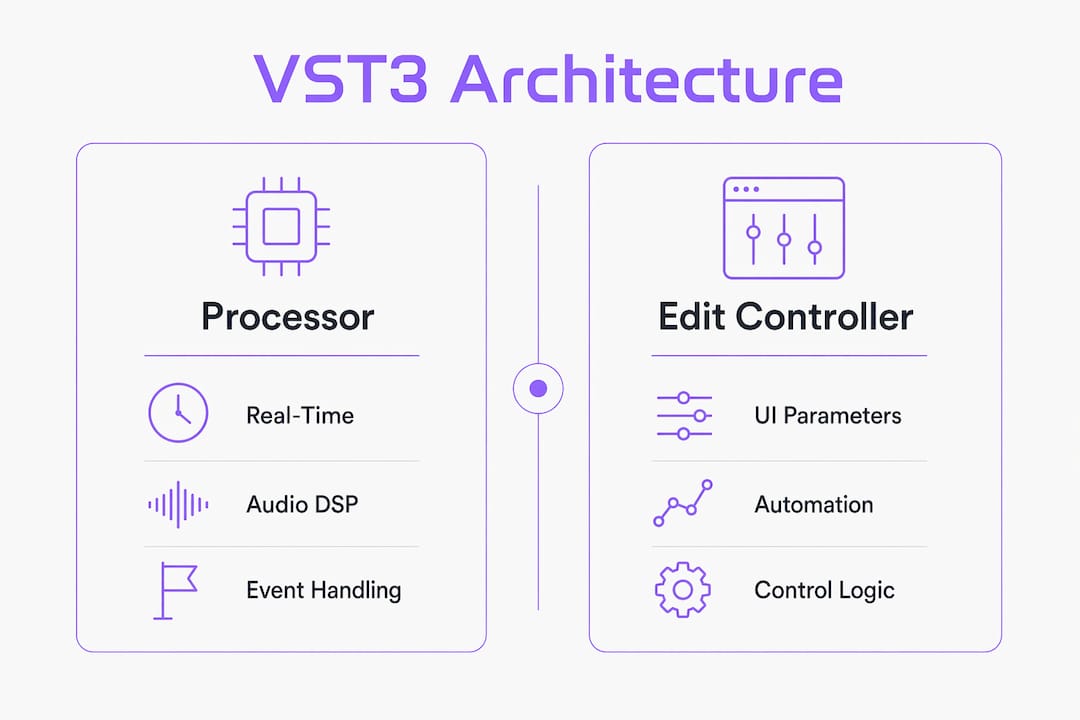
The Edit Controller manages parameters, preset data, and the plugin's graphical interface. It runs on the main thread and communicates with the host about parameter values, automation lanes, and state serialization. The VST3 API standardizes host-plugin communication so that audio buffers and parameters move through a defined contract, not ad hoc callbacks.
The Edit Controller also owns the plugin view, which is the window the host embeds in its UI. It creates and destroys the view on demand, and it responds to parameter changes coming from both the host and the Processor.
- Processor responsibilities: audio buffer processing, event handling, bus management, state serialization for the audio thread
- Edit Controller responsibilities: parameter tree management, UI creation, host automation communication, preset handling
- Communication path: Processor sends data blocks via Data Exchange; Controller maps those blocks to parameter values using
setParamNormalized - Thread rule: never call Controller methods from the Processor's audio thread directly
Pro Tip: Structure your Processor and Edit Controller as completely independent classes from day one. Developers who couple them early spend weeks untangling threading bugs later.
How does parameter management and automation work in VST3?
Parameter management is where most VST3 plugin development mistakes happen. The architecture gives you two distinct mechanisms, and using the wrong one at the wrong time breaks host automation recording or leaves the host's parameter cache stale.
-
Use
performEditfor automation recording. When the user moves a knob in your UI, callperformEditon the component handler. This tells the host to record that gesture as an automation event. Without it, the host never knows a parameter changed, and automation recording fails silently. -
Use
restartComponent(kParamValuesChanged)for cache consistency. When the Processor sends new parameter values back to the Controller via Data Exchange, calling onlyperformEditis not enough. You must also callrestartComponentto force the host to refresh its cached parameter states. Skipping this step causes the host UI and your plugin UI to show different values. -
Handle
onDataExchangeBlocksReceivedcorrectly. This method fires in the Controller when the Processor sends a data block. Inside it, map incoming payloads tosetParamNormalizedcalls for each affected parameter. Do not callperformEditinside this handler unless the change originated from user interaction. -
Organize parameters with the parameter tree. The VST3 parameter tree groups parameters into logical units, which simplifies automation lane display in DAWs like Ableton Live, Logic Pro, and Cubase. Sample-accurate automation depends on this structure being correct.
-
Avoid bidirectional update loops. If the Controller calls
setParamNormalizedand that triggers a UI repaint that callsperformEdit, you create a feedback loop. Guard against this with a simple boolean flag that blocks re-entrant updates.
Pro Tip: Log every parameter update path during development with timestamps. Most automation bugs only appear at specific DAW tempos or buffer sizes, and a log makes them reproducible.
How does GUI creation and plugin view attachment work?
GUI integration in VST3 is where developers encounter the most host-specific crashes. The root cause is almost always incorrect sequencing of the view attachment process, not a bug in the drawing code itself.
The IPlugFrame must be assigned to your PlugView instance before you call plugView->attached(). Hosts set IPlugFrame on the view to give it a callback channel for resize requests. If you call attached() first, the view has no frame reference and any resize attempt during initialization crashes the host.
The correct sequence looks like this:
- Create your PlugView instance inside
createView() - Return the view to the host without calling
attached()yourself - Wait for the host to call
setFrame()on the view, passing its IPlugFrame - The host then calls
attached()with the parent window handle - Only after
attached()completes should you initialize child widgets or trigger repaints
View integration issues arise mostly from host-side window handling rather than GUI drawing code. This means the same plugin can crash in one DAW and work perfectly in another, depending on how that host sequences its calls.
The Steinberg SDK includes an editorhost example that demonstrates the correct attach sequence. Study it before writing your own host-side test harness. Developers who skip this step spend days debugging crashes that the example would have prevented in an hour.
Pro Tip: Build a minimal host test harness using the editorhost example early in development. Testing only inside commercial DAWs makes it nearly impossible to isolate attach-sequence bugs.
How does VST3 compare to AU, AAX, and CLAP formats?
Understanding VST3 architecture is sharper when you place it against the alternatives. Each format makes different tradeoffs between flexibility, licensing, and host integration.
| Feature | VST3 | AU | AAX | CLAP |
|---|---|---|---|---|
| Dual-component split | Yes | No | No | No |
| Sample-accurate automation | Yes | Partial | Yes | Yes |
| Cross-platform support | Windows, macOS, Linux | macOS only | Windows, macOS | Windows, macOS, Linux |
| Licensing | Free, open source | Apple proprietary | Avid proprietary | Free, open source |
| Parameter tree / units | Yes | No | No | No |
| Host communication API | Defined VST3 API | CoreAudio API | AAX API | CLAP API |
AU (Audio Units) is macOS-only and uses Apple's CoreAudio framework. It lacks the explicit Processor/Controller split, so parameter threading is the developer's responsibility. AAX, used exclusively in Pro Tools, requires Avid certification and has its own parameter model. CLAP is an open-source format gaining traction in 2026, with strong community support but fewer commercial hosts than VST3.
For developers targeting Windows and macOS with full automation support, VST3 remains the most complete architecture. The format differences between VST3, AU, and AAX go deeper than licensing. They reflect fundamentally different philosophies about who owns parameter state.
Practical best practices for VST3 SDK development
Knowing the architecture is one thing. Applying it without introducing subtle bugs requires discipline in how you structure your code and use the SDK's tools.
- Use the Steinberg VST3 SDK repository directly. The official SDK repository on GitHub contains validator tools, example plugins, and the
editorhostreference. Run the validator against your plugin before testing in any commercial DAW. - Keep the audio thread free of allocations. Pre-allocate all buffers and lookup tables during
setupProcessing(), not insideprocess(). Memory allocation on the audio thread causes priority inversion and dropouts. - Version your state serialization. Write a version number into your
getState()output from day one. Preset files created by version 1.0 of your plugin must still load correctly in version 2.0. - Test parameter automation in at least three DAWs. Cubase, Ableton Live, and Reaper each handle parameter caching differently. A plugin that passes automation tests in one may fail silently in another.
- Join the Steinberg developer forums. The forums are the fastest path to resolving edge cases in host behavior. Many attach-sequence and parameter-sync bugs have already been documented and solved there.
Key takeaways
The VST3 SDK architecture's Processor and Edit Controller split is the foundational design decision that determines every aspect of plugin performance, automation accuracy, and host compatibility.
| Point | Details |
|---|---|
| Two-component split | Processor handles audio; Edit Controller handles parameters and UI on separate threads. |
| Parameter update sequence | Use performEdit for automation and restartComponent to keep host cache consistent. |
| GUI attach order | Assign IPlugFrame before calling attached() to prevent host crashes. |
| Cross-format comparison | VST3 offers the most complete automation and cross-platform support among major formats. |
| SDK resources | Use the Steinberg SDK validator and editorhost example before testing in commercial DAWs. |
What working with VST3 architecture actually taught me
I have spent years working inside VST3 SDK architecture, and the lesson that took longest to internalize is this: the architecture is not bureaucratic overhead. Every constraint exists because audio software runs in one of the most demanding real-time environments in consumer computing.
The Processor/Controller split feels like extra work until the first time you catch a threading bug before it ships. The parameter update rules feel pedantic until you watch a host's automation lane display the wrong value because you skipped restartComponent. These are not edge cases. They are the normal failure modes of plugins that almost get the architecture right.
The GUI attach sequence is where I see the most experienced developers stumble. The instinct is to blame the drawing framework, whether that is JUCE, iPlug2, or a custom solution. The real issue is almost always the host's window management sequence. Following the editorhost example exactly, even when it seems overly cautious, prevents the class of crashes that only appear in specific DAW versions on specific operating systems.
My honest advice: treat the Steinberg developer forums as a primary resource, not a last resort. The answers to most real-world integration problems are already there, documented by developers who hit the same walls. The VST3 plugin signal chain decisions you make early in development compound quickly. Getting the architecture right from the start is far cheaper than refactoring a shipped plugin.
— Kai
Build precision audio plugins with Vector-dsp

Vector-dsp builds professional audio plugins on the same VST3 architecture principles covered in this article, with a focus on real-time performance and low-latency DSP design. ToneLab is Vector-dsp's flagship effects processor, built with intentional DSP design and full VST3 compatibility across major DAWs. If you want to see how a production-grade VST3 plugin applies these architectural principles in practice, explore ToneLab and the full Vector-dsp platform. For deeper technical reading on plugin formats, formats, and signal chain design, the Vector-dsp blog covers the full stack from architecture to deployment.
FAQ
What are the two main components of VST3 SDK architecture?
The VST3 SDK architecture splits every plugin into a Processor, which handles real-time audio processing, and an Edit Controller, which manages parameters, UI, and host communication. This two-part split separates DSP from control logic for thread safety and modularity.
When should I use performEdit vs. restartComponent in VST3?
Use performEdit when a user gesture triggers a parameter change that the host should record as automation. Use restartComponent(kParamValuesChanged) when the Processor sends new values back to the Controller via Data Exchange, to keep the host's parameter cache consistent.
Why does my VST3 plugin crash on GUI attach in some DAWs?
The most common cause is calling plugView->attached() before the host has set IPlugFrame on the view. Missing IPlugFrame setup causes crashes even when all plugin logic is correct. Follow the editorhost example attach sequence exactly.
How does VST3 handle sample-accurate automation?
VST3 uses a parameter tree that organizes parameters into logical units, enabling hosts to deliver parameter changes with sample-accurate timing inside each audio buffer. This structure supports both automation recording and preset management across compliant DAWs.
Where can I find official VST3 SDK documentation and examples?
Steinberg maintains the official VST3 SDK on GitHub, including the editorhost example, validator tools, and full API documentation. The Steinberg developer forums are the best resource for host-specific integration questions.