Make Parallel Buses Sum Clean: Sample Accurate Alignment for Mixers
Make Parallel Buses Sum Clean: Sample Accurate Alignment for Mixers
Align parallel buses sample-accurately whenever processing introduces timing offsets between the dry and processed paths. The three tools that fix nearly every case: Automatic Delay Compensation (ADC) to catch bulk latency, a sample-accurate delay plugin to nudge what ADC misses, and a polarity inversion test to confirm the fix actually worked.
TL;DR:
- Sample-accurate delay plugins and polarity inversion tests are essential for confirming precise timing alignment between parallel buses.
- Non-linear phase processes like look-ahead compressors and minimum-phase EQs can cause frequency-dependent timing errors that simple bulk delay compensation cannot fix.
- Using linear-phase EQs, matching plugin architectures, and standardizing buffer settings across sessions help prevent alignment issues before they occur.
- Sub-sample misalignments primarily affect punch and transient clarity on drum buses and parallel compression, but are less critical on ambient or reverb-heavy tracks.
- Plugins with internally managed, consistent latency and multi-lane designs, like Vector-dsp, significantly reduce manual adjustments and improve coherence.
Table of Contents
- Why Time Align Parallel Bus Timing Matters for Punch and Tone
- How to Time Align a Parallel Bus, Step by Step
- Verification Tests That Actually Confirm Alignment
- Session Habits That Prevent Alignment Problems Before They Start
- The DSP View: Why Plugin Architecture Determines How Much Manual Work You Do
- When Perfect Alignment Matters and When It Doesn't
- Vector-dsp: Built for Precision Without the Manual Cleanup
- Sources
Why Time Align Parallel Bus Timing Matters for Punch and Tone
A parallel bus is only as good as its timing. Send a signal down two paths, process one of them, and any latency difference between the two creates comb filtering when they sum back together. Certain frequencies cancel, others double up, and the result is a mix that sounds thin or oddly hollow even though every individual track sounds fine solo.
The symptoms show up in predictable ways:
- Transient impact disappears, especially on drum bus parallel compression, because the attack from one path arrives a few samples ahead of the other.
- The stereo image shifts or narrows when left and right channels pick up different amounts of latency.
- Certain frequency bands sound thin or boosted for no obvious EQ-related reason.
The usual culprits are non-linear-phase processes. Look-ahead compressors delay the signal internally to catch peaks before they happen. Minimum-phase EQs shift phase unevenly across frequencies. Both introduce timing errors that change depending on frequency, which is why a single flat delay compensation doesn't always solve the problem.
DAW-native ADC handles simple cases well. It reads a plugin's reported latency and shifts the signal to compensate. The trouble starts with complex routing or third-party plugins that don't report their internal latency accurately, which a well-documented signal-alignment issue in high-speed data links describes as a structural risk in any system where multiple parallel paths carry data that needs to recombine in sync. Audio is no exception. When ADC misreports, the paths drift, and you won't see it in the DAW. You'll only hear it.
How to Time Align a Parallel Bus, Step by Step
This workflow works the same whether you're on Pro Tools, Logic, Ableton, or Cubase. The tools change names; the process doesn't.
- Isolate the two paths. Solo the dry signal and the parallel-processed signal separately. Bypass any additional processors on both sides that might mask timing issues, like limiters or heavy compression.
- Document the chain. Note every plugin on the parallel path and its known or suspected latency. This matters later if you need to recreate the session or troubleshoot after adding a plugin.
- Measure bulk latency. Check what your DAW's ADC reports, or use a dedicated latency-measurement utility if you don't trust the reading. If the two paths show a difference, that's your starting offset.
- Apply a sample-accurate delay plugin to the earlier-arriving path to match the bulk latency shown in step three. Most delay-compensation plugins let you enter the offset directly in samples or milliseconds.
- Fine-tune by ear and by eye. Zoom into a transient (a kick drum hit works well) on both waveforms and nudge the delay until the peaks line up visually. A sample-accurate delay approach confirms that even a handful of samples of mismatch can shift the perceived transient attack.
- Check a phase-correlation meter while both paths play together. Values pulling toward negative one indicate real cancellation, a sign you're not done yet.
- If phase rotation persists after bulk alignment, the problem likely isn't timing anymore, it's phase. Swap the offending EQ for a linear-phase alternative, or reorder filters so the sharpest phase-shifting stage comes last.
- Freeze or bounce both paths and listen to the full sum. This catches interactions that solo/mute checks miss.
- Save a preset or session note documenting the exact sample offset you landed on, especially if you're likely to reuse this chain.
Pro Tip: Keep a dedicated utility track in your template with a sample-accurate delay plugin already inserted and bypassed. When you build a new parallel bus, you're one click away from testing alignment instead of hunting for a plugin mid-session.
Verification Tests That Actually Confirm Alignment
Fixing the delay is only half the job. You need proof it worked, and the fastest, most reliable proof is the polarity inversion test.
Flip the polarity on one of the two paths and sum them. If the paths are perfectly time-aligned and identical in level, they cancel to near silence. Any residual signal you hear is either leftover timing offset or phase rotation that bulk delay alone can't fix. This test is standard practice in signal alignment research precisely because it's binary. Either it cancels or it doesn't.
Beyond polarity, a few other checks round out verification:
- Phase-correlation meters give you a running numeric readout. Values near positive one indicate strong correlation; values drifting toward zero or negative suggest partial cancellation somewhere in the spectrum.
- Narrowband EQ sweeps while monitoring in mono can isolate exactly which frequency range is canceling, which helps you decide whether it's a timing issue or a phase issue.
- Mono-sum listening on a full mix catches problems that never show up when you're monitoring in stereo.
A comb-filter notch from even a few samples of mismatch tends to sit in the upper midrange, exactly where snare crack and vocal presence live, which is why analysis of frequency-dependent phase cancellation treats timing errors as a tonal problem as much as a technical one.
Session Habits That Prevent Alignment Problems Before They Start
The fastest alignment fix is the one you never have to make. A few habits at the session-design stage cut the manual work down considerably.
- Use linear-phase EQ on parallel lanes where constant group delay matters, particularly on drum buses and anything transient-heavy, since phase-coherent processing research shows linear-phase designs preserve timing relationships that minimum-phase EQs distort.
- Keep identical plugin chains on both paths when the parallel processing allows it. Matching latency by matching architecture beats compensating for a mismatch after the fact.
- Place latency-heavy plugins after the split point rather than before, so their delay only affects one path and stays easy to isolate and compensate.
- Standardize buffer settings and plugin versions across collaborators on a shared session. A plugin update that changes internal latency without warning is a common, avoidable source of drift.
- Document every compensation value you dial in, and save it as part of your template or preset, not just in your head.
Pro Tip: If you're building a parallel drum bus you'll reuse across projects, bounce a reference version once alignment is confirmed, and keep it as a sanity check against future sessions where something has drifted.
Refining a session's routing this way pairs naturally with broader bus processing workflow habits that keep parallel chains predictable from project to project.
The DSP View: Why Plugin Architecture Determines How Much Manual Work You Do
Look-ahead and linear-phase processing both cost you something. Look-ahead buys predictive gain control at the price of added latency. Linear phase buys constant group delay at the price of higher CPU load and its own latency hit. Neither is free, and sub-sample misalignment between paths matters more than most engineers assume, since a fraction of a sample can still shift where a transient's energy lands in the frequency domain.
This is where plugin architecture does real work. A multi-lane design that manages internal buffering consistently across every lane keeps those lanes coherent by default, the same principle behind source-synchronous design strategies that keep parallel data paths deskewed automatically rather than relying on the receiving system to fix it after the fact.
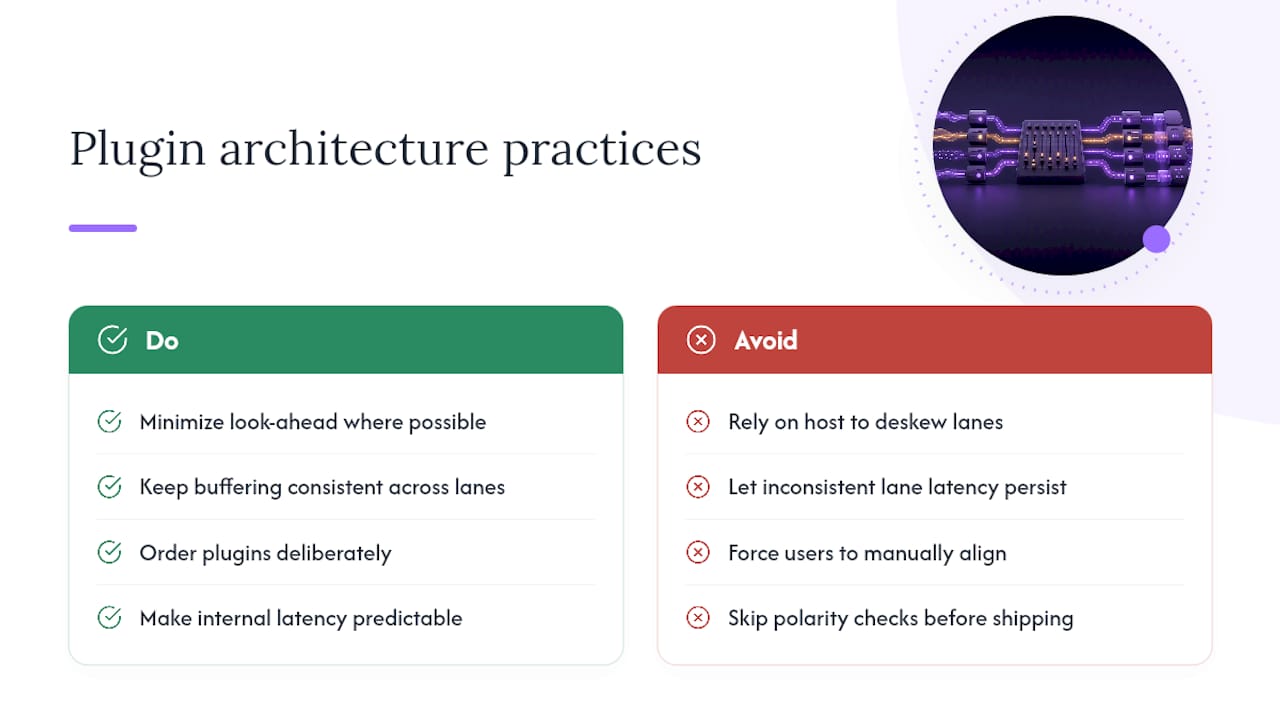
Sub-sample coherence isn't a nice-to-have in a multi-lane processor. If the internal architecture doesn't manage lane latency consistently, every user ends up doing manually what the plugin should have handled internally. Minimizing look-ahead where possible and keeping buffering consistent across lanes is the difference between a plugin that needs babysitting and one that doesn't.
Ordering plugins deliberately, keeping internal latency predictable, and testing with polarity inversion before shipping a preset are the practical habits that separate reliable multi-lane tools from ones that quietly drift.
When Perfect Alignment Matters and When It Doesn't
Strict alignment earns its time on drum bus summing, transient-heavy parallel compression, and anything you're about to check before a final export. That's where a few samples of drift audibly costs you punch, and it's worth the two minutes a polarity test takes.
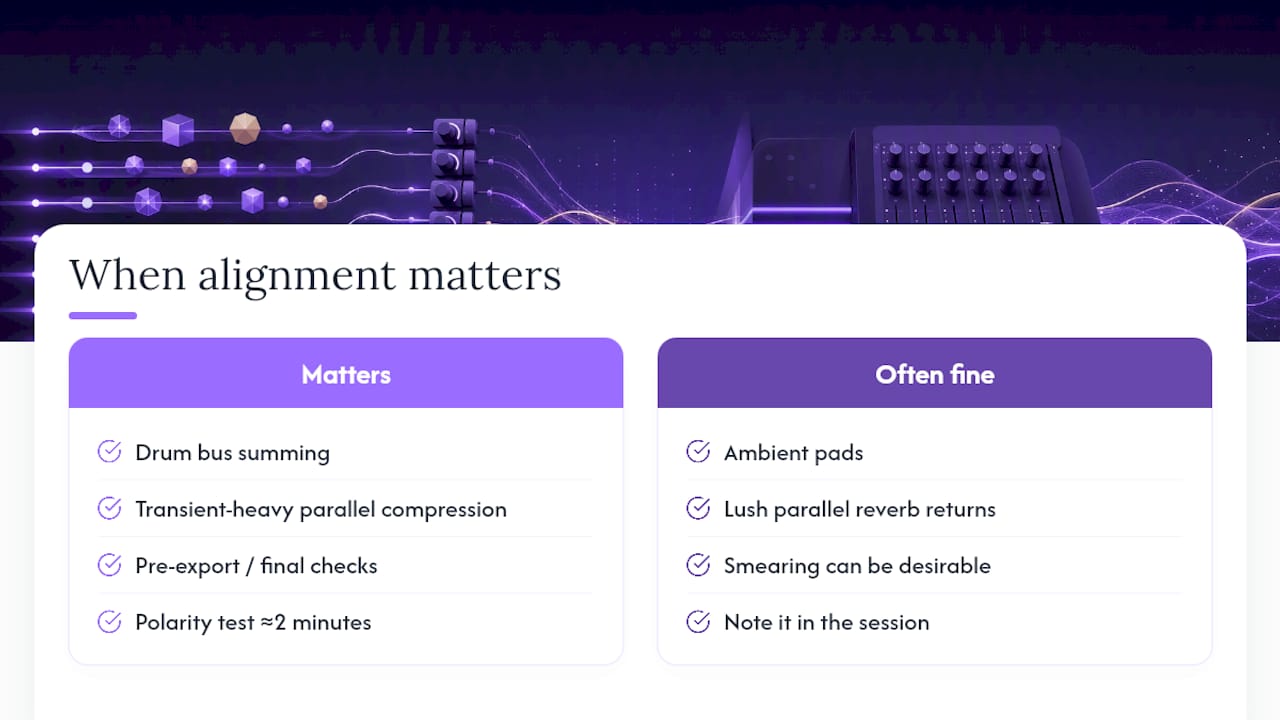
Coloration from slight misalignment is often fine on ambient pads, lush parallel reverb returns, or anything where the "smearing" is part of the character you're going for. Just note it in your session so a future mix engineer doesn't chase a phantom problem.
For rough mixes, a quick correlation-meter glance is enough. Before mastering or client delivery, run the full polarity check. That's the line I'd draw.
— Kai
Vector-dsp: Built for Precision Without the Manual Cleanup
Vector-dsp designs multi-lane effects architecture specifically to avoid the alignment headaches this article just walked through. Per-lane timing consistency and low-latency DSP are built into the core design, not bolted on as an afterthought, so parallel processing stays coherent across lanes without you reaching for a delay plugin every time.

If you've ever spent twenty minutes chasing a phase issue on a parallel drum bus, you already know why that matters. ToneLab's multi-lane architecture handles per-lane EQ targeting with the same internal latency discipline described in Vector-dsp's own guide to latency compensation in DAWs, so the sub-sample coherence problem gets addressed at the plugin level instead of the session level. Download the demo at Vector-dsp and run your own polarity inversion test against your current parallel chain. The comparison speaks for itself.
Sources
- Aligning data in a wide, high-speed, source synchronous parallel link - Cisco Technology, Inc.
- Time alignment techniques for experimental sensor data
- Ensemble-based Time Alignment of Biomedical Signals