Can You Share Presets Across DAWs? Here's What Works
Can You Share Presets Across DAWs? Here's What Works
Yes, you can share presets across DAWs, and it works reliably when two conditions line up: you're using the same plugin, and that plugin is running in the same format on both machines. Match those two things and the plugin's own export/import function will carry your settings over cleanly almost every time.
The most dependable path is always the plugin's internal preset menu, not a DAW's browser or media bay. If the formats don't match, or the collaborator doesn't own the plugin at all, your fallback options are rendering audio, exchanging MIDI, or trading full sessions through an emerging standard called DAWproject, which Vector-dsp's engineering team treats as the closest thing to a universal session format right now.
- Same plugin, same format: preset export/import works almost every time.
- Different format or different plugin: render stems, share MIDI, or use DAWproject.
- Vendor-native preset files beat anything stored inside a DAW's own preset browser.
Quick fact: PreSonus documents DAWproject as offering meaningfully better session fidelity than legacy AAF/OMF exchange, specifically because it can carry plugin states across supported DAWs.
Key Takeaways
Preset transfers succeed when the plugin format matches on both ends and fail almost every time it doesn't, regardless of which DAWs are involved.
| Point | Details |
|---|---|
| Match plugin format first | Confirm VST3, AU, or AAX in both DAWs' plugin managers before exporting anything. |
| Use vendor export, not DAW browsers | Plugin-internal export/import avoids DAW media bay indexing problems entirely. |
| Reach for DAWproject for full sessions | Use it when both DAWs support the format and you need plugin states and automation preserved. |
| Rescan after manual file copies | Force a plugin rescan whenever you drop preset files into a folder manually. |
| Document version and tested host | Keep a README noting plugin version and tested DAW when sharing presets with others. |
Table of Contents
- How to share presets across DAWs the fast way
- Do VST3, AU, and AAX presets transfer between hosts?
- What is DAWproject and when do you need it?
- Why won't my preset show up? Common fixes
- The step-by-step workflow for a clean preset transfer
- What Vector-dsp recommends for reliable preset sharing
- Ready to build a plugin chain worth sharing
- An editorial take on preset sharing advice
- Sources
How to share presets across DAWs the fast way
Three methods cover almost every real-world transfer, and you should try them roughly in this order.
- Use the plugin's own export function first. Nearly every serious plugin has a small menu (often a folder icon or a "preset" dropdown) with a "Save," "Export," or "Save As" option that writes a vendor-format file to disk. This is preferred because it captures the plugin's native parameter state, not a DAW-specific wrapper around it.
- Copy preset files manually if there's no export button. Locate the plugin's preset folder on the source machine, copy the individual preset file, and paste it into the matching folder on the destination machine. Folder locations vary by vendor, but they're usually documented in the plugin's manual or a support article.
- Drag and drop when the plugin supports it. Some plugins let you drag a preset file straight from your desktop or file browser onto the plugin window, skipping the import dialog entirely.
If you're handing off ten or twenty sounds instead of one, look for a batch export option inside the plugin, or just zip the whole preset folder before sending it. That's faster than exporting one file at a time and it keeps naming intact.
Pro Tip: Never rely on your DAW's built-in media browser to "find" a preset you copied in manually. Media browsers often index only their own managed folders, so a perfectly valid preset file can sit right there and still never show up until you point the browser at it directly or restart a plugin scan.
Do VST3, AU, and AAX presets transfer between hosts?
Not automatically, and this is where most failed transfers actually happen. VST3, AU, and AAX are different plugin formats, and a DAW can only load whichever formats it supports. Logic Pro, for instance, only hosts AU on macOS, while Pro Tools is AAX-only. Cubase, Studio One, and most Windows DAWs run VST3.
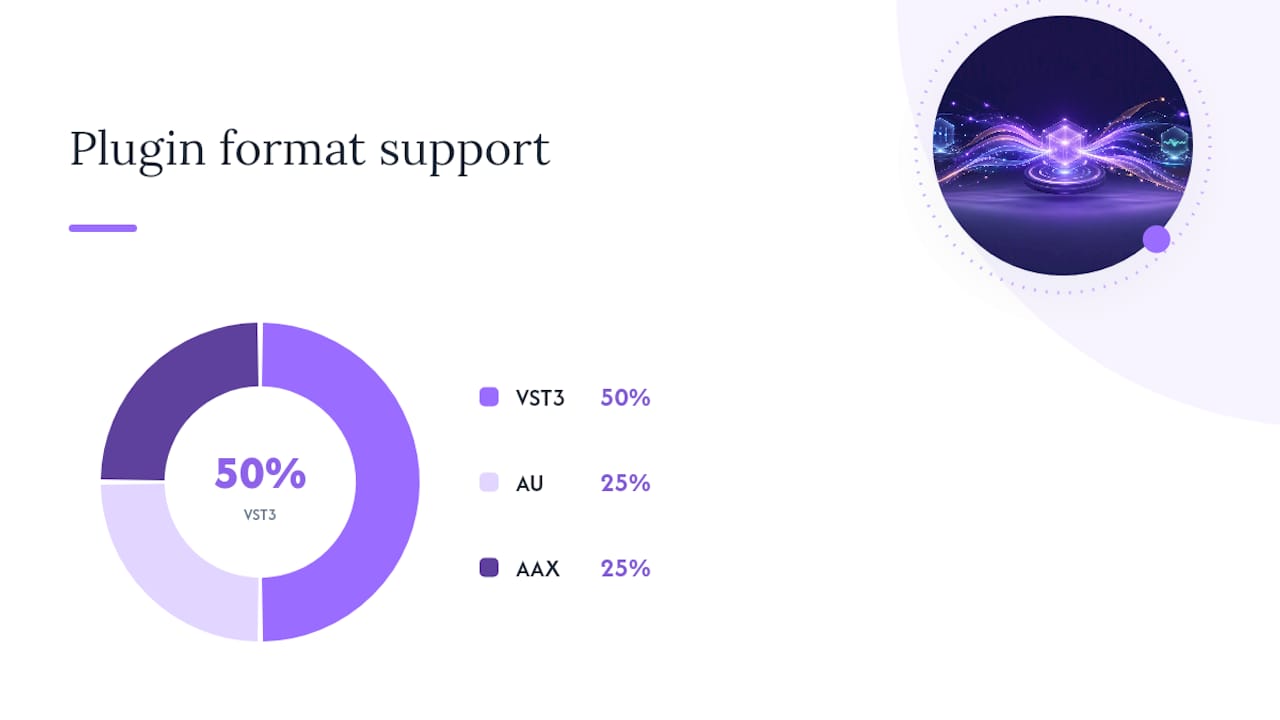
A preset saved from the AU build of a plugin will not reliably load into the VST3 build of the same plugin, even with an identical file extension. Forum reports from working engineers confirm this is a common, recurring complaint, because hosts can handle internal parameter mapping differently between formats.
Before you transfer anything, check which format the target DAW actually loaded. Vector-dsp's plugin format comparison breaks down exactly how VST3, AU, and AAX differ under the hood, which is worth a read if you regularly move between Mac and Windows setups.
- Confirm the plugin format in your DAW's plugin manager before exporting anything.
- Export in whichever format the receiving DAW will actually instantiate.
- Treat identical file extensions as a hint, not a guarantee.
Pro Tip: If a preset won't load and everything else looks right, open the plugin manager and check whether the DAW loaded the AU or VST3 version. Ten seconds of checking saves twenty minutes of troubleshooting.
What is DAWproject and when do you need it?
Sometimes a single preset isn't the goal, you need the entire session, plugin chains, automation, and all, to survive the move to another DAW. That's what DAWproject is built for. It's an open exchange format designed to carry plugin states, automation curves, notes, and audio between DAWs that support it, and PreSonus, Bitwig, and a growing list of others have added support.
- DAWproject preserves plugin states and automation when both DAWs on either end support the format.
- Coverage isn't universal. Some plugins or unusual routing setups may still flatten or drop data on export.
- It's a fundamentally different tool than bouncing stems or exporting MIDI, which throw away plugin settings entirely and keep only the resulting audio or note data.
Use DAWproject when a full mix handoff matters more than any single preset. Use plain preset export when you just need one sound to travel.
Why won't my preset show up? Common fixes
Most "missing preset" problems trace back to one of three things: file permissions, format mismatches, or a plugin that simply hasn't been rescanned.
- Check folder permissions and locations first. Windows and macOS store plugin data in different system folders, and copying a preset into the wrong one, or into a protected system folder without permission, is the single most common failure.
- Remember that AU is Mac-only. If a collaborator sends you an AU preset and you're on Windows, it won't work under any circumstances, because AU doesn't exist outside Apple's ecosystem. You'll need the VST3 or AAX version instead.
- Force a plugin rescan. Most DAWs have a "rescan plugins" or "reset plugin cache" command in preferences. Run it after adding new preset files, especially if you pointed the DAW at a custom preset folder it hasn't indexed before.
- Update or reinstall the plugin. Presets built for one build may not recognize an older or newer plugin instance if internal parameter indexing changed between versions.
Pro Tip: Keep the plugin version numbers identical on both machines when you can. It's the single easiest way to avoid the "preset loads but sounds wrong" problem that has nothing to do with format at all.
The step-by-step workflow for a clean preset transfer
Follow this order every time and you'll avoid nearly every common mistake:
- Confirm format and version in both DAWs. Open the plugin manager on each machine and note whether it's running VST3, AU, or AAX, and check the version number.
- Export from inside the plugin, not the DAW. Use the plugin's own save/export command. Batch export if you're sending a whole folder of sounds.
- Move the files. Cloud storage, a USB drive, or a zipped folder all work fine. Drop the files into the plugin's user preset folder, or use the plugin's import dialog if it has one.
- Rescan and test. Force a plugin rescan in the receiving DAW, load an instance of the plugin, and confirm the preset loads with the expected sound.
- Fall back when needed. If the plugin format doesn't match or the collaborator lacks the plugin entirely, render a stem or exchange a DAWproject file instead of forcing a preset that won't survive the trip.
Audacity's own preset documentation shows a version of this same pattern: export/import functions built directly into the tool, with presets stored as portable files you can move between installations without needing to touch a DAW's internal browser at all.
What Vector-dsp recommends for reliable preset sharing
Vector-dsp's plugin architecture treats vendor-format export as the default, not an afterthought, because the alternative, letting a DAW manage presets internally, breaks the moment you switch hosts.
- Save and share the vendor preset file directly. Don't rely on a DAW's media bay to surface externally added files.
- Keep a dedicated shared-presets folder labeled with plugin version and tested host, and drop in a short README when handing presets to someone else.
- If you're distributing presets publicly, export both VST3 and AU versions where the plugin supports it, and list which hosts you actually tested.
Pro Tip: A one-line README with the plugin version and tested DAW saves more support emails than any troubleshooting guide ever will.
Ready to build a plugin chain worth sharing
Preset portability only matters if the sound underneath is worth carrying around in the first place. Vector-dsp builds its plugins, including ToneLab's multi-lane parallel effects architecture, around VST3, AU, and AAX support from day one, so a preset you export on one machine stands a real chance of loading cleanly on the next. If you're organizing a growing preset library across projects and collaborators, Vector-dsp's guide to plugin organization covers folder structures and naming conventions that hold up once you're managing dozens of sounds instead of a handful. Start with a free demo at Vector-dsp and see how the export workflow feels on your own sessions.
An editorial take on preset sharing advice
Most advice on this topic gets tangled up comparing DAWs against each other, as if the software you're running is the variable that matters most. It isn't. The plugin format is the variable that matters, and almost every failed transfer I've seen traced back to someone assuming a .vstpreset file is universal just because the extension looks the same everywhere.
The conventional wisdom also oversells DAWproject a little. It's a genuinely useful format, and it's the right tool when a full session needs to survive a move intact. But it's not a substitute for good preset hygiene at the plugin level, and treating it as a catchall solution ignores the fact that coverage still depends on both ends supporting it.
If you take one thing from this, prioritize the plugin's own export function over everything else. It's boring advice, but it's the one habit that actually prevents the support headaches everyone else is writing troubleshooting guides about.
— Kai
Sources
- Manage presets — Audacity manual
- bitwig/dawproject README
- Introducing DAW Project – Knowledge Base | PreSonus
- Import VSTi preset from another DAW - Nuendo - Steinberg Forums