Pro Tools Plugin Architecture Explained for Developers
Pro Tools Plugin Architecture Explained for Developers
Pro Tools plugin architecture explained properly is something most tutorials skip entirely. They tell you how to insert a plugin, not how the system actually works underneath. If you're an audio professional or a developer building tools for Pro Tools, that gap in understanding costs you time, stability, and creative control. The AAX format is not just another plugin wrapper. It's a tightly coupled, proprietary ecosystem with distinct processing modes, hardware dependencies, and an increasingly powerful extension layer called ARA. This article breaks all of it down with the depth your work demands.
Table of Contents
- Key takeaways
- Pro Tools plugin architecture explained: formats and roles
- The technical architecture of AAX plugins
- ARA integration in Pro Tools and its workflow impact
- Practical considerations for working with Pro Tools plugins
- My take on what the architecture really means
- Take your plugin workflow further with Vector-dsp
- FAQ
Key takeaways
| Point | Details |
|---|---|
| AAX is the only current format | Pro Tools exclusively uses AAX Native and AAX DSP, with all legacy formats phased out. |
| Processing mode determines hardware needs | AAX Native runs on your CPU; AAX DSP requires dedicated hardware like HDX cards or Carbon interfaces. |
| ARA unlocks clip-based editing | ARA plugins ingest entire audio clips for non-destructive, timeline-aware editing without file bouncing. |
| SDK access shapes developer workflow | Avid's proprietary SDK gives AAX plugins deep DAW integration that generic formats cannot replicate. |
| Architecture knowledge prevents problems | Understanding plugin processing modes and latency behavior helps you avoid session performance issues. |
Pro Tools plugin architecture explained: formats and roles
Understanding Pro Tools plugins starts with recognizing that the format you use determines everything: how audio is processed, what hardware is required, and how deeply the plugin integrates with the DAW itself.
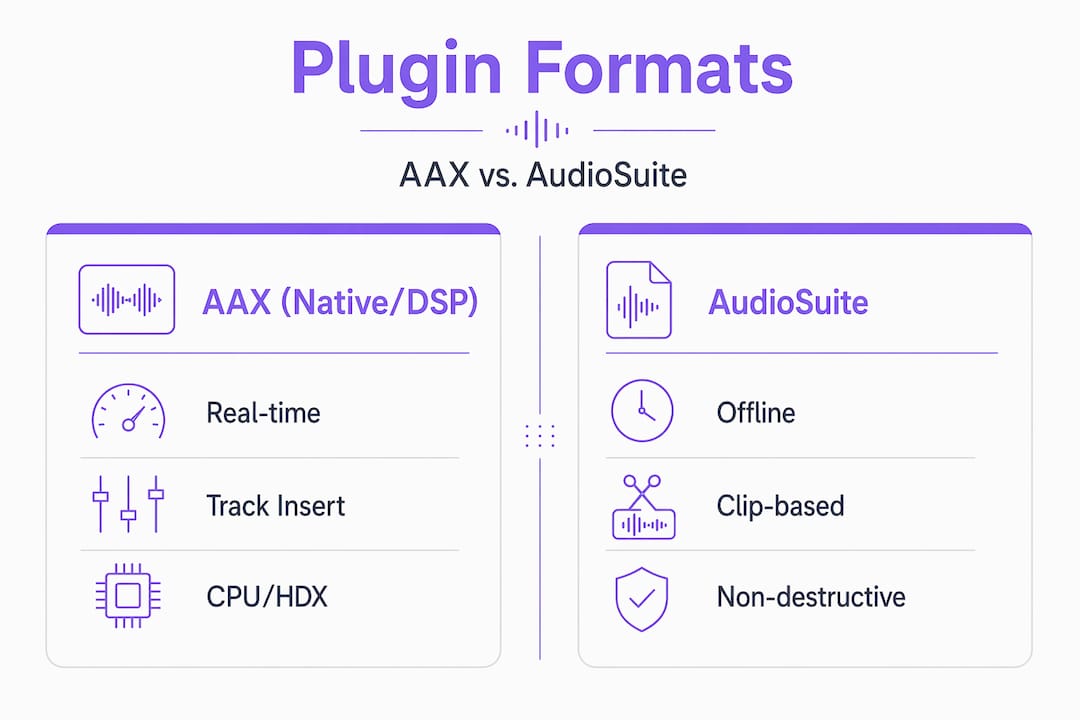
AAX Native and AAX DSP are the two active processing modes in modern Pro Tools. AAX Native runs entirely on your host CPU, making it accessible to any Pro Tools system. AAX DSP offloads processing to dedicated hardware accelerators like HDX cards or the Carbon interface, freeing your CPU for other tasks and delivering deterministic, ultra-low latency performance. Both share the same AAX plugin format specification, but they compile to different targets and behave differently under load.
AudioSuite is the third active format, and it works differently from the other two. Rather than processing audio in real time on a track insert, AudioSuite renders audio to a new file. It's non-real-time, destructive by default (though you can use it non-destructively with the "create individual files" option), and useful for tasks like time-stretching or noise reduction where you want a baked result rather than live processing.
Here's how the formats compare at a glance:
| Format | Processing type | Hardware required | Real-time |
|---|---|---|---|
| AAX Native | CPU-based | Standard CPU | Yes |
| AAX DSP | Hardware accelerated | HDX card or Carbon | Yes |
| AudioSuite | File-based render | Standard CPU | No |
| RTAS (legacy) | CPU-based | Standard CPU | No longer supported |
| TDM (legacy) | TDM hardware | TDM cards | No longer supported |
RTAS and TDM are legacy 32-bit formats that modern Pro Tools no longer supports. If you're still sitting on a library of RTAS plugins from a decade ago, they will not load in current Pro Tools versions. The transition to 64-bit AAX was a hard cutoff, not a gradual deprecation.
Key things to know about the format ecosystem:
- AAX Native plugins work on any Pro Tools system, including Artist and Studio tiers.
- AAX DSP plugins require HDX hardware or a Carbon interface and are typically used in post-production and high-track-count mixing environments.
- AudioSuite plugins share code with their real-time AAX counterparts in many cases, but they operate in a completely different processing context.
- ARA is not a standalone format. It's an extension layer that sits on top of AAX, which we'll cover in detail later.
The technical architecture of AAX plugins
The AAX plugin ecosystem is built on Avid's proprietary SDK, which gives developers access to Pro Tools internals that generic plugin formats simply cannot touch. This is where AAX separates itself from VST3 or AU in ways that matter for professional workflows.
When you insert an AAX plugin on a track, Pro Tools instantiates the plugin's processing object and connects it to the session's audio graph. The plugin receives audio buffers, processes them, and returns the result. That part sounds straightforward. What makes AAX architecture distinctive is what happens around that audio processing loop.
AAX plugins can hook directly into Pro Tools features like track freeze, clip gain, and automation lanes. AAX enables low latency, stable processing and advanced DAW feature integration that VST or AU wrappers cannot replicate without significant workarounds. When a developer builds an AAX plugin using the SDK, they're writing against a specification that understands session context, not just audio buffers.
The architecture separates the audio processing engine from the user interface deliberately. Separating engine and UI in plugin design is critical for stability and responsiveness, especially in demanding Pro Tools sessions where heavy CPU load must never cause audio dropouts or plugin crashes. The processing thread runs at real-time priority. The UI thread does not. Any developer who conflates these two in their code will produce an unstable plugin.
Pro Tip: When developing AAX plugins, never allocate memory or perform file I/O inside the real-time audio processing callback. These operations are non-deterministic and will cause glitches or crashes under load. Prepare all resources during initialization, not during processing.
Compared to VST3 or AU, AAX offers tighter coupling at the cost of exclusivity. You cannot run an AAX plugin in any DAW other than Pro Tools. That tradeoff is intentional. Avid designed the format to give Pro Tools a controlled, optimized plugin environment rather than a broadly compatible but loosely integrated one.
ARA integration in Pro Tools and its workflow impact
ARA (Audio Random Access) is the most significant architectural addition to Pro Tools in recent years. Since Pro Tools 2022.9, ARA plugins allow deep, clip-based non-destructive editing with instant audio access. Understanding what that means technically changes how you think about plugin capabilities entirely.
Traditional real-time plugins receive audio one buffer at a time. They have no awareness of what came before or after the current buffer. ARA breaks that constraint entirely. An ARA-enabled plugin ingests the entire audio clip when it's instantiated, giving it full access to the audio file's content from any point in time. This is why tools like pitch correction and spectral repair can operate with awareness of the full phrase, not just the current playback position.
ARA changes workflows from linear real-time transfers to nonlinear, non-destructive edits tightly linked to session clips. You no longer need to bounce a vocal to an external application, edit it, and reimport the file. The ARA plugin lives inside the clip itself, and its edits update dynamically as you work.
The practical workflow benefits are significant:
- Vocal tuning plugins can analyze the entire phrase before you make a single edit, improving pitch detection accuracy.
- Spectral repair tools can reference surrounding audio for more natural-sounding repairs.
- Timeline-aware editing means that if you trim or move a clip, the plugin's edits automatically update to reflect the new clip boundaries.
- No file bouncing means faster iteration and a cleaner session folder.
ARA represents a fundamental evolution from real-time to non-destructive editing, eliminating tedious bounce steps and improving user workflows in ways that traditional plugin architecture simply cannot match.
Pro Tip: ARA plugins in Pro Tools are clip-based, not track-based. If you have multiple clips on a track, each clip gets its own ARA plugin instance. Plan your session structure accordingly, especially when working with heavily edited vocal tracks.
The developer implications are equally significant. Building an ARA extension requires implementing the ARA SDK on top of the AAX plugin framework. The plugin must handle audio ingestion, manage its own internal state per clip, and respond correctly when Pro Tools signals that a clip has been moved or trimmed. It's a more complex development target than standard AAX, but the workflow payoff for end users is substantial.
Practical considerations for working with Pro Tools plugins
Knowing the architecture is one thing. Applying that knowledge to real sessions is where it pays off. Here's how to translate Pro Tools plugin architecture knowledge into better daily workflow.
-
Install and authorize correctly. Downloading and running AAX installers then entering license information is straightforward, but authorization must complete before Pro Tools launches or the plugin will not appear in the menu. Always authorize before opening a session.
-
Organize your plugin view. Pro Tools organizes plugins by categories including flat list, manufacturer, and combined views. In large sessions with dozens of plugins installed, using the manufacturer or category view dramatically reduces the time you spend hunting for the right tool.
-
Understand latency compensation. AAX Native plugins introduce processing latency that Pro Tools compensates for automatically using delay compensation. AAX DSP plugins on HDX hardware operate at fixed, predictable latency. Mixing both types in a session requires understanding how Pro Tools routes compensation across the signal path, particularly on buses and aux tracks.
-
Manage CPU allocation between modes. If you're running a Native-only system and hitting CPU limits, AudioSuite rendering is your friend. Baking a reverb or saturation plugin to audio frees up real-time processing headroom without changing the sound.
-
Audit your legacy plugins. If you're migrating an older session, check for any RTAS references. Those plugins will appear as inactive inserts in modern Pro Tools. You'll need AAX equivalents or the processing simply won't be there.
Pro Tip: Use the "inactive" plugin state strategically. You can deactivate a CPU-heavy plugin without removing it from the insert slot, preserving your routing and settings while freeing up processing resources during tracking or editing phases.
My take on what the architecture really means
I've spent years working with plugin development and professional audio sessions, and the thing I keep coming back to is this: the tightness of the AAX architecture is both its greatest strength and its most underappreciated feature.
Most engineers treat plugins as interchangeable inserts. Drop it in, turn some knobs, move on. But when you understand that AAX plugins communicate directly with the session's automation engine, that they participate in track freeze operations, that their latency is reported to and compensated by the host in real time, you start making different decisions. You choose plugins that were built correctly for the format, not just ported from VST with a wrapper.
ARA, in my view, is the most consequential architectural shift in Pro Tools in the past decade. The ability to do phrase-level pitch editing inside a clip, with full timeline awareness, without ever leaving the session, changes the editing rhythm fundamentally. Engineers who haven't used it yet tend to underestimate it until they try it.
The challenge I see most often from developers is underestimating the real-time safety requirements of the audio thread. Separating audio engine from UI is not optional or stylistic. It's the difference between a plugin that ships and one that crashes sessions. I've reviewed code where developers were updating UI components from the processing callback and wondered why their plugin caused dropouts. The architecture demands discipline, and that discipline produces better software.
If you're an audio professional trying to optimize your sessions, learn which of your plugins are AAX Native versus DSP. Learn where your latency is coming from. The architecture gives you the tools to make informed decisions. Use them.
— Kai
Take your plugin workflow further with Vector-dsp
Understanding Pro Tools plugin architecture is the foundation. Building on it with precisely engineered tools is the next step. Vector-dsp develops professional-grade audio plugins built on the same principles that make great AAX plugins work: real-time safety, low latency, and intentional DSP design. Whether you're a sound engineer looking for processing tools that behave correctly under load, or a developer studying how high-quality plugins are architected, Vector-dsp's approach reflects the same standards that Pro Tools' own architecture demands. Explore what's in development and see how precision DSP design translates into tools built for professionals who care about how things work, not just how they sound.
FAQ
What formats does Pro Tools currently support?
Pro Tools exclusively supports AAX Native, AAX DSP, and AudioSuite formats. Legacy formats like RTAS and TDM are no longer supported in modern versions.
How does AAX DSP differ from AAX Native?
AAX Native processes audio on your host CPU, while AAX DSP offloads processing to dedicated hardware like HDX cards or Carbon interfaces, delivering lower and more predictable latency.
What is ARA and how does it work in Pro Tools?
ARA (Audio Random Access) is an extension layer that allows plugins to ingest entire audio clips for non-destructive, timeline-aware editing. It has been supported since Pro Tools 2022.9.
Can VST or AU plugins run in Pro Tools?
No. Pro Tools does not natively support VST or AU formats. Plugins must be built and distributed in the AAX format to run in Pro Tools.
How do developers access the AAX SDK?
Developers access the AAX SDK through Avid's developer program. The SDK provides the APIs needed to build plugins that integrate with Pro Tools features like automation, track freeze, and clip gain.