Parallel Transient Shaping: A Practical Setup Guide
Parallel Transient Shaping: A Practical Setup Guide
Route the source to an aux, drop an aggressive transient shaper on that return, and blend it back under the dry track at a low level. That's parallel transient shaping: you keep the original sustain and body untouched while layering in extra snap from the processed copy. Here's the two-minute version.
- Create an aux/bus send from the track (drum bus, kick, room mic, whatever needs punch) and route it to a new return channel.
- Insert a transient shaper on the return only, push Attack hard toward its maximum, and pull Sustain down slightly to keep the tail from smearing.
- Bring the aux return fader up slowly while listening in context, not solo.
Most engineers land on an attack boost that sounds almost silly in isolation, paired with a return blend under 30% once it's sitting under the dry signal.
Pro Tip: Check phase before you trust your ears. Flip the polarity on the return and listen for the mix getting thinner or hollow. If it does, your parallel lane is fighting the dry track instead of reinforcing it.
Key Takeaways
Parallel transient shaping adds perceived punch by processing a copy of the signal aggressively and blending it low under an untouched dry track.
| Point | Details |
|---|---|
| Detection is level-independent | Dual envelope followers track rate of change, not absolute level, unlike a threshold-based compressor. |
| Start conservative on blend | Aggressive attack boosts on the parallel lane paired with a return blend under 30% is a reliable starting range. |
| Phase checks are mandatory | Invert-phase listening and delay compensation checks catch cancellation before it reaches a final mix. |
| Match the technique to the source | Kicks and rooms often need sustain reduction, while snares and guitars respond better to attack boosts. |
| Vector DSP's ToneLab supports this workflow | Its multi-lane architecture with per-lane EQ targeting is built for low-latency parallel transient chains. |
Table of Contents
- What Is Transient Shaping and How It Differs From Compression
- Inside the Engine: Envelope Followers, Attack and Sustain Paths
- Parallel Transient Shaping Workflow: Routing, Alignment, and Setup
- Start Settings and Recipes by Source
- Multiband and Advanced Parallel Shaping
- Benefits, Artifacts, and Warning Signs
- Verifying the Result Before You Commit
- How Vector DSP Approaches Multi-Lane Transient Workflows
- A Working Producer's Take on When This Actually Pays Off
- A Simpler Way to Build Parallel Transient Chains
- Frequently Asked Questions
- Sources
What Is Transient Shaping and How It Differs From Compression
A transient shaper splits a sound into two parts, the initial attack and the sustain that follows, and lets you push each one independently. It doesn't care how loud the signal is. It cares how fast the level is rising. That's the detail most producers miss when they treat a shaper like a fancy compressor.
Compressors work off a threshold: cross it, and gain reduction kicks in. Transient shapers skip the threshold entirely and react to the rate of change in the signal, which means a quiet ghost note and a loud rimshot get treated the same way as long as their attack shape is similar.
That distinction changes when you reach for one over the other:
- Use a compressor when you need to control overall dynamic range or glue a group of tracks together.
- Use a transient shaper when you need to add or remove punch without touching average loudness.
- Use both in sequence when a source needs leveling and shaping, since compression before shaping gives the shaper a more consistent envelope to work with.
- Reach for a shaper on a parallel lane specifically when you like the dry tone but want more snap layered on top rather than baked into the original.
Vector-dsp's own note on audio compressor purpose covers where leveling ends and shaping begins in more depth, if you want the full breakdown of what each tool is actually built to solve.
Inside the Engine: Envelope Followers, Attack and Sustain Paths
Transient shapers detect transients using two envelope followers running at different speeds, one fast and one slow. The gap between them at any given moment tells the plugin whether it's looking at an attack (fast follower spikes ahead) or sustain (the two converge). This dual-path detection is what makes shapers level-independent, and it's also why they can sometimes misfire on complex material like layered drum buses where multiple transients overlap.
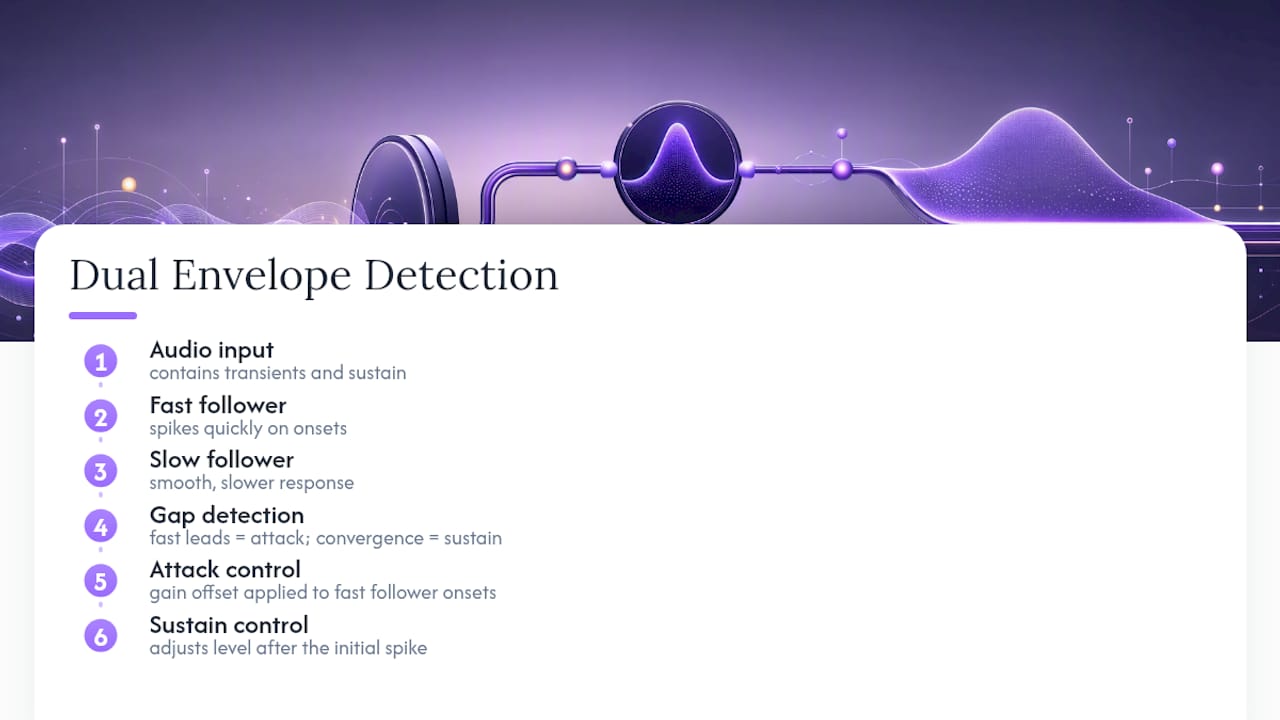
The Attack control applies a gain offset to whatever the fast follower flags as an onset. Push it up and transients pop; pull it down and you soften pick noise, plosives, or cymbal splash. Sustain works the same way but targets everything after the initial spike, so you can expand the attack while compressing the tail in a single pass, something a compressor genuinely cannot do because it only has one gain path.
Most plugins also include an internal Mix knob that blends the processed signal against the dry input inside the plugin itself. That's functionally similar to parallel routing, but a dedicated aux return gives you separate EQ, separate metering, and the option to compress or saturate the parallel lane without touching the original. iZotope's Neutron documentation frames the internal Mix control the same way: convenient for quick work, limited when you need real sound design control.
Pro Tip: If a shaper starts pumping or chattering on a busy source, the fast follower is probably re-triggering on sustain artifacts it mistakes for new attacks. Slow down the attack detection time constant slightly, or shorten the sustain window, before you touch the gain amounts.
Parallel Transient Shaping Workflow: Routing, Alignment, and Setup
You have two ways to build this chain. An aux send/return keeps the dry track completely untouched and lets you route multiple sources into one shared parallel bus, which is efficient when you're processing a full drum kit. A duplicate track gives you a fully independent channel with its own inserts and automation, useful when one source needs a chain that's too specific to share.
Either way, the setup follows the same order:
- Create the send or duplicate the track.
- If using a send, set it to post-fader so your dry level changes don't silently change the parallel blend.
- Insert the transient shaper on the return or duplicate channel, never on the original.
- Check your plugin's latency reporting. Most transient shapers run near zero latency, but confirm your DAW's delay compensation is active so the return doesn't drift out of sync.
- Set the shaper aggressively, then bring the return fader up from silence while the mix is playing.
- Sanity-check gain staging: the parallel lane should never be louder than the dry track at unity.
Phase is where this workflow quietly breaks. Two versions of the same waveform, one processed and one not, can cancel frequencies when summed if either is even a few samples out of alignment.
- Flip phase on the return and listen for the mix thinning out. If it does, flip it back.
- Solo the sum of dry plus parallel and compare it against the dry track alone. A good parallel blend adds punch without changing the tonal balance.
- If your shaper plugin reports non-zero latency, confirm your DAW's automatic delay compensation is engaged rather than assuming it.
Vector-dsp's guide to parallel processing walks through invert-phase checks and delay alignment in more detail, and it's worth running through once on a source you know well so you can recognize what misalignment sounds like before it shows up on a mix that matters.
Pro Tip: Automate the return fader down during quiet verses if the parallel lane starts poking through on sparse material. Static blend levels that work in a chorus often overprocess a bridge.
Start Settings and Recipes by Source
These are starting points, not rules. Every source responds differently depending on the room, the mic, and what's already happened to the signal upstream.
Kick drum: Push attack hard on the parallel return to emphasize beater click, and pull sustain down slightly to tighten low-frequency bloom rather than let it ring. This sustain-reduction approach is standard for tightening kicks that sound boomy in a dense mix.
Snare: Max attack for crack, keep sustain closer to neutral so the body doesn't disappear. A narrow EQ cut around 300 to 500 Hz on the parallel lane keeps the extra attack from adding boxiness.
Room mics: Reduce sustain here instead of boosting attack. It controls bleed and tightens the room sound while preserving the initial ambient hit that gives the drums their space. This is one of the few cases where sustain reduction, not attack boost, is the primary tool.
Bass: Be conservative. A small attack boost on a parallel bass return adds pick or finger definition without wrecking low-end weight, but anything aggressive tends to introduce clicking that reads as distortion rather than punch.
Acoustic guitar: Light attack boost on strums brings out pick attack in a busy arrangement. Avoid pushing sustain down much, since acoustic guitar sustain is part of its character, not something to trim away.
Piano: Subtle attack enhancement on the hammer strike can help a piano cut through a dense arrangement, but go carefully. Piano transients are complex, and heavy-handed shaping introduces a metallic edge fast.
A few dos and don'ts apply across all of these. Don't push extreme attack boosts on cymbals or hi-hats; the transient detection tends to misfire on fast, overlapping hits and you'll get flutter instead of clarity. Do use EQ on the parallel lane itself, not just the dry track, to cut low-mid mud before it reaches the blend. Do adjust by ear first, then confirm with a level meter that you haven't quietly raised the mix's overall loudness by three or four decibels without noticing.
Multiband and Advanced Parallel Shaping
A single broadband transient shaper treats the whole frequency spectrum the same way, which is a problem when a kick's low-end thump and a snare's top-end crack need opposite treatment. Multiband transient shaping solves this by splitting the signal into frequency bands first, then applying separate attack and sustain settings to each.
Two patterns cover most real-world use. You can run a multiband shaper directly on a single parallel bus, tightening low-band sustain while boosting high-band attack in one plugin instance. Or you can split the parallel send itself into two or three frequency lanes, each with its own dedicated shaper and EQ, which gives you more surgical control at the cost of more CPU and more routing to manage.
Crossover phase is the trap here. Splitting a signal into bands and recombining it introduces phase shift at the crossover points unless the crossover is linear-phase, and that shift can cause subtle cancellation when the multiband parallel signal sums back with the dry track. Linear-phase crossovers cost more latency, so check your DAW's delay compensation again whenever you add one.
Pro Tip: Run targeted EQ cuts on each frequency lane of a multiband parallel bus before the shaper, not after. It stops mud from building in a specific band while leaving your attack and sustain settings untouched.
Benefits, Artifacts, and Warning Signs
Done well, parallel transient shaping adds punch and separation in a dense mix without touching the dry track's natural sustain, which is exactly why it's preferred over shaping the source directly in most professional workflows.
Done poorly, it introduces problems that are easy to miss until they're baked into a final mix:
- Transient distortion or clicking from pushing attack too far past what the source material supports.
- Phase cancellation between the dry and parallel lanes, thinning the mix instead of thickening it.
- Detection misclassification on busy sources, where the shaper reacts to the wrong events.
- Harshness from clipping or saturation building up on an over-driven parallel lane.
Watch for audible pumping, a stereo image that suddenly feels narrower, or bass that seems to lose weight the moment you bring the parallel return up. Any of those is a sign to check phase before adjusting levels further.
Pro Tip: Test aggressive settings on individual stems before committing them to a bus or the master. What sounds tight on a solo kick can turn into an unpleasant edge once every other transient in the mix is competing for the same frequency space.
Verifying the Result Before You Commit
Trust your ears first, but confirm with your eyes before printing anything final.
- A/B the parallel blend in full context, not solo, and toggle bypass at your actual mix level rather than turned up loud.
- Check the mono sum. A parallel lane that sounds great in stereo but collapses in mono has a phase problem worth chasing down.
- Watch a phase correlation meter while toggling the return on and off; a sharp drop toward negative values means cancellation.
- Compare peak versus RMS before and after. A big peak jump with little RMS change usually means you've added transient snap without inflating perceived loudness, which is the goal.
- Look at the waveform directly if your DAW allows it. Pre-ringing or unexpected high-frequency buildup on the parallel lane usually shows up visually before you consciously hear it.
How Vector DSP Approaches Multi-Lane Transient Workflows
Building a plugin that handles parallel transient shaping cleanly comes down to a few non-negotiables in the DSP itself.
- Low-latency envelope detection matters more in a parallel context than a direct-insert one, since any added delay on the processed lane has to be compensated against a dry signal that has none.
- Per-lane EQ targeting, rather than one blanket EQ on the whole plugin, lets you clean up mud on a parallel bus without touching the tonal balance of the dry track feeding it.
- Multiformat support (VST3, AU, AAX) matters practically because parallel routing setups often get built once in a session template and reused across projects, sometimes across different DAWs entirely.
ToneLab's multi-lane architecture was built around this exact problem: giving each parallel lane its own EQ targeting and transient control inside a single low-latency instance, instead of forcing engineers to stack three or four separate plugins to get the same result.
A Working Producer's Take on When This Actually Pays Off
Parallel transient shaping earns its place on drums, room mics, and programmed percussion, where you want punch layered on top of a sound you already like rather than a replacement for it. On melodic or harmonic sources, I'd reach for it far less often and much more carefully.
The best parallel transient work is felt more than heard. If a listener notices the processing, the blend is too high.
A Simpler Way to Build Parallel Transient Chains
Most of the friction in parallel transient shaping isn't the concept. It's the plugin math: stacking a send, a shaper, an EQ, and a limiter across separate instances just to keep one parallel lane clean. ToneLab handles that inside a single low-latency instance, with per-lane EQ targeting so you can clean up a parallel bus without hunting through four separate plugin windows mid-session.

If you're already running the workflow described above, whether it's a kick, a room mic bus, or a full drum group, ToneLab's product page walks through how the multi-lane setup maps onto exactly this kind of parallel routing. Download the demo and build one lane against a source you already know well, then compare it to whatever chain you're currently stacking.
Frequently Asked Questions
Is parallel transient shaping the same as a Mix knob on a transient shaper? Not quite. An internal Mix control blends wet and dry inside one plugin, which is convenient but limits you to whatever processing that single instance offers. A dedicated parallel aux return lets you EQ, compress, or saturate the processed lane independently before it sums back with the dry signal.
How much attack boost is too much on a parallel lane? There's no universal ceiling, but if the parallel lane starts sounding distorted or clicky when soloed, you've likely gone past what a low blend can hide. Pull attack back until the processed signal sounds aggressive but still recognizable as the source.
Do I need a multiband transient shaper for drums? Not always. A single broadband shaper handles most individual drum sources fine. Multiband becomes useful when one source, like a full drum bus, needs opposite treatment in different frequency ranges, such as tightening kick sustain while boosting snare and cymbal attack simultaneously.
Can transient shaping replace compression entirely? No. Compression controls overall dynamic range and levels a performance; transient shaping only affects the attack and sustain balance. Most professional chains use both, typically compression first for consistency, then shaping for character.
Why does my parallel blend sound thin instead of punchier? That's almost always a phase problem. Flip the polarity on the parallel return and listen again. If the mix suddenly sounds fuller, your original blend was out of phase with the dry track.
Sources
For deeper technical grounding, ProducerHive's breakdown of transient shapers versus compressors and Black Ghost Audio's comparison both cover the mechanics in more depth. MusicProductionWiki's transient shaping entry is a solid reference for source-specific applications. Engineers curious about the control-theory side can look at this modular transient response shaping paper. For routing and phase alignment specifics, see Vector-dsp's guide to bus processing workflow.
- Musicproductionwiki
- Best Transient Shaper Plugins in 2026 (Add Punch and Attack to Drums, Bass, and Guitars) | MixingGPT
- Transient Shaper vs Compressor (Differences & When To Use Each) | ProducerHive
- Transient Shapers vs Compressors | Black Ghost Audio