Parallel Distortion: How to Add Grit Without Losing Punch
Parallel Distortion: How to Add Grit Without Losing Punch
Parallel distortion is a mixing technique where you blend a heavily distorted duplicate of a track (the "parallel lane") back in with the original, dry signal. You get the harmonics, density, and perceived loudness that distortion adds, but the attack and transient snap of the untouched source stays intact. Here's the fastest way to hear it work:
- Duplicate the track or create an aux/send return from it.
- Insert a distortion or saturation plugin on the duplicate and push it harder than you'd ever dare on the main channel.
- Blend the distorted return under the dry signal until you hear thickness appear without the transient going soft.
Before you commit, run three quick checks:
- Flip polarity on the parallel lane and listen for which position sounds fuller, not thinner.
- Solo the blend and confirm the initial hit or pluck still cuts through.
- Check the low end in mono to make sure nothing's canceling.
Key Takeaways
Parallel distortion adds harmonic density and perceived loudness while keeping the dry signal's transient attack fully intact.
| Point | Details |
|---|---|
| Split before you distort | Duplicate the track or use an aux send so the dry signal stays untouched. |
| EQ after distortion | Shape harmonics once they exist, not before, for more predictable control. |
| Low-pass bass lanes hard | Filtering around 300-500 Hz keeps 808s and bass thick without fizz. |
| Check phase every time | Flip polarity and solo the parallel lane before trusting the blend. |
| Use per-lane tools when possible | Vector-dsp's ToneLab handles multiple parallel lanes with independent EQ in one plugin. |
Table of Contents
- What Parallel Distortion Actually Does to Your Signal
- Which Instruments Benefit Most From Parallel Distortion?
- How Do You Route Parallel Distortion in Any DAW?
- Recipes: Filter Ranges and Mix Ratios That Actually Work
- Fixing Parallel Distortion Problems: Phase, Mud, and Harshness
- Try Parallel Distortion With Per-Lane Control Built In
- Frequently Asked Questions
- Sources
What Parallel Distortion Actually Does to Your Signal
Distortion works by clipping or reshaping a waveform, which generates new harmonic content, but it also flattens dynamics in the process. Run it inline on a drum bus and you'll often hear the attack get squashed along with everything else. Split the signal first, distort only the duplicate, and you sidestep that trade entirely.
The dry path keeps its original transient intact; the parallel path piles on harmonics and density. Blend them and the ear reads both at once: sharp attack, thick body. This works whether you route it through an aux send or use a plugin's built in wet/dry knob. Sends give you more flexibility for further processing on that lane, while a wet/dry control is faster to dial in on a single insert. Parallel saturation preserves transient detail in a way that inline distortion simply can't, since parallel processing keeps a clean copy running underneath the processed one.
Pro Tip: Put your EQ after the distortion on the parallel lane, not before. Shaping the harmonics after they're generated gives you far more control than trying to predict what the distortion will do to a pre-shaped signal.
Which Instruments Benefit Most From Parallel Distortion?
Not every source responds the same way. Some instruments come alive with a parallel distortion pass; others just get muddy.
- Bass and 808s: Heavy distortion on the parallel lane, then a low-pass filter, adds harmonic content that translates on small speakers without turning the low end harsh.
- Kick and snare, or full drum loops: Distortion here adds knock and grit that a compressor alone can't replicate, especially useful on loops that feel flat.
- Vocals: A light parallel saturation pass adds presence and edge without smearing consonants or intelligibility.
- Sustained synths and pads: Great for adding movement and texture, particularly on static, held notes that need life.
- Group buses and master bus: Works, but sparingly. A little goes a long way at this stage.
Reach for parallel distortion when you want density without killing transients. Reach for straight inline distortion when you want an instrument to sound aggressively destroyed on purpose.
How Do You Route Parallel Distortion in Any DAW?
The mechanics are identical whether you're in Ableton, Logic, Pro Tools, or Studio One:
- Create an aux or bus track and set its input to receive from the source track.
- Send the source to that aux, either pre or post fader depending on whether you want the send level to track your fader moves.
- Insert your distortion or saturation plugin on the aux channel and drive it hard.
- Filter the aux: high pass to remove unwanted rumble, low pass to tame harsh top end, depending on the source.
- Check phase alignment between the aux and the dry track, flipping polarity if the blend sounds thin.
- Bring the aux fader up slowly while listening against the dry signal, and stop as soon as the character you want appears.
Logic Pro users can get there fastest with Clip Distortion on a send return, a setup MusicTech's tutorial walks through directly for adding crunch to drums.
Watch for these common snags: phase cancellation between the two paths, plugin latency throwing off alignment (use your DAW's automatic delay compensation), poor gain staging on the distorted lane clipping your master bus, and forgetting to check the blend in mono before calling it finished.
Recipes: Filter Ranges and Mix Ratios That Actually Work
Numbers help more than adjectives here. These are reasonable starting points, not rules. All frequency ranges assume you're processing the parallel lane, not the dry signal.
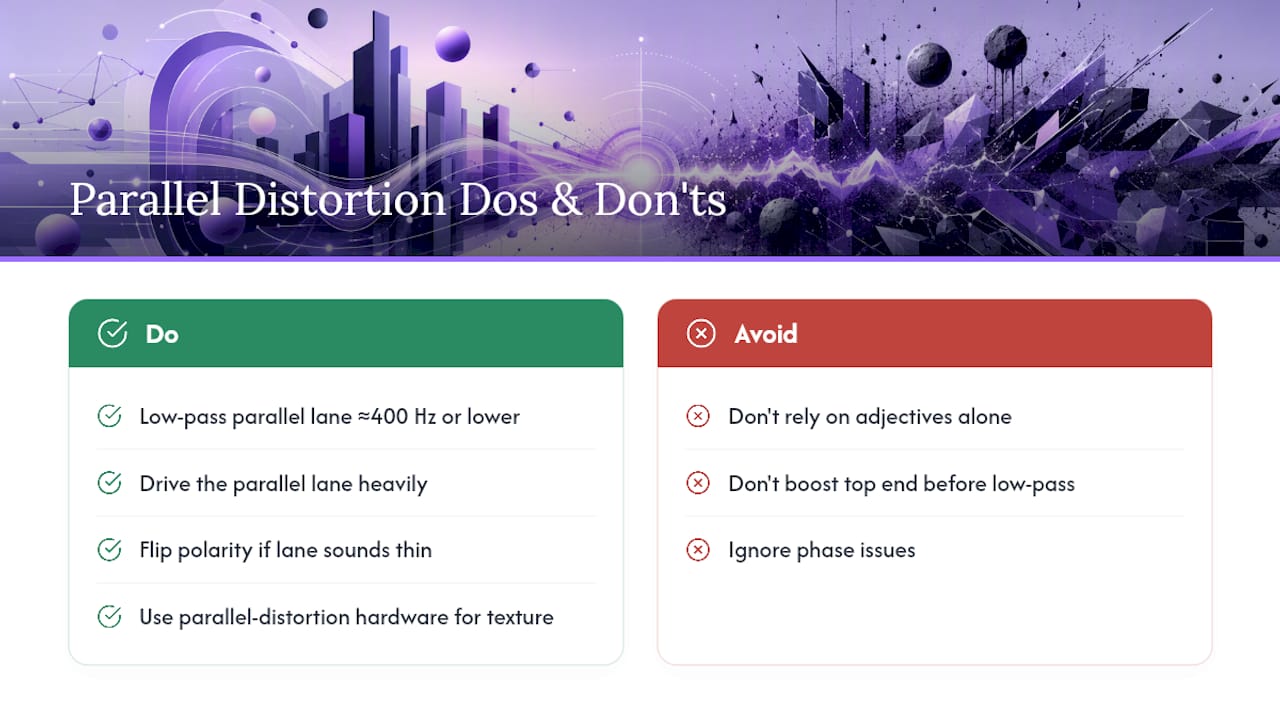
For bass and 808s specifically, The Pro Audio Files describes heavily distorting the parallel lane and low-passing it around 400 Hz or lower, which reinforces upper harmonics for small-speaker translation without introducing fizz. That low-pass step matters more than the distortion type. You can run an almost destroyed signal through it and still end up with something usable once the top end is gone.
Pro Tip: If the parallel lane sounds thin no matter how hard you push the drive, try flipping polarity before reaching for more distortion. A phase issue disguises itself as a level problem more often than you'd think.
Some engineers use dedicated hardware, like parallel-distortion pedals that blend two separate distortion circuits internally, to get hybrid textures a single plugin can't replicate.
Fixing Parallel Distortion Problems: Phase, Mud, and Harshness
Most parallel distortion failures come down to four repeat offenders: the parallel lane pushed too loud in the blend, EQ applied before the distortion instead of after, an unchecked polarity mismatch, or harsh upper harmonics nobody filtered out.
- Solo the parallel lane on its own and listen for offending frequencies before blending back in.
- Flip polarity and A/B both positions; trust your ears over assumption.
- Low-pass bass-focused lanes around 400-800 Hz if things sound muddy in context.
- Bypass everything periodically and compare against the untouched original in mono.
Guides on fixing this exact problem consistently point to phase and polarity checks as the first troubleshooting step, before touching EQ or drive at all.
How Parallel Distortion Preserves Transients: A DSP Note
Distortion reduces crest factor. It clips peaks, which is functionally similar to compression even though the mechanism differs, and that's why an inline distorted signal often loses its punch. Running distortion on a parallel lane doesn't change that physics. It sidesteps it, because the dry path retains its original, undistorted crest factor while the parallel path supplies harmonic density.
Extreme drive settings raise the risk of aliasing, especially with clipping-style distortion, so oversampling the parallel lane or filtering aggressively afterward keeps artifacts from becoming audible. Latency from oversampling is usually negligible on a return track since you're not tracking through it live.
Parallel routing doesn't defeat the math of distortion. It just keeps a clean reference signal in the mix so the math only affects half the picture.
Pro Tip: If your plugin offers an oversampling toggle, turn it on for the parallel lane specifically when you're driving distortion hard. You'll hear fewer harsh, aliased overtones creeping into the top end.
A Mixing Engineer's Take on When to Break the Rules
My favorite target is always bass. Pads run a close second, especially when I want a riser. Push a static pad through heavy parallel distortion, low-pass what comes out, and automate the blend up over eight bars. It stops sounding like a pad and starts sounding like tension building toward a drop.
Try Parallel Distortion With Per-Lane Control Built In
Most of the routing described above requires juggling multiple aux tracks, sends, and plugin instances just to get one parallel distortion pass working cleanly. Vector-dsp built ToneLab around a multi-lane parallel architecture specifically so you skip that setup. Each lane gets its own EQ, its own drive character, and its own blend control, all inside a single plugin instance instead of a tangle of aux returns.

That means the bass recipe, the snare recipe, and the vocal recipe from this guide can each live on their own lane, dialed in independently, without eating your session's CPU or your patience. If you've been routing parallel distortion manually and want to see what per-lane EQ control feels like, download the ToneLab demo and load it on your next drum bus.
Frequently Asked Questions
Is parallel distortion the same as parallel saturation? They overlap but aren't identical. Saturation typically means gentler harmonic coloring, while distortion pushes further into aggressive clipping and waveform reshaping. Both use the same parallel routing principle.
How is parallel distortion different from parallel compression? Parallel compression blends a heavily compressed duplicate to add sustain and density without losing transient punch. Parallel distortion does something similar but adds harmonics and grit instead of just dynamic control. Use compression when you want body; use distortion when you want character.
Can I use parallel distortion on a full mix bus? Yes, but apply it lightly. A subtle parallel saturation pass on the master bus can add energy, though pushing it too far there flattens the punch you've worked to preserve everywhere else.
Does parallel distortion cause phase issues? It can, especially if the distorted lane introduces latency or phase shift relative to the dry signal. Always check polarity and listen in mono before finalizing the blend.
Sources
- The Advantages of Parallel Processing — Yamaha Hub
- 4 Effective Ways to Use Parallel Processing in a Mix — The Pro Audio Files
- How to give your drums an extra crunch with parallel distortion in Logic Pro — MusicTech
- Q&A: Parallel Distortion — The Self-Recording Band