MIDI Processing Plugins for Producers: 2026 Guide
MIDI Processing Plugins for Producers: 2026 Guide

MIDI processing plugins are software tools that modify or generate MIDI data before it reaches an instrument or sound generator, affecting notes, velocity, timing, and pitch. Unlike audio effects, they never touch the actual sound. They reshape the musical instructions sent to your synths and samplers. Tools like Cthulhu, Scaler 2, and built-in DAW MIDI FX slots all fall into this category. Understanding what MIDI processing plugins do gives you a fundamentally different kind of creative control, one that operates at the compositional level rather than the sonic one.
What is MIDI processing plugins: core definition and function
MIDI processing plugins sit in the signal chain before your virtual instrument or hardware synth. They intercept the MIDI messages coming from your keyboard, sequencer, or DAW, transform them according to their internal logic, and pass the altered messages downstream. The instrument then plays whatever the plugin tells it to, not what you originally played or programmed.
This distinction matters more than most producers realize. When you play a single note into Cthulhu, it outputs a full chord voicing to your synth. When you run a sequence through Scaler 2, it constrains every note to a chosen key and scale. The instrument never knows the difference. It simply receives and plays the modified MIDI stream.
MIDI FX run in real time on incoming MIDI and can reshape performance or sequence inputs into entirely new note, chord, or rhythm patterns. That real-time capability is what makes them so powerful for live performance and studio composition alike. You can automate their parameters mid-session and watch your arrangement evolve without touching a single note in the piano roll.
The audio plugin ecosystem treats MIDI FX as a distinct plugin type, separate from instruments and audio effects, and most modern DAWs provide dedicated MIDI FX slots to reflect that separation.
How do MIDI plugins work under the hood?
The core mechanism behind MIDI processing plugins is the processBlock method. JUCE tutorials demonstrate that a MIDI FX plugin receives a buffer of incoming MIDI messages, iterates through each event, modifies the relevant data fields such as note number, velocity, or channel, and writes the results to a new output buffer. That output buffer then replaces the original before being passed to the next plugin or instrument in the chain.
The reason plugins write to a new buffer rather than editing the original in place is stability. Modifying a buffer while iterating through it causes concurrency errors and unpredictable behavior. Creating a separate output buffer and swapping it with the input is the standard best practice for plugin stability in frameworks like JUCE.
Timing is the other critical variable. Incorrect scheduling of MIDI events across a buffer timeline can cause latency or timing drift. Some DAW hosts post all MIDI events at sample position zero within a buffer. Others distribute events across the buffer timeline with sample-accurate timestamps. A well-built MIDI FX plugin handles both cases without drifting off the beat.
Pro Tip: When chaining multiple MIDI FX plugins, watch for hosts that collapse all events to position zero. If your groove feels slightly off after adding a plugin, check whether the host is flattening your event timestamps and look for a plugin setting that compensates for it.
What are the common types of MIDI processing plugins?
Common MIDI FX include arpeggiators, chord generators, scale quantizers, randomizers, velocity modifiers, and transposers. Each type solves a specific creative or technical problem in production.
- Arpeggiators take held notes and output them as a rhythmic sequence. Kirnu Cream is a dedicated arpeggiator plugin with deep pattern editing and MIDI output routing.
- Chord generators expand single notes into full chord voicings. Cthulhu by Xfer Records is the go-to example, turning one finger into rich harmonic stacks.
- Scale quantizers snap incoming notes to a chosen scale, eliminating wrong notes in real time. Scaler 2 by Plugin Boutique handles both scale locking and chord progression suggestions.
- Randomizers and humanizers introduce controlled variation to velocity, timing, or note selection. They make programmed sequences feel less mechanical.
- Velocity modifiers compress, expand, or remap the velocity curve of incoming notes, shaping how hard or soft the instrument responds.
- Transposers shift notes by semitones or octaves, useful for live key changes or layering the same part at multiple pitches.
MIDI FX can also remap controller messages (CC), split or layer MIDI channels, and convert between different MIDI event types. This expands their usefulness well beyond simple note manipulation.
| Plugin Type | Example Tool | Primary Use |
|---|---|---|
| Arpeggiator | Kirnu Cream | Rhythmic note sequences from held chords |
| Chord Generator | Cthulhu (Xfer Records) | Expand single notes into chord voicings |
| Scale Quantizer | Scaler 2 (Plugin Boutique) | Lock notes to a key or scale in real time |
| Humanizer | MIDI Shaper | Add velocity and timing variation to sequences |
| Transposer | DAW built-in tools | Shift pitch by semitone or octave |
| CC Remapper | MIDImod | Reroute controller data between devices |
How are MIDI FX different from audio effects?
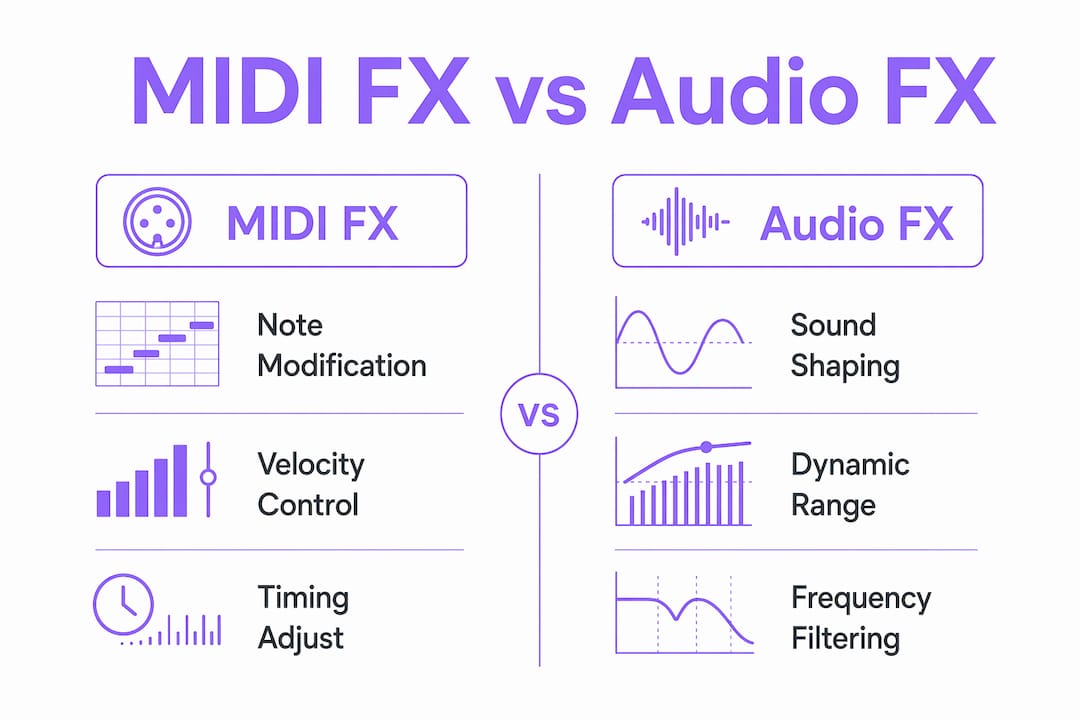
The clearest way to understand the difference is to think about what gets processed. MIDI FX process musical instructions before any sound is generated. Audio effects process the resulting sound after an instrument has already converted those instructions into audio. These are two completely separate stages in the signal chain.
A compressor on your synth channel shapes the dynamics of the audio waveform. A velocity modifier in the MIDI FX slot shapes the dynamics of the MIDI instructions that tell the synth how hard to play each note. Both affect perceived loudness, but they operate at different points and produce different results. The distinction between processing musical data versus audio signals clarifies their complementary roles in any production setup.
| Feature | MIDI FX | Audio Effects |
|---|---|---|
| Data processed | MIDI messages (notes, velocity, CC) | Audio waveforms |
| Chain placement | Before the instrument | After the instrument |
| Examples | Arpeggiator, scale quantizer, chord generator | Reverb, compressor, EQ |
| Destructive to audio | No | Can be (when printed) |
| Works with hardware synths | Yes, via MIDI routing | Only after audio output |
MIDI FX are non-destructive by nature. Because they modify instructions rather than audio, you can remove or bypass them at any point and the underlying MIDI data remains untouched. This makes them ideal for experimentation. You can try a completely different harmonic approach by swapping one scale quantizer for another without reprinting anything.
Hardware synth users benefit significantly from MIDI FX. You can run a MIDI FX plugin in your DAW, route the output to a hardware synth via a MIDI interface, and the synth plays the transformed sequence as if you had programmed it manually. Understanding plugin format differences like VST3, AU, and AAX matters here because not every format supports MIDI FX output to external devices equally well.
Practical workflow tips for using MIDI processing plugins
Getting MIDI FX into your workflow requires understanding how your DAW handles them. Logic Pro, Ableton Live, and Reason each approach MIDI FX slots differently, and those differences affect how you build your chains.
- Logic Pro has dedicated MIDI FX slots above the instrument in the channel strip. You can stack multiple MIDI FX plugins and they process in order from top to bottom.
- Ableton Live supports Max for Live MIDI effects natively and places them before the instrument in the device chain. Third-party MIDI FX plugins load as instruments with MIDI output routing.
- Reason uses a Rack Plugin format. Reason Rack Plugin automatically receives MIDI from the host track by default, but the effect variant will not receive MIDI if another plugin sits before it in the chain.
For DAWs without native MIDI FX support, MIDI Player Pro solves the problem directly. It is a 64-bit VST2, VST3, and AU plugin host that chains up to 8 MIDI FX plugins in a rack, supports tempo sync, and can turn MIDI FX plugins into standalone applications. It handles the routing complexity so you can focus on the creative side.
Pro Tip: Always check plugin order before troubleshooting a MIDI FX that seems unresponsive. In many DAWs, a MIDI FX plugin placed after an instrument in the chain will not receive MIDI input. Move it before the instrument and the issue resolves immediately.
Routing MIDI FX to hardware synths adds one more step. You need a MIDI output track in your DAW set to the correct hardware port and channel. Place your MIDI FX plugins on the source track, then route the MIDI output to the hardware track. The synth receives the processed MIDI stream exactly as it would from a software instrument. For deeper reading on why producers use audio plugins in general, the principles that apply to audio FX apply equally to MIDI FX in terms of workflow integration.
Key takeaways
MIDI processing plugins give producers compositional control that audio effects cannot replicate, because they transform musical instructions before any sound is generated.
| Point | Details |
|---|---|
| Definition is precise | MIDI FX modify note, velocity, and timing data before it reaches an instrument. |
| Signal chain placement matters | MIDI FX must sit before the instrument in the chain to function correctly. |
| Six core plugin types | Arpeggiators, chord generators, scale quantizers, humanizers, transposers, and CC remappers each serve distinct creative roles. |
| Non-destructive by design | Removing or bypassing a MIDI FX plugin leaves the original MIDI data completely intact. |
| DAW behavior varies | Logic Pro, Ableton Live, and Reason handle MIDI FX slots differently, and plugin order errors are the most common cause of MIDI FX failures. |
Why MIDI FX changed how i think about composition
The first time I dropped Scaler 2 into a Logic Pro MIDI FX slot and played a single note that came out as a perfectly voiced chord in the right key, I stopped thinking about MIDI FX as a convenience tool. They are a compositional instrument in their own right.
What most producers miss is that MIDI FX work best when you automate their parameters. A scale quantizer locked to C minor for eight bars, then switched to C Dorian on the drop, creates a harmonic shift that feels intentional and musical without a single note being redrawn in the piano roll. That kind of live, parameter-driven composition is where MIDI FX genuinely separate themselves from anything you can do with audio effects.
The compatibility quirks are real and worth knowing upfront. Ableton Live's handling of third-party MIDI FX is less direct than Logic Pro's dedicated slots, and Reason's routing rules catch people off guard regularly. Spend thirty minutes learning your DAW's specific MIDI FX architecture before you build a complex chain. That investment pays back immediately.
My honest recommendation: start with a humanizer or velocity modifier before you reach for an arpeggiator. Learning to shape the feel of what you already play builds a stronger foundation than generating new patterns from scratch. Once you understand how MIDI FX modify your input, the generative tools become far more controllable.
— Kai
Explore MIDI and audio processing with Vector-dsp

Vector-dsp builds professional-grade audio software for producers who want precise control over every stage of their signal chain. The ToneLab plugin suite is designed with the same DSP rigor that applies to MIDI and audio processing, built for VST3, AU, and AAX formats and tested for real-time performance with low latency. If you are building a production setup where signal chain precision matters, Vector-dsp's tools are worth a close look. Visit Vector-dsp to see the full range of plugins in development and learn how their DSP-first approach translates into tools you can actually rely on in a session.
FAQ
What is a MIDI processing plugin?
A MIDI processing plugin is a software tool that modifies MIDI data, including notes, velocity, timing, and controller messages, before that data reaches an instrument or sound generator. It sits in the signal chain ahead of the instrument and outputs altered MIDI messages for playback.
How do MIDI plugins work in a DAW?
MIDI plugins receive a buffer of incoming MIDI events, process each event inside a processBlock method, and pass a modified buffer to the next plugin or instrument in the chain. The host DAW manages timing and routing between plugins.
What is the difference between MIDI FX and audio effects?
MIDI FX process musical instructions before sound is generated. Audio effects process the resulting audio waveform after the instrument has played. Both affect the final sound, but they operate at completely different stages of the signal chain.
Which daws support MIDI processing plugins natively?
Logic Pro supports MIDI FX in dedicated slots above the instrument. Ableton Live supports Max for Live MIDI effects natively. Reason handles MIDI FX through its Rack Plugin format with specific routing rules that affect plugin order.
Can MIDI FX plugins work with hardware synths?
Yes. You route the MIDI output from a MIDI FX plugin in your DAW to a MIDI output track set to your hardware synth's port and channel. The synth receives the processed MIDI stream and plays it exactly as it would from a software instrument.