Console Emulation DSP Explained for Audio Engineers
Console Emulation DSP Explained for Audio Engineers
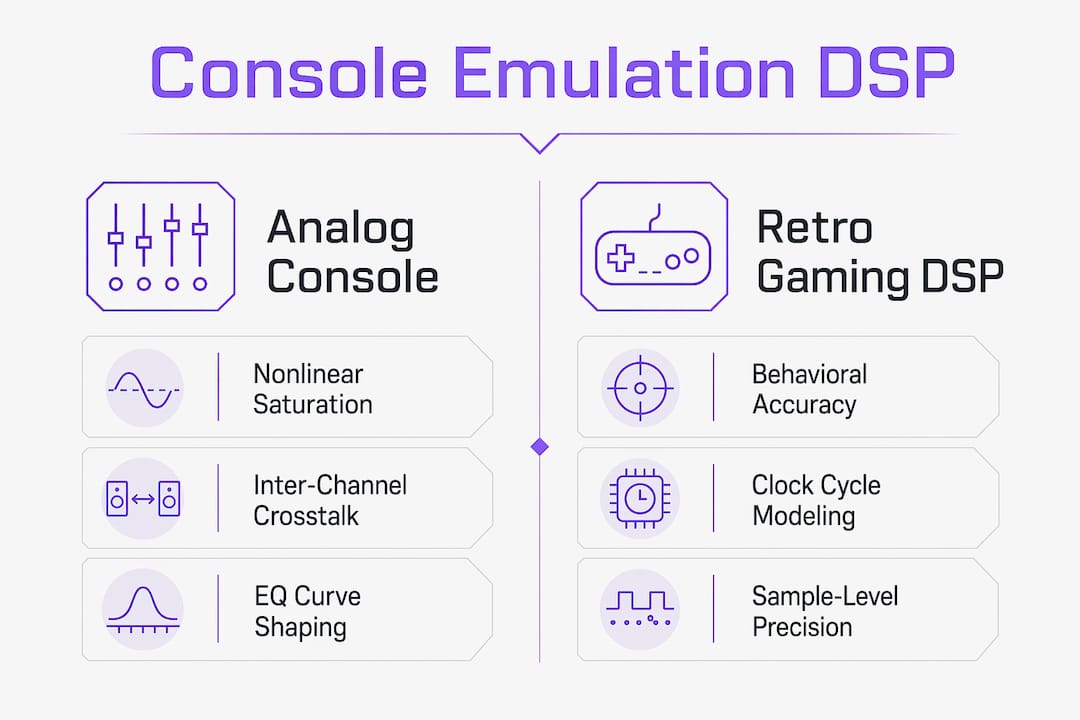
Console emulation DSP is defined as digital signal processing technology that recreates the sonic characteristics of analog mixing consoles or retro gaming audio hardware through mathematical algorithms. The term covers two distinct domains: studio console emulation, which models the warmth, saturation, and crosstalk of classic analog boards, and retro gaming sound chip emulation, which reconstructs the exact waveform behavior of vintage hardware like the SNES Audio Processing Unit. Both rely on the same foundational DSP techniques, including filtering, convolution reverb, and nonlinear saturation, but their goals and implementations differ sharply. For audio engineers and music producers, understanding what is console emulation DSP means knowing which domain you are working in and which algorithms drive the results you hear.
What is console emulation DSP and how does it work?
Console emulation DSP is the application of mathematical DSP operations such as filtering, convolution reverb, and nonlinear saturation to audio signals in real time. These operations run inside a processing buffer, typically within a 5–20ms window, to prevent audible glitches like clicks and pops. Each algorithm targets a specific sonic characteristic: low-pass filters simulate the high-frequency roll-off of aging analog circuits, convolution reverb captures the room acoustics of a physical console room, and nonlinear saturation adds the harmonic distortion that gives analog gear its perceived warmth.
The real-time constraint is what separates console emulation DSP from offline audio rendering. A plugin running in a DAW must compute every sample within the buffer window or the audio chain breaks. That constraint forces developers to write highly efficient code, often in C++ or Rust, and to make deliberate tradeoffs between algorithm complexity and CPU cost.

| DSP Algorithm | Function | Role in console emulation |
|---|---|---|
| Low-pass filter | Attenuates high frequencies | Simulates analog circuit bandwidth limits |
| Convolution reverb | Applies impulse response to signal | Recreates room acoustics of console environments |
| Nonlinear saturation | Adds harmonic distortion | Models analog warmth and soft clipping |
| High-pass filter | Removes low-frequency content | Emulates transformer coupling behavior |
| Inter-channel crosstalk | Bleeds signal between channels | Replicates analog console channel interaction |
Pro Tip: When choosing buffer sizes for console emulation plugins, start at 128 samples and increase only if you hear CPU-related artifacts. Smaller buffers reduce latency but raise CPU load, so find the floor your system can sustain before committing to a session template.
Vector-dsp's work on DSP algorithm design shows how nonlinear distortion profiles and inter-channel crosstalk are the primary contributors to the characteristic sound of analog consoles. Getting those two elements right is more impactful than any other single algorithm choice.
How do analog console emulation and retro gaming DSP differ?
Console emulation in DSP covers two fundamentally different applications: emulating the hardware sound chips of retro gaming consoles, and simulating the signal path of analog mixing consoles. Confusing the two leads to wrong tool choices and wasted session time.
Analog mixing console emulation
Analog console emulation focuses on the nonlinear behavior of physical signal paths. The DSP models distortion curves, EQ response shapes, and the subtle bleed between adjacent channels known as crosstalk. The goal is perceptual: the output should sound like it passed through a Neve, SSL, or API-style board, with the density and glue those circuits produce. The nonlinear distortion and crosstalk are the defining technical targets, not clock accuracy or register state.
Retro gaming sound chip emulation
Retro console DSP emulation is a different problem entirely. Here, the goal is behavioral accuracy. The emulator must model the exact register states, clock cycles, and DAC artifacts of the original hardware. The SNES Audio Processing Unit is a well-documented example: its real-world sample rate averages around 32,076 Hz rather than the specified 32,000 Hz, because ceramic resonator degradation causes clock drift over time. An emulator that ignores this detail will run audio slightly fast, shifting pitch and game timing in ways that dedicated players immediately notice.
Accurate vintage sound chip emulation requires cycle-accurate or sample-accurate methods, often built with specialized libraries like Blip Buffer or FAUST and written in C++ or Rust for precise timing control.
| Domain | Primary goal | Key DSP techniques | Main challenge |
|---|---|---|---|
| Analog console emulation | Perceptual warmth and density | Nonlinear saturation, crosstalk, EQ curves | Accurate distortion modeling |
| Retro sound chip emulation | Behavioral hardware accuracy | Clock modeling, waveform synthesis, DAC artifacts | Clock precision and drift |
Common pitfalls engineers encounter when mixing up these two approaches:
- Applying retro chip emulation plugins to a mix bus expecting analog console warmth, and getting harsh digital artifacts instead
- Using analog console emulation on game audio expecting authentic 16-bit character, and losing the waveform accuracy that defines the retro sound
- Overlooking clock drift compensation in retro emulation, causing subtle pitch and timing errors that accumulate over long audio sequences
- Treating both domains as interchangeable in plugin chains, which produces phase and saturation conflicts that are difficult to diagnose
What latency and hardware factors affect DSP emulation performance?
Buffer size is the single most controllable variable in console emulation DSP performance. Buffer sizes between 5–20ms are standard for real-time audio work. Smaller buffers cut latency but raise CPU load, which increases the risk of dropouts when running multiple emulation plugins simultaneously. Larger buffers reduce CPU strain but introduce monitoring delay that makes live tracking impractical.
Hardware plays an equally important role. DSP hardware acceleration offloads compute-heavy tasks from the CPU, improving real-time performance without sacrificing audio quality. Audio interfaces with onboard DSP chips handle certain processing tasks at the hardware level, freeing the host CPU for more complex plugin chains. The quality of the audio interface's clock also matters: jitter in the word clock signal introduces timing errors that interact badly with saturation and convolution algorithms.
Spectral processing represents the current frontier of console-style DSP. It enables content-aware transformations like source isolation and timbral morphing that go beyond what time-domain filters can achieve. The tradeoff is latency: spectral processing can add 10–21ms of algorithmic delay, which is acceptable for mixing and mastering but problematic for interactive audio or live monitoring.
Practical steps to manage latency in console emulation workflows:
- Set your DAW buffer to the lowest stable size during tracking, then raise it for mixing when real-time monitoring is less critical
- Use your audio interface's direct monitoring path for zero-latency input monitoring instead of routing through plugin chains
- Check your hardware vs. software processing options before adding more emulation plugins to a session
- Freeze or print tracks running CPU-heavy emulation plugins to free resources for active channels
- Monitor CPU load in real time and set a personal ceiling at 70–75% to leave headroom for transient spikes
Pro Tip: Print your console emulation processing to audio before final mixing. This removes the real-time CPU burden, locks in the saturation and crosstalk character you dialed in, and prevents plugin state changes from affecting the mix later.
How is console emulation DSP used in audio production and gaming?
Console emulation DSP delivers practical value in two professional contexts: studio mixing and mastering, and game audio design. In the studio, emulation plugins add the density and harmonic character of classic analog boards to digital sessions. A mix bus processed through an analog console emulation plugin gains the inter-channel glue and soft saturation that makes individual tracks feel like they belong together. Mastering engineers use the same tools to add weight and presence to a final stereo bus without the cost or maintenance of physical hardware.
In game audio, DSP emulation serves a different purpose. Retro game developers and audio designers use sound chip emulation to preserve the authentic character of classic platforms. A chiptune composer working in the style of early Nintendo or Sega hardware needs accurate waveform synthesis and register modeling, not analog warmth. The audio interface's role in elevating sound quality extends to game audio pipelines as well, where low-latency monitoring and accurate playback are non-negotiable.
Top benefits and usage scenarios for audio engineers working with console emulation DSP:
- Mix bus density. Running a full mix through an analog console emulation plugin adds harmonic glue that individual channel processing cannot replicate.
- Saturation on individual tracks. Applying nonlinear saturation to drums, bass, or vocals adds presence and controls transient peaks without obvious compression artifacts.
- Retro game audio authenticity. Sound chip emulation preserves the exact waveform character of vintage hardware for games targeting a classic aesthetic.
- Room acoustics via convolution reverb. Impulse responses captured from real console rooms let you place a mix in a specific acoustic space with high accuracy.
- Workflow speed. A well-designed emulation plugin chain replaces hours of hardware patching with a repeatable, recallable digital session.
Key Takeaways
Console emulation DSP covers two distinct domains, and knowing which one you are working in determines every algorithm and tool choice that follows.
| Point | Details |
|---|---|
| Two separate domains | Analog console emulation targets perceptual warmth; retro chip emulation targets behavioral hardware accuracy. |
| Core algorithms | Filtering, convolution reverb, and nonlinear saturation are the three foundational DSP operations in console emulation. |
| Buffer size tradeoff | Buffers of 5–20ms balance latency and CPU load; smaller buffers cut delay but raise dropout risk. |
| Clock accuracy matters | Retro DSP emulation requires precise clock modeling; even small drift errors shift pitch and timing. |
| Hardware acceleration helps | Offloading DSP to dedicated hardware chips frees CPU headroom for complex emulation plugin chains. |
Why the distinction between these two domains is the most underrated skill in DSP work
Most articles on console emulation DSP treat the topic as a single category. That framing causes real problems in practice. I have seen experienced engineers load a retro chip emulation plugin onto a mix bus, hear something harsh and digital, and conclude that "emulation plugins don't work." What actually happened is a domain mismatch. The tool was built for behavioral accuracy, not perceptual warmth. Those are genuinely different engineering problems.
The more I work with DSP design, the more I believe that the algorithm complexity conversation is secondary to the domain clarity conversation. You can have a technically excellent nonlinear saturation model and still get the wrong result if you are applying it to a problem that requires clock-accurate waveform synthesis. The reverse is equally true.
Spectral processing is where I see the most exciting development right now. The ability to do content-aware transformations, isolating and reshaping specific timbral elements rather than processing the whole signal, opens up console emulation approaches that were not practical even five years ago. The latency cost is real and you have to manage it deliberately. But for mixing and mastering contexts where you are not monitoring live, that tradeoff is worth making.
My practical advice: before you load any emulation plugin, decide which domain you are in. If you want analog density and warmth, look for tools built around nonlinear distortion and crosstalk modeling. If you want authentic retro character, look for tools built around cycle-accurate waveform synthesis. Vector-dsp's DSP concepts resource is a solid starting point for building the vocabulary to tell the difference.
— Kai
Vector-dsp: professional DSP tools built for this level of work

Vector-dsp builds professional audio plugins grounded in the same DSP principles covered in this article. The company's focus on real-time performance, low-latency architecture, and intentional algorithm design means its tools are built for engineers who understand the difference between analog console emulation and retro chip modeling. Vector-dsp supports VST3, AU, and AAX formats, covering the full range of professional DAW environments. If you are ready to apply these concepts in your own sessions, the Vector-dsp plugin catalog is the place to start.
FAQ
What is console emulation DSP in simple terms?
Console emulation DSP is digital signal processing that recreates the sound of either an analog mixing console or a retro gaming sound chip using mathematical algorithms. The two applications have different goals and require different technical approaches.
How does buffer size affect console emulation DSP?
Buffer sizes between 5–20ms are standard for real-time console emulation. Smaller buffers reduce monitoring latency but increase CPU load, raising the risk of audio dropouts during complex plugin sessions.
What DSP algorithms are used in analog console emulation?
Analog console emulation relies primarily on nonlinear saturation, inter-channel crosstalk modeling, and EQ curve shaping. These three algorithms recreate the harmonic density and signal interaction that define the sound of classic analog boards.
Why does clock accuracy matter in retro console DSP emulation?
Retro sound chip emulation requires precise clock modeling because real hardware clocks drift over time. The SNES Audio Processing Unit, for example, runs at roughly 32,076 Hz rather than its specified 32,000 Hz, and ignoring that drift causes pitch and timing errors in the emulated output.
What is spectral processing and how does it relate to console emulation DSP?
Spectral processing is an advanced DSP technique that enables content-aware audio transformations beyond standard time-domain filtering. It can add 10–21ms of algorithmic delay, making it better suited for mixing and mastering than for live monitoring or interactive game audio.