CI audio plugins explained: a guide for producers
CI audio plugins explained: a guide for producers
Continuous integration audio plugins explained is a topic that trips up even experienced audio developers. Most producers and engineers hear “CI” and picture software teams pushing code, not plugin chains in a DAW. But if you work with audio plugin development, whether you’re building tools or demanding the most from them, understanding CI with audio is the difference between shipping stable, high-performance plugins and discovering catastrophic bugs mid-session. This guide walks through CI pipelines, real DAW simulation, ARA integration, and audio quality regression checks so you can apply these concepts immediately.
Table of Contents
-
Leveraging Audio Random Access (ARA) for enhanced plugin integration
-
Implementing audio quality regression checks in CI pipelines
-
The overlooked power of quality gates and real host simulation in audio plugin CI
-
Explore advanced audio plugins and solutions with Vector DSP
Key Takeaways
| Point | Details |
|---|---|
| CI in audio plugins | Continuous integration automates building and testing audio plugins on every code change to catch problems early. |
| Realistic test simulation | Simulating real DAW behavior during CI uncovers performance and stability issues before release. |
| ARA integration | Audio Random Access lets plugins process entire clips, speeding up editing and reducing processing overhead. |
| Audio quality gates | Using measurable audio metrics in CI detects subtle quality regressions, not just functional bugs. |
| Batch processing workflows | CLI-based batch audio processing fits CI/CD pipelines for consistent, scalable audio production outside DAWs. |
What continuous integration means for audio plugins
CI is not a deployment tool. It is an automated quality enforcement system that runs the moment a developer commits code. For audio plugin development specifically, that means every change to the DSP algorithm, the GUI, or the plugin wrapper triggers a cascade of checks before anything reaches your session.
Every code change triggers automated builds and tests designed to catch breakages before a plugin ever loads in a DAW. That is the core promise of CI for audio software: problems surface in the pipeline, not in your mix.
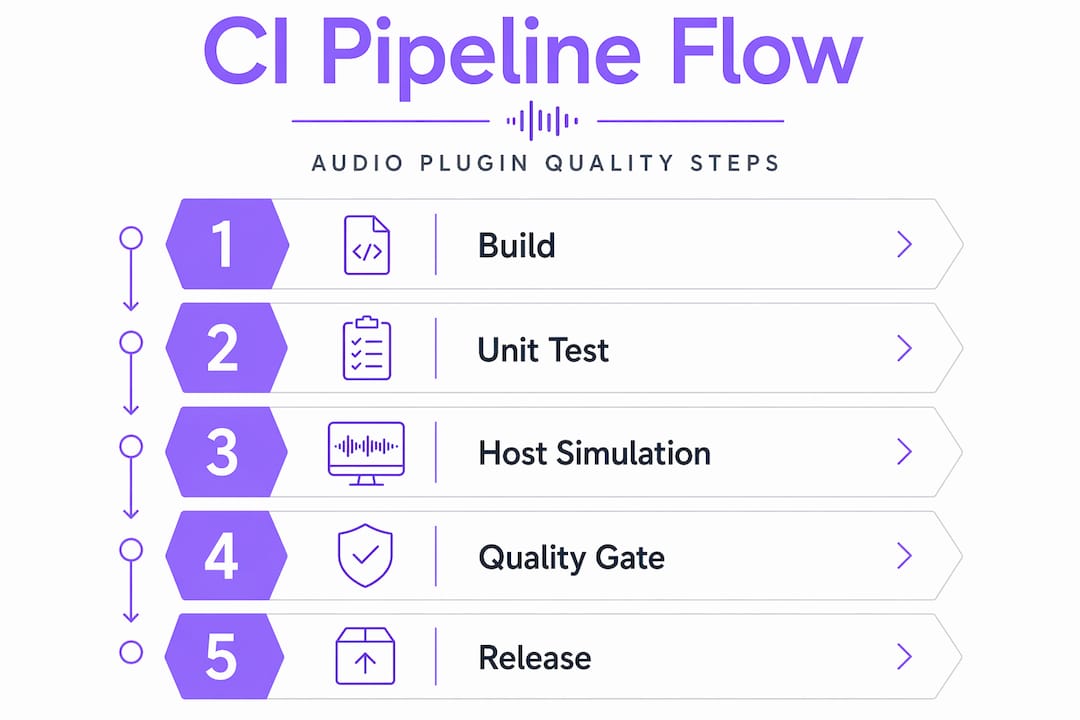
Here is what a well-structured CI pipeline for audio software typically covers:
-
Automated builds across platforms: Compiling VST3, AU, and AAX binaries for Windows and macOS simultaneously, so a change that breaks one format is caught immediately.
-
Cross-platform compatibility tests: Verifying that the plugin initializes, processes audio, and shuts down cleanly on every supported OS version.
-
Static analysis: Scanning code for memory errors, thread safety violations, and undefined behavior before they become real-time audio glitches.
-
Documentation and metadata builds: Ensuring that parameter names, preset files, and plugin manifests stay consistent with the codebase.
-
Gated publishing: Releases only go out after every CI check passes, so producers never receive a build that failed internal validation.
The practical result for you as a producer or engineer is that plugins built on solid CI pipelines arrive more stable, crash less, and behave predictably across DAWs. Audio software integration techniques built on CI are not optional polish. They are the foundation of trustworthy tools.
Simulating real DAW environments to test plugin performance
Unit tests tell you a function returns the right value. They do not tell you whether your plugin survives 45 minutes of heavy automation, a rapid patch switch mid-playback, or a DAW that calls the audio callback from an unexpected thread. That gap is where real DAW simulation becomes essential in any CI pipeline for audio software.
One 2026 VST3 repository implements a CI-ready automated test host that simulates DAW behavior and enforces timing-based performance thresholds. This is the model worth studying.
A proper simulation-based test suite for integrating plugins with CI runs scenarios like these, in order of complexity:
-
Load and unload cycles: The plugin is instantiated and destroyed repeatedly to expose memory leaks.
-
Activation and deactivation: The host activates the plugin, sets sample rate and block size, then deactivates it, mimicking what happens when a DAW stops and restarts playback.
-
Audio block processing: Actual audio buffers are fed through the DSP chain and outputs are validated against expected values.
-
Rapid open/close sequences: The GUI is opened and closed in rapid succession to catch threading issues in the editor component.
-
Long-running sessions: The plugin processes audio continuously for an extended period to surface gradual memory growth or state corruption.
The table below shows how basic unit testing compares to full host simulation in terms of what each approach actually catches:
| Test type | What it catches | What it misses |
|---|---|---|
| Unit tests | Logic errors, math bugs | Thread safety, DAW timing issues |
| Host simulation | Race conditions, memory leaks | Platform-specific driver behavior |
| Stress tests | Gradual degradation, state corruption | Edge cases in specific DAW implementations |
| Integration tests | Cross-component failures | User interaction patterns |
Pro Tip: When setting performance thresholds in your CI pipeline, base them on actual measurements from a reference DAW session at your target buffer size, not arbitrary numbers. A threshold of 2ms for a 128-sample buffer at 48kHz is grounded in reality. A threshold of “under 10ms” is not.
Stress testing is where the most dangerous bugs live. Race conditions in audio plugins are notoriously difficult to reproduce manually because they depend on thread scheduling that varies by machine and load. CI stress tests, running hundreds of iterations automatically, surface these issues reliably.
Leveraging Audio Random Access (ARA) for enhanced plugin integration
Traditional plugin processing is reactive. The DAW calls your plugin with a buffer, you process it, you return. ARA (Audio Random Access) flips that model entirely. Instead of waiting for the host to push audio at you, the plugin pulls the audio it needs, when it needs it, from anywhere on the timeline.
ARA gives plugins direct access to entire timeline audio, enabling clip-wide processing and syncing with DAW edits in real time. For tasks like stem separation, noise reduction, and complex audio cleanup, this is a fundamental shift in what is possible.
The benefits for continuous integration in music production workflows are significant:
-
Instant update propagation: When a user trims a clip, the ARA plugin knows immediately and can reprocess only the affected region, not the entire file.
-
Clip-based caching: Results are stored per clip, so switching between processing models or parameter states does not require reprocessing audio you have already analyzed.
-
Background analysis: ARA plugins can analyze audio before playback reaches that point in the timeline, eliminating the latency that traditional real-time processing imposes on complex algorithms.
-
Tighter DAW synchronization: Tempo changes, pitch shifts, and edit boundaries are communicated directly to the plugin, keeping processing results accurate without manual refresh.
Pro Tip: If you are evaluating a plugin that uses machine learning models for noise reduction or stem separation, ARA support is not a luxury feature. It is what separates a tool you can actually use in a session from one you render offline and forget about.
The one constraint worth knowing: ARA requires explicit DAW support. If the host does not implement the ARA SDK, the plugin falls back to traditional real-time processing. Most modern professional DAWs support it, but always verify before building a workflow that depends on clip-based caching.
Implementing audio quality regression checks in CI pipelines
Functional CI testing answers “does the plugin load and process audio without crashing?” Audio quality regression testing answers a harder question: “does it still sound right?” These are not the same question, and treating them as equivalent is one of the most common gaps in audio software integration techniques.
Bounce-house CLI measures 26 audio metrics with pass, warn, and fail thresholds specifically designed for CI audio quality regression detection. That kind of multi-metric analysis is what separates a meaningful quality gate from a green checkmark on a build log.
Here is how to implement audio quality regression checks in a CI pipeline for audio software:
-
Render reference outputs: For each plugin preset or algorithm configuration, render a known audio file through the plugin and store the output as a reference.
-
Define metric thresholds: Set machine-readable pass, warn, and fail values for metrics like integrated loudness (LUFS), spectral centroid, stereo width, and true peak.
-
Run batch analysis on every build: After each code change, re-render the same audio through the updated plugin and measure the same metrics.
-
Compare against reference: Flag any metric that falls outside the defined threshold as a regression, blocking the release until resolved.
The table below illustrates what a practical metric threshold configuration looks like:
| Metric | Pass | Warn | Fail |
|---|---|---|---|
| Integrated loudness | Within 0.3 LUFS | 0.3 to 1.0 LUFS | Over 1.0 LUFS |
| True peak | Under -1.0 dBTP | -1.0 to 0.0 dBTP | Over 0.0 dBTP |
| Stereo width | Within 5% of reference | 5% to 15% deviation | Over 15% deviation |
| Spectral centroid | Within 50 Hz of reference | 50 to 200 Hz deviation | Over 200 Hz deviation |
This approach catches DSP drift, accidental coefficient changes, and mixing algorithm regressions that would otherwise only surface when a producer notices something sounds off in a session.
File-based automation and batch processing outside DAWs
Not every CI application for audio involves a plugin running inside a DAW. Broadcast teams, podcast networks, and post-production houses often need to process hundreds of audio files per day with consistent settings. For these workflows, CLI-based audio tools integrated into CI/CD pipelines are the right model.
Auphonic CLI supports batch audio processing integrated into CI/CD pipelines for normalization and noise reduction at scale. This is the kind of tool that turns a manual, error-prone process into a repeatable, auditable workflow.
The advantages of file-based CI automation for audio production are distinct from DAW plugin testing:
-
No real-time constraints: Batch processing runs as fast as the hardware allows, not at the pace of a 44.1kHz audio clock.
-
Consistent parameter application: Every file in a batch receives identical processing settings, eliminating the variation that comes from manual plugin adjustments.
-
Audit trails: CI pipelines log every processing run, making it possible to trace exactly what settings were applied to any given file.
-
Easy rollback: If a processing update produces undesirable results, reverting to a previous pipeline version is straightforward.
-
Scale without overhead: A CI pipeline can process thousands of files overnight without any manual intervention.
Pro Tip: For teams managing podcast or broadcast audio, combine a CLI batch processor with automated loudness measurement in the same CI job. That way, every output file is both processed and validated against your delivery spec before it leaves the pipeline.
The distinction between CI tools for audio production in DAW contexts and file-based batch contexts matters. DAW plugin CI is about real-time reliability and host compatibility. Batch CI is about consistency and scale. Both are legitimate applications of continuous integration in music production and broadcast workflows.
The overlooked power of quality gates and real host simulation in audio plugin CI
Here is what most articles on best practices for CI in audio get wrong: they treat CI as a checklist. Pass the build. Pass the unit tests. Ship the plugin. That framing misses the point entirely.
The developers who build genuinely reliable audio plugins treat CI as a simulation of reality, not a proof of code correctness. Code can be correct and still produce a plugin that deadlocks under specific DAW threading models, leaks memory after 200 load cycles, or introduces a 0.4 LUFS loudness shift after a seemingly unrelated coefficient change.
Unit tests alone are insufficient; real host simulation and race condition detection are what catch the critical issues that only appear during actual DAW use. This is not a theoretical concern. It is the difference between a plugin that works in a demo and one that holds up in a 10-hour mixing session.
At Vector DSP, we think about CI pipelines the way a structural engineer thinks about load testing. You do not just verify that the design is theoretically sound. You apply real forces and watch what breaks. For audio plugins, those forces are real-time audio callbacks, concurrent GUI and DSP threads, and the unpredictable behavior of host applications that do not always follow the spec.
The other undervalued piece is the audio quality gate. Most CI pipelines in audio development stop at functional correctness. But a plugin that loads, processes, and unloads without errors can still sound wrong. Integrating metric-based quality gates into your pipeline means you catch the subtle regressions, the ones that would only surface when a producer notices that something in the high end changed, before they ever reach a session.
The practical takeaway: design your CI pipeline around the scenarios that will actually kill a session, not just the ones that are easy to automate. Fast DSP unit tests for every commit, host simulation tests on every pull request, and audio quality regression checks before every release. That layered approach is how you implement CI for plugins that producers can trust.
Explore advanced audio plugins and solutions with Vector DSP
Understanding CI principles is one thing. Having access to plugins built on them is another.
At Vector DSP, every plugin in development is built against the exact standards described in this guide: automated builds across VST3, AU, and AAX formats, real-time performance validation, and DSP-level quality checks baked into the development pipeline. If you are a producer or engineer who needs tools that hold up under real session pressure, not just in a demo, Vector DSP is building them with that standard in mind. Explore the lineup and see how rigorous development practices translate directly into tools you can rely on.
Frequently asked questions
What is continuous integration in audio plugin development?
Continuous integration in audio plugin development means automatically testing and building plugins with every code change to catch bugs and performance issues before they reach a DAW session.
How does simulating a real DAW help in plugin testing?
Simulating a real DAW catches timing, activation, and memory issues that only appear during real-time use. A 2026 VST3 test host demonstrates how timing-based thresholds and DAW behavior simulation expose issues unit tests never surface.
What is Audio Random Access (ARA) and why is it important?
ARA is an integration model that gives plugins direct access to timeline audio, enabling clip-wide processing and real-time sync with DAW edits, making complex tasks like noise reduction dramatically faster than traditional real-time processing.
Can continuous integration help maintain audio quality beyond functionality?
Yes. Tools like bounce-house measure 26 audio metrics with pass, warn, and fail thresholds, allowing CI pipelines to catch DSP drift and loudness shifts that functional tests would never flag.
Is continuous audio processing possible outside DAWs?
Absolutely. Auphonic CLI integrates directly into CI/CD pipelines for batch normalization and noise reduction, making it practical for broadcast and podcast teams to process large audio volumes with consistent, auditable results.