Audio Effects vs Instruments Explained for Producers
Audio Effects vs Instruments Explained for Producers
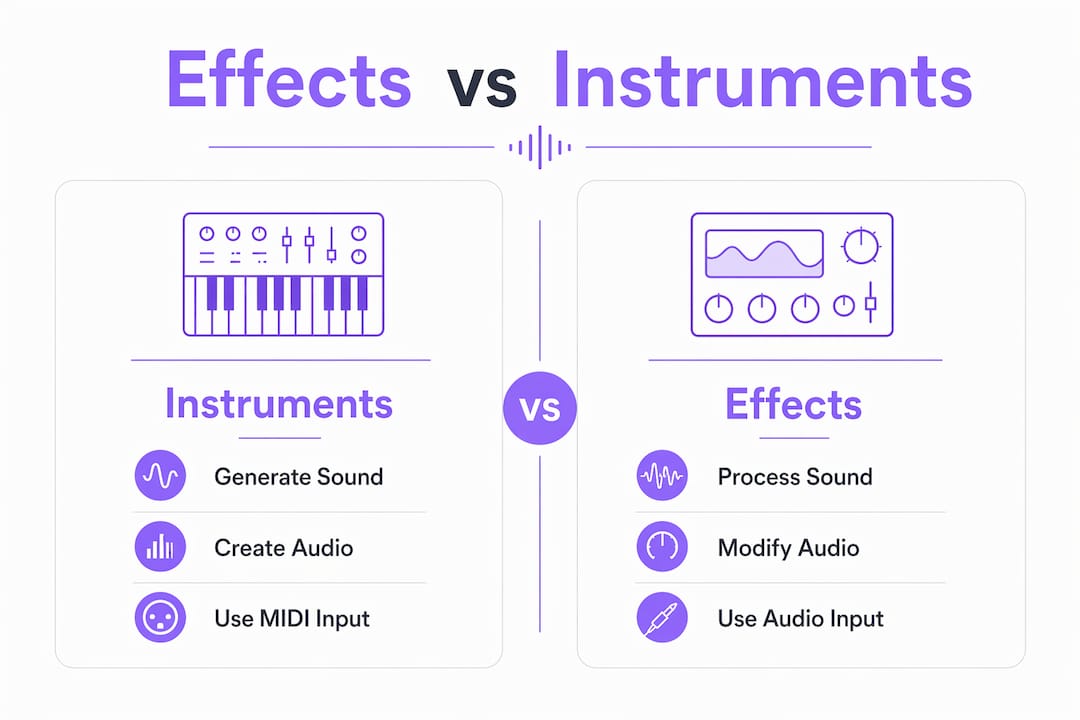
Audio effects and instruments serve fundamentally different roles in music production: instruments generate sound as the primary source, while audio effects process and shape that sound to achieve desired textures and dynamics. Getting this distinction right is the foundation of every clean mix and intentional sound design session. The audio effects vs instruments explained framework is not just academic. It directly affects how you route signals, build plugin chains, and make creative decisions under pressure. Vector-dsp builds its entire plugin philosophy around this distinction, designing effects processors and instrument plugins that respect the boundary between sound generation and sound processing.
What is the difference between audio effects and instruments?
Instruments generate sound to serve as the initial audio source, while audio effects process that signal to modify volume, frequency, and spatial properties. That single sentence defines the entire instruments and effects comparison. An instrument creates something from nothing. An effect transforms what already exists.
In a digital audio workstation (DAW), a virtual instrument (VST, AU, or AAX format) sits on an instrument track. It responds to MIDI input and outputs audio. An audio effect sits on an audio track or as an insert on any channel. It receives audio, processes it, and passes it downstream. The signal flow is always instrument first, then effects.

This distinction matters for workflow clarity. Producers who blur the two roles end up with messy routing, unexpected CPU spikes, and mixes that are hard to recall or troubleshoot. Knowing which tool belongs in which slot is the first step toward professional signal chain discipline.
How do audio effects work and what are their common types?
Audio effects are signal processors that alter one or more characteristics of an incoming audio signal. They do not create sound on their own. Every effect type targets a specific dimension of the signal.
The main categories producers work with include:
- Dynamics processors: Compressors, limiters, and gates control the volume envelope of a signal. A compressor reduces the gap between the loudest and quietest parts of a performance.
- EQ and filtering: Equalizers boost or cut specific frequency ranges. High-pass filters remove low-end rumble. Surgical EQ corrects problem frequencies before creative EQ adds character.
- Modulation effects: Chorus, flanger, and phaser add movement by mixing slightly delayed or pitch-shifted copies of the signal with the original.
- Time-based effects: Reverb simulates acoustic spaces. Delay repeats the signal at set intervals. Both create depth and dimension in a mix.
- Saturation and distortion: These add harmonic content by gently or aggressively overdriving the signal. Saturation adds warmth. Distortion adds aggression.
Routing is as important as effect type. Insert effects process the whole signal in series, whereas send/return routing processes a copy in parallel, preserving the original sound's clarity. Reverb and delay almost always belong on a send/return bus. Compression and EQ almost always belong as inserts.
Pro Tip: Place your EQ before your compressor when you want to control which frequencies trigger gain reduction. Flip the order when you want the compressor to react to the full signal first, then sculpt the result.
Chain discipline, the intentional ordering and selection of effects, matters more than the number of plugins you own. A well-ordered chain of three effects will outperform a cluttered chain of twelve every time.
What are instruments in digital music production and how do they generate sound?
Virtual instruments are software plugins that generate audio from scratch. They do not process an incoming signal. They respond to MIDI data and produce audio output. MIDI is a control protocol that instructs virtual instruments to generate audio. It is entirely distinct from audio signals themselves.
Think of MIDI as sheet music and the virtual instrument as the musician reading it. The sheet music carries no sound. The musician produces the sound by interpreting the instructions. This analogy clarifies a common confusion: loading a virtual instrument into a DAW produces no sound until MIDI data triggers it.
Virtual instruments generate sound through several distinct methods:
- Subtractive synthesis: Starts with a harmonically rich oscillator waveform and uses filters to remove frequencies, shaping the tone.
- FM synthesis: Uses one oscillator to modulate the frequency of another, creating complex, metallic, and bell-like timbres.
- Wavetable synthesis: Scans through stored waveform snapshots to create evolving, digital textures.
- Granular synthesis: Slices audio into tiny grains and reassembles them in new ways, producing atmospheric and glitchy sounds.
- Sample-based playback: Synths generate sound via oscillators, samplers play back real recorded audio, and romplers provide pre-recorded sound playback for realistic instruments like strings or brass.
Each method produces a fundamentally different sonic character. Subtractive synthesis suits analog-style basses and leads. Granular synthesis suits evolving pads and textures. Samplers suit realistic acoustic instruments. Choosing the right synthesis type for your musical goal is as important as choosing the right effect type for your mix.
Understanding sound design basics helps producers make faster, more intentional choices between these instrument types during a session.
How do instruments and effects work together in production?
Instruments and effects are not competing tools. They are sequential stages in a single creative process. The instrument defines the raw material. The effects shape it into something finished and contextual.
A practical workflow looks like this:
- Choose your instrument and synthesis method based on the sonic role you need. A subtractive synth for a bass line. A sampler for a realistic piano.
- Record or program MIDI to trigger the instrument and capture the performance.
- Apply insert effects directly on the instrument channel. Start with EQ to remove problem frequencies, then compress to control dynamics.
- Route to send/return buses for shared ambience. One reverb bus and one delay bus can serve multiple instruments simultaneously, creating a cohesive sense of space across the mix.
- Use saturation or distortion as a final insert to add harmonic glue and presence before the signal hits the mix bus.
Sound design and sound editing overlap in ways that blur the traditional line between instruments and effects. Effects can generate entirely new textures, not just modify existing sounds. Running a simple sine wave through a granular effect, a pitch shifter, and a convolution reverb produces something that sounds nothing like the original source. The effect becomes a creative instrument in its own right.
Some modern synth plugins incorporate internal effects chains, blurring the line between instrument and effect in sound design workflows. Multi-engine synths allow producers to achieve complete sound design without loading a single external effect. This is powerful, but it can also create confusion about where the instrument ends and the processing begins. Keeping a clear mental model of the signal flow prevents mix problems later.
Pro Tip: When a synth has built-in effects, bypass them before sending the signal to your DAW channel strip. This gives you full control over the processing chain and prevents double-processing artifacts.
Professional software ecosystems increasingly bundle both instruments and effects in a single suite for workflow efficiency and sonic consistency. Understanding the audio plugin ecosystem helps producers navigate these bundles without losing sight of the fundamental roles each tool plays.
What practical considerations should producers keep in mind?
The instruments and effects comparison becomes most useful when it informs real decisions during a session. Here are the most common pitfalls and how to avoid them.
- Confusing MIDI with audio: A common beginner mistake is confusing MIDI with audio, leading to misunderstanding why some loaded instruments don't produce audible sound without correct MIDI input. Always check that your MIDI track is routed to the correct instrument plugin and that the instrument track is armed or playing back.
- Misusing insert effects on send channels: Placing a compressor as an insert on a reverb return bus compresses the wet signal independently of the dry signal. This creates an unnatural pumping effect. Keep dynamics processing on the source channel, not the send return.
- Overloading instrument channels with effects: Piling ten effects on a single instrument channel makes it nearly impossible to identify which plugin is causing a problem. Build chains incrementally and solo each effect to verify its contribution.
- Choosing breadth over depth in your plugin collection: Owning thirty mediocre plugins produces worse results than mastering five excellent ones. Depth of knowledge with a small, well-chosen set beats a large, underused collection every time.
Reviewing audio plugin architecture best practices gives producers a technical foundation for making smarter decisions about which tools belong in their signal chain and why. Understanding audio signal flow step by step is equally valuable for producers who want to troubleshoot routing problems quickly.
For producers working across genres, adapting music to specific thematic needs often requires rethinking how instruments and effects interact to serve the emotional context of a piece.
Key Takeaways
Instruments generate sound and effects shape it. Mastering that distinction, and the routing logic that follows from it, is the single most reliable way to improve mix clarity and creative output.
| Point | Details |
|---|---|
| Instruments create, effects process | Instruments generate audio from MIDI input; effects modify audio that already exists. |
| Routing type determines mix clarity | Use insert effects for per-channel processing and send/return for shared ambience like reverb. |
| Chain discipline beats plugin quantity | Intentional effect ordering with fewer plugins produces cleaner results than large, cluttered chains. |
| MIDI is not audio | MIDI carries instructions, not sound. A virtual instrument requires MIDI input to produce any audible output. |
| Modern synths blur the line | Built-in effects inside synths can replace external processing, but bypass them first to maintain chain control. |
Why this distinction changed how I work
The clearest improvement I made to my production workflow came not from buying a new plugin, but from drawing a hard line between what generates sound and what processes it. For years I treated every plugin as roughly the same category of tool. The result was sessions full of redundant processing, instruments buried under effects I couldn't account for, and mixes that took twice as long to finish.
Once I started treating instruments and effects as belonging to separate stages of a signal chain, decisions became faster. I stopped asking "what plugin should I add?" and started asking "does this track need a new sound source or does it need better processing?" Those are very different questions, and they lead to very different outcomes.
The evolution of multi-engine synths with built-in effects chains has made this discipline harder to maintain, not easier. When a single plugin can synthesize, filter, modulate, and reverb all at once, it's tempting to stop thinking about signal flow altogether. I've found the opposite approach works better: use the synth's internal effects for sound design during the creative phase, then strip them back and rebuild the processing chain in the DAW for the mix phase. You get the best of both worlds without sacrificing control.
The producers I respect most are not the ones with the largest plugin collections. They are the ones who can explain exactly why each tool in their chain is there and what it contributes. That level of intentionality comes directly from understanding the difference between instruments and effects at a fundamental level.
— Kai
Vector-dsp: built around the instrument/effect distinction
Vector-dsp develops professional audio plugins grounded in the same signal flow logic this article describes. Its effects processors are designed to complement instrument plugins without competing with them, giving producers precise control over each stage of the chain.

Whether you are building a new production workflow or refining an existing one, Vector-dsp's tools are built with the instrument/effect boundary in mind. Every plugin targets a specific role in the signal chain, from character-driven effects processing to instrument-grade sound generation. Visit Vector-dsp to see the full plugin lineup and learn how each tool fits into a professional production workflow.
FAQ
What is the core difference between audio effects and instruments?
Instruments generate audio from MIDI input, while audio effects process audio that already exists. One creates sound; the other shapes it.
Can an audio effect be used as an instrument?
Effects can generate new textures when used creatively, such as running a signal through granular or pitch-shifting effects, but they still require an input signal to process. A true instrument generates sound independently from MIDI.
What is the difference between insert and send/return effects?
Insert effects process the full signal in series on a single channel. Send/return effects process a parallel copy of the signal, which preserves the original and allows multiple channels to share one effect like reverb or delay.
Why does my virtual instrument produce no sound?
The most common cause is missing or incorrect MIDI input. MIDI carries instructions, not audio. The instrument plugin needs a MIDI signal routed to it before it produces any audible output.
How do modern synths blur the line between instruments and effects?
Many current multi-engine synths include internal effects chains, such as built-in reverb, chorus, and distortion modules. This allows complete sound design inside a single plugin, but it can obscure the traditional boundary between sound generation and signal processing.