AAX Plugin Format for Pro Tools: A Pro's Guide
AAX Plugin Format for Pro Tools: A Pro's Guide
AAX, which stands for Avid Audio eXtension, is the exclusive 64-bit plugin format for Avid's Pro Tools DAW, replacing the legacy RTAS and TDM formats since 2011. If you work in Pro Tools, every plugin you load is AAX. There is no alternative path, no native VST or AU support, and no workaround that matches the stability of a true AAX build. Understanding what the AAX plugin format is, how its three distinct types function, and how it compares to VST3 and AU is the foundation for making informed decisions about your plugin library and DAW setup.
What is the AAX plugin format and why does it matter?
AAX is Avid's proprietary audio plugin standard, built from the ground up to serve Pro Tools' architecture across both software-only and hardware-accelerated systems. Since Pro Tools 11, AAX has been the sole format the DAW accepts, providing full 64-bit processing support. That transition retired 32-bit RTAS and TDM plugins in 2013, which means any plugin you run in a modern Pro Tools session must be a 64-bit AAX build.
The format was designed with a specific goal: unify plugin operation across native CPU-based rigs and DSP-accelerated hardware systems. A session built on a laptop running Pro Tools Artist opens without plugin mismatches on a studio's HDX-equipped Pro Tools Ultimate rig. That session compatibility across systems is not a minor convenience. It is the reason AAX became the professional standard for broadcast, film post-production, and major recording studios worldwide.
For developers, AAX means working within Avid's SDK and signing process, which adds overhead compared to VST3 development. For engineers and producers, it means your plugin library is tightly scoped to what Avid and third-party developers have certified. Both realities carry tradeoffs worth understanding before you commit to a Pro Tools workflow.
What are the three AAX plugin types?
The AAX format is not a single monolithic specification. It contains three distinct processing modes, each suited to different workflow demands.
-
AAX Native runs entirely on your computer's CPU, processing audio in real time. This is the most common type and covers the vast majority of plugins available for Pro Tools, from equalizers and compressors to virtual instruments. Modern CPUs handle AAX Native workloads efficiently, and most mixing sessions never require anything beyond this mode.
-
AAX DSP offloads processing to dedicated Avid DSP hardware, specifically HDX PCIe cards and the Carbon interface. The primary advantage is ultra-low latency tracking, which matters when recording performers who need near-zero monitoring delay. Without supported DSP hardware, AAX DSP plugins revert to CPU processing and lose their latency advantage entirely.
-
AAX AudioSuite handles offline, non-real-time rendering. You select a region of audio, apply the plugin, and the processed result is written to a new audio file. AudioSuite is the right choice for destructive processing tasks like noise reduction, pitch correction on a final take, or heavy convolution reverb that would tax real-time resources.
Pro Tip: When building a Pro Tools rig for tracking live instruments, prioritize AAX DSP plugins for your monitoring chain if you have HDX or Carbon hardware. Reserve AAX Native for mixing, where latency is not a concern.
Understanding which type a plugin uses changes how you plan your session. A plugin listed as "AAX" on a developer's product page is almost always AAX Native unless the listing explicitly states DSP support. Check before purchasing if low-latency DSP offload is part of your workflow plan.
How does AAX compare to VST3 and AU?
The most direct answer: AAX is proprietary to Pro Tools, VST3 is a universal standard developed by Steinberg that runs in nearly every DAW except Pro Tools, and AU (Audio Units) is Apple's format exclusive to macOS and iOS hosts like Logic Pro and GarageBand. Each format solves the same problem differently.
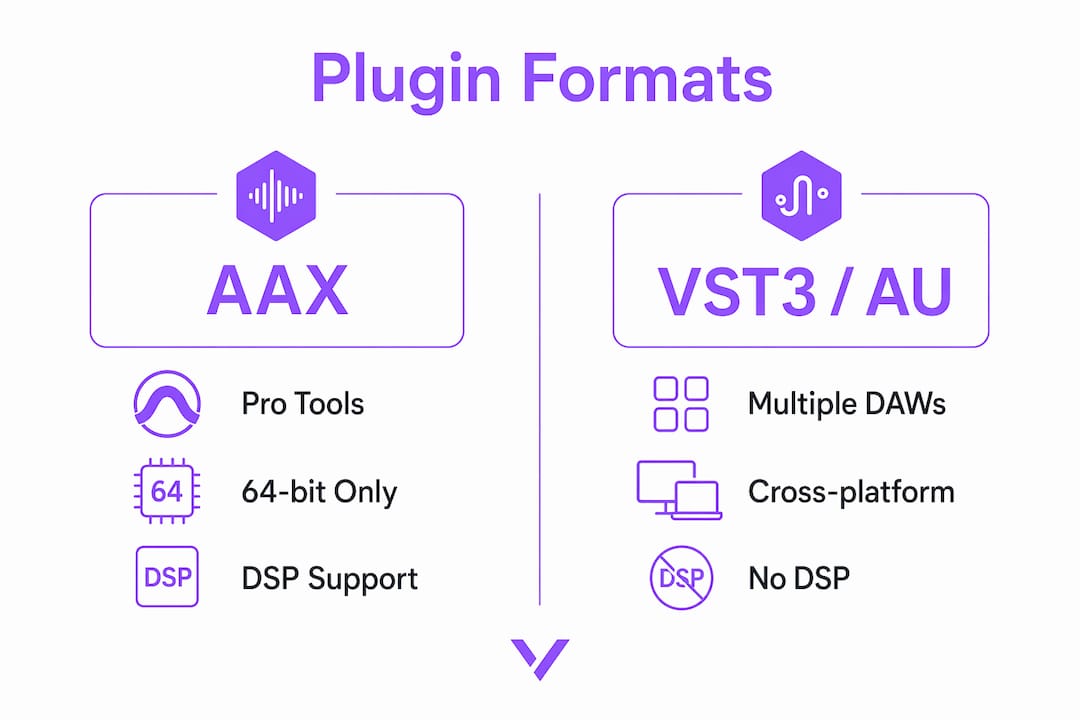
Pro Tools does not natively support VST or AU. Third-party wrapper tools exist that attempt to bridge the gap, but they introduce latency and instability that native AAX plugins do not carry. For professional sessions where reliability is non-negotiable, wrappers are a liability. The format differences between VST3, AU, and AAX go deeper than host compatibility and affect how automation, parameter recall, and session portability behave.
| Feature | AAX | VST3 | AU |
|---|---|---|---|
| Host compatibility | Pro Tools only | Nearly all DAWs | macOS/iOS hosts only |
| Processing modes | Native, DSP, AudioSuite | Native only | Native only |
| DSP hardware offload | Yes (HDX, Carbon) | No | No |
| 64-bit support | Yes (mandatory) | Yes | Yes |
| Session portability | Seamless across Pro Tools rigs | DAW-dependent | macOS-only |
| Developer certification | Avid SDK required | Open standard | Apple SDK required |
The table makes one thing clear: AAX's closed ecosystem is both its strength and its constraint. The Avid certification process means every AAX plugin that ships has been validated against Pro Tools' architecture. That is why AAX ensures session compatibility between native and DSP systems in a way that VST3 cannot replicate across different DAWs. The tradeoff is a smaller plugin catalog compared to VST3, which benefits from decades of open development across hundreds of hosts.
For developers building plugins with formats like VST3, AU, and AAX, the Pro Tools plugin architecture requires a separate development path. You cannot port a VST3 directly to AAX without working through Avid's SDK and signing workflow.
How to install and manage AAX plugins in Pro Tools
Installing an AAX plugin correctly is straightforward, but the file path matters. Pro Tools scans specific directories on launch, and a plugin placed anywhere outside those paths will not load.
- On macOS, AAX plugins install to "/Library/Application Support/Avid/Audio/Plug-Ins/`. This is the system-level library, not your user library. Plugins placed in the user-level equivalent will not be recognized.
- On Windows, the correct installation path is
C:\Program Files\Common Files\Avid\Audio\Plug-Ins\. Most installers handle this automatically, but manual installs require placing the.aaxpluginfile here precisely. - After installation, launch Pro Tools and allow the plugin scan to complete. If a plugin fails the scan, Pro Tools moves it to a "dead" plugins folder and logs the error. Check the DigiTrace log for specifics.
- For Apple Silicon Macs, confirm the plugin ships as a native ARM build. Rosetta 2 handles Intel-compiled AAX plugins, but native ARM builds deliver better performance and lower CPU overhead on M-series hardware.
- To manage a large plugin library, use Pro Tools' plugin menu organization features to group plugins by type or manufacturer. This reduces session load time and makes your insert menus navigable during fast-paced sessions.
Pro Tip: Keep a separate "test" Pro Tools session with no audio content. Use it exclusively for scanning new plugins and checking for conflicts before adding them to active project sessions.
Plugin conflicts in Pro Tools almost always trace back to two causes: a corrupted .aaxplugin bundle or a version mismatch between the plugin and your Pro Tools build. Always check the developer's compatibility notes against your exact Pro Tools version before installing.
What are the real workflow benefits and limitations of AAX?
The benefits of AAX plugins are concrete and measurable for Pro Tools users.
- Automation support is fully integrated. AAX plugins expose their parameters to Pro Tools' automation system natively, meaning every knob and switch can be written, read, and trimmed without workarounds.
- Session stability is higher than with wrapper-based alternatives. Because VST/AU wrappers introduce latency and instability, studios running critical sessions avoid them entirely.
- DSP offloading via HDX or Carbon hardware reduces CPU load during tracking, allowing engineers to run more plugins at lower buffer sizes without dropout artifacts.
- 64-bit memory addressing means AAX plugins can access more RAM than legacy 32-bit formats, which matters for large sample libraries and convolution reverbs.
The limitations are equally real. Pro Tools' closed ecosystem means you cannot use the majority of the VST3 plugin market without a separate DAW. If a developer has not built an AAX version, you simply cannot use that plugin in Pro Tools. This is a genuine constraint for producers who want access to boutique or independent developers who only ship VST3.
"While AAX DSP offers benefits for low-latency tracking, modern CPUs handle most mixing tasks efficiently using AAX Native plugins." — Production Expert
One confusion worth addressing directly: the .aaxplugin file extension used by Pro Tools plugins shares the "AAX" name with Audible's audiobook container format. They are entirely unrelated file types. If you search for AAX files and land on audiobook conversion tools, you are in the wrong category entirely.
The future of AAX points toward continued 64-bit development and growing Apple Silicon support. Avid has committed to the format as Pro Tools evolves, and major plugin developers including iZotope, Waves, and FabFilter maintain current AAX catalogs. For anyone building a long-term Pro Tools workflow, AAX is not going away.
Key takeaways
AAX is the mandatory 64-bit plugin format for Pro Tools, with three processing modes covering real-time CPU, DSP hardware offload, and offline rendering.
| Point | Details |
|---|---|
| AAX is Pro Tools-exclusive | No native VST or AU support exists in Pro Tools; AAX is the only certified path. |
| Three distinct plugin types | AAX Native uses CPU, AAX DSP offloads to HDX or Carbon hardware, AudioSuite renders offline. |
| DSP hardware is required for DSP benefits | Without HDX or Carbon, AAX DSP plugins run as CPU plugins with no latency advantage. |
| Installation path determines recognition | Plugins must be placed in the correct OS-specific folder for Pro Tools to scan and load them. |
| AAX and Audible AAX are unrelated | The .aaxplugin format and Audible's audiobook AAX container share a name but nothing else. |
Why AAX still defines professional Pro Tools work
I have spent years watching engineers debate whether Pro Tools' closed plugin ecosystem is a feature or a flaw. My honest position: it is both, and the answer depends entirely on what you are building.
For post-production facilities and major recording studios, AAX's certification process is the point. When a session moves between rooms, between engineers, between a tracking rig and a mix suite, the plugin behavior is predictable. That predictability has real dollar value in professional environments where session failures cost time and client trust.
Where I think the ecosystem genuinely limits users is in the independent and experimental production space. The VST3 catalog is enormous, and some of the most interesting processing tools available today ship VST3-only. If your workflow lives in Pro Tools, you are making a tradeoff every time a developer skips AAX development.
From a development perspective, the Avid SDK and signing process adds friction that open standards like VST3 do not. At Vector-dsp, building across VST3, AU, and AAX means treating each format as its own engineering target. AAX is not harder, but it is more structured. That structure is exactly what makes it reliable at the professional level.
The engineers who get the most from AAX are the ones who stop treating it as a limitation and start treating it as a specification. Know your types, know your hardware, and know your installation paths. The format rewards precision.
— Kai
Explore Vector-dsp's plugin development resources

Vector-dsp builds professional audio plugins with AAX, VST3, and AU support at their core, designed for engineers and producers who need precision at every stage of the signal chain. If you are working in Pro Tools and want tools built to the same standard as the format itself, Vector-dsp's audio DSP solutions are worth exploring. The development philosophy behind every Vector-dsp plugin prioritizes real-time performance, low latency, and format-correct behavior. For producers who want to understand why audio plugins matter beyond the basics, the resources on the Vector-dsp site go deep on the technical decisions that separate good tools from great ones.
FAQ
What does AAX stand for in audio plugins?
AAX stands for Avid Audio eXtension. It is the proprietary plugin format developed by Avid exclusively for use in Pro Tools.
Can I use VST plugins in Pro Tools?
Pro Tools does not natively support VST or AU plugins. Third-party wrappers can load VST plugins into Pro Tools, but they introduce latency and instability compared to native AAX plugins.
What hardware do I need for AAX DSP plugins?
AAX DSP plugins require Avid HDX PCIe cards or the Carbon interface to offload processing to dedicated DSP hardware. Without this hardware, AAX DSP plugins run on your CPU without the low-latency benefit.
Where do AAX plugins install on macOS?
On macOS, AAX plugins must be installed to /Library/Application Support/Avid/Audio/Plug-Ins/ at the system level. Plugins placed outside this path will not be recognized during Pro Tools' plugin scan.
Is the AAX plugin format the same as Audible's AAX audiobook format?
No. The .aaxplugin format used by Pro Tools and Audible's AAX audiobook container share the same acronym but are entirely unrelated file types with no technical connection.